

This feature is in beta.Cumulative invoicing is currently available to a limited set of customers. If you’re interested in enabling this feature or have feedback, please reach out to your Orb account team or contact support.
Overview
Cumulative invoicing lets you evaluate pricing over a longer billing period while invoicing your customers on a shorter cadence. The classic example is an annual tiered usage that you still want to invoice monthly: tiers accumulate over the full year, but the customer gets an invoice every month for just that month’s charges. Under the hood, cumulative invoicing separates two concepts that are often conflated:- Billing cadence - how Orb evaluates the price (e.g. tiers over 1 year).
- Invoicing cadence - how often Orb cuts an invoice (e.g. monthly).
Is Cumulative Invoicing right for you?
Use cumulative invoicing if:- You offer a multi-period tiered usage contract but want to invoice on a shorter cadence (annual tiers with monthly invoicing is the most common setup, but any combination works - e.g. 6-month tiers with bi-monthly invoicing, or quarterly tiers with monthly invoicing).
- Tiers should be evaluated against year-to-date usage rather than resetting each invoicing period.
- You want each invoice to show only that period’s charges, while still being driven by the full billing period’s pricing.
- You want to bill when usage crosses a specific trigger. Use threshold invoicing instead - which triggers an invoice when total usage-based charges reach a configured monetary threshold, whereas cumulative invoicing is purely time-based.
- Your billing and invoicing cadences are the same (standard in-arrears billing covers this).
How Cumulative Invoicing works
1. Billing cadence vs. invoicing cadence
On a cumulative price, you configure two separate cadences:- billing_cycle_configuration controls the period over which pricing is evaluated (e.g. 1 year).
- invoicing_cycle_configuration controls when invoices are cut (e.g. 1 month).
- Billing cadence: Annual
- Invoicing cadence: Monthly
- Tiered pricing on Output_Tokens:
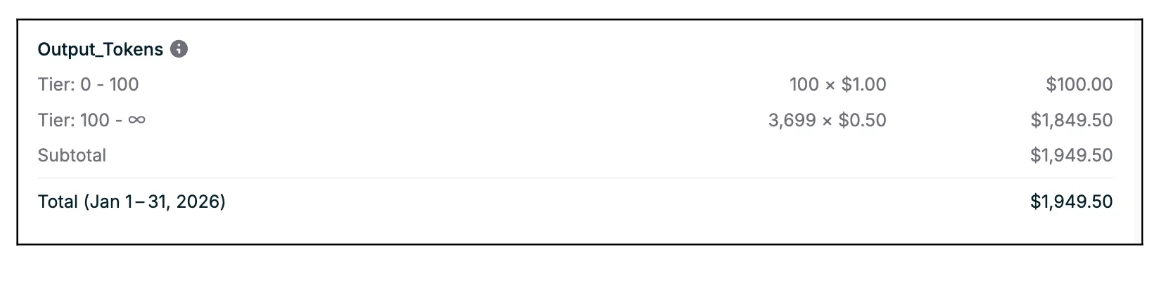
- 0 – 100 units: $1.00/unit
- 100+ units: $0.50/unit
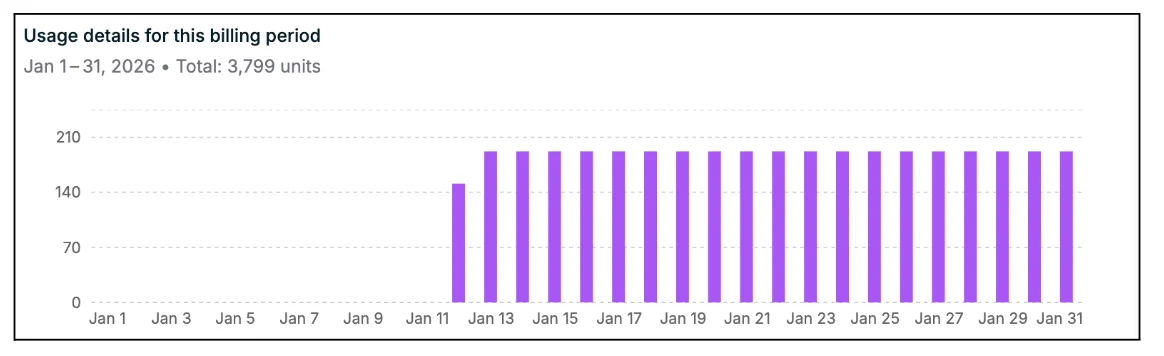
- Month 1 (Jan 2026): 3,799 units
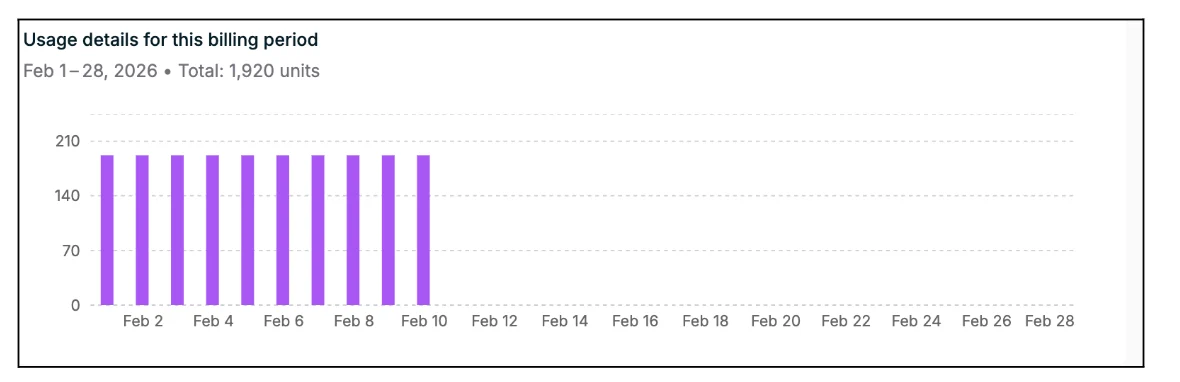
- Month 2 (Feb 2026): 1,920 units (cumulative: 5,719)
Without Cumulative Invoicing
Without cumulative invoicing, each month stands alone and tiers reset:- Month 1 invoice: 100 × $1.00 + 3,699 × $0.50 = $1,949.50
- Month 2 invoice: 100 × $1.00 + 1,820 × $0.50 = $1,010.00 (resets into tier 1 again)
With Cumulative Invoicing
- Month 1 invoice: cumulative 3,799 units → 100 × $1.00 + 3,699 × $0.50 = $1,949.50 total → $1,949.50 this month
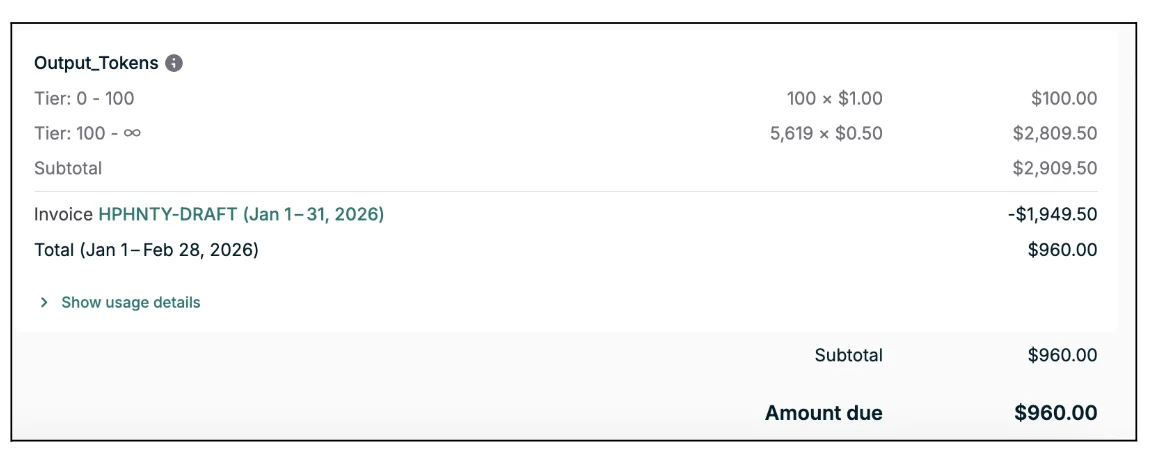
- Month 2 invoice: cumulative 5,719 units → 100 × $1.00 + 5,619 × $0.50 = $2,909.50 total, minus $1,949.50 already invoiced → $960.00 this month
2. Setting up Cumulative Invoicing
Cumulative invoicing is configured at the price level by setting a shorter invoicing cycle configuration than the billing cycle configuration. In the Orb app When creating or editing a price, set the Billing cycle to the period over which tiers should be evaluated (e.g. Annual). Then check Invoice at a higher frequency and choose a shorter cadence (e.g. 1 month).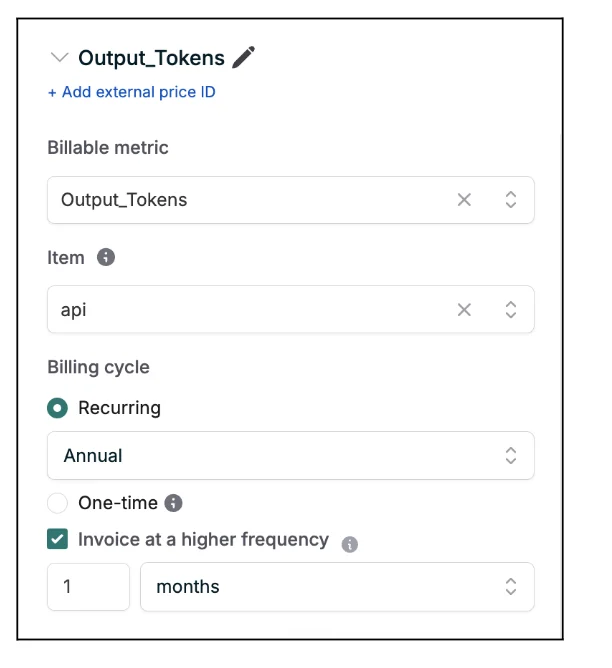
3. Invoice Display
Cumulative invoices are designed to be both incremental (what changed since last invoice) and contextual (how we got to the current tier/amount):- The usage breakdown view surfaces the current period’s usage, so it is clear what the usage during this billing period was.
January Invoice
February Invoice
- Previous invoices & Amount due under the same cumulative price are listed for context, so it’s easy to see how charges have built up over time. Furthermore, the amount due shows the current invoice’s charges, not the entire year-to-date amount. So the number at the bottom of each invoice is the amount owed for that invoicing period.
January Invoice
February Invoice
Viewing usage by invoicing period (API)
Cumulative invoices use the standard invoice APIs, there is no separate resource. For cumulative pricing specifically, Orb exposes a dedicated endpoint that returns usage broken down by each invoicing period within the billing cycle:start_date, end_date- The service period for that invoicing cycle, not the full billing cycle.quantity- Usage scoped to that invoicing cycle, not the cumulative total across the billing period.sub_line_items- For tier, matrix, and similar price types, shows how that period’s units were distributed across tiers based on the cumulative usage at the time each unit was consumed. Empty for simpler price models. Same shape as sub_line_items on the Fetch invoice API.
Syncing Cumulative Invoices to external systems
When you sync cumulative invoices to systems like NetSuite, Stripe, or QuickBooks, Orb sends the scoped period amounts, the incremental amount for each invoicing period, rather than the full year-to-date total. This keeps service periods and recognized revenue aligned with each invoice. Over the course of the full billing period, the sum of synced invoices still equals the total cumulative charges for the period. The practical upshot:- Your accounting system sees clean per-period (e.g. monthly) revenue.
- Your teams can still rely on Orb’s UI and API to understand the cumulative usage and tiers driving those charges.