

What is a product?
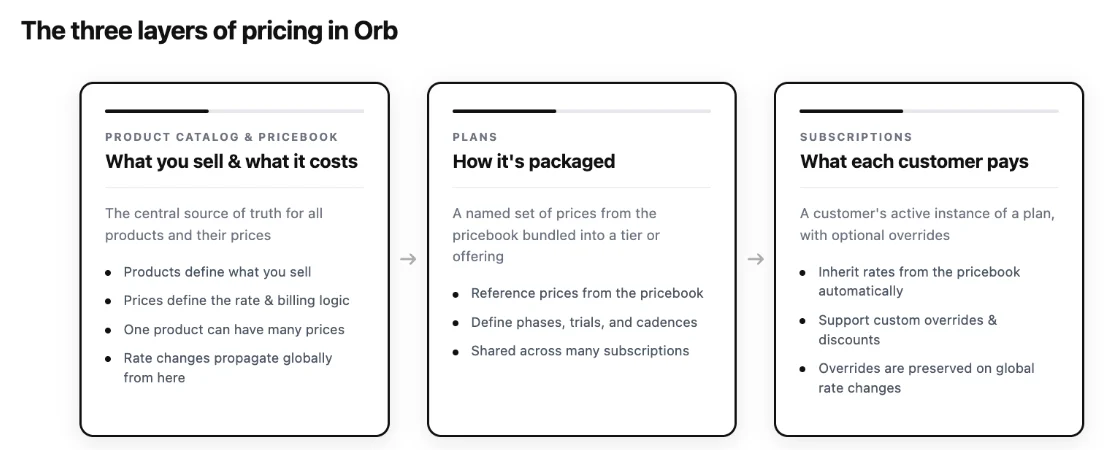
A product is a representation of what you sell. It’s not necessarily a standalone offering, but a billable component of a larger product category (eg. “API Compute Units,” “Storage GB,” or “Premium Support”). In Orb, every price is attached to a product. Beyond pricing and invoices, products are also how Orb categorizes and attributes revenue. Your finance team can slice revenue by product across Orb’s reports, making products the basis of accurate, auditable revenue reporting.Products and downstream integrations
Products also connect Orb to your external finance, tax, and accounting systems. The same product object that anchors your pricing also stores the mappings Orb needs to handle each line item downstream. When Orb syncs an invoice to an external invoicing provider like NetSuite, QuickBooks, Stripe Invoicing, or Bill.com, it uses the product’s invoicing provider mapping to match each invoice line to the correct item in that system. When Orb calculates tax through a provider like Anrok, Avalara, or Stripe Tax, it applies the right treatment to each line item based on the tax code configured on the product. You configure these mappings once per product, from the product details page. After that, every invoice for that product, across every plan and customer, flows correctly into your downstream systems automatically, without manual intervention. Conversely, if a product doesn’t have its external mappings configured, invoices that include it will fail to sync or be taxed incorrectly. You don’t need mappings in place before you start building in Orb, but you do need them before you go live with any integration. The setup guide for each integration walks through the mapping step for that provider.What is a price?
A price defines how much and how a customer is charged for a given product: the rate, pricing model, currency, and cadence. Every price lives in your pricebook and can be referenced by multiple plans and subscriptions.- Price names appear on invoices. Name prices clearly and consistently, since whatever you name a price becomes the line item label the customer sees.
- Prices are shared, not copied. Because prices live in your pricebook independently of any single plan, the same price can be referenced by many plans, and you can always see exactly which plans use a price before you change how you package it.