Mixed cadences: earliest-date billing
When a subscription includes different cadences (e.g., monthly usage and a quarterly platform fee), the next scheduled invoice for one charge might be later than the earliest date the deferred charge would normally bill. In these cases, Orb does not keep deferring to match the longer cadence—Orb bills at the earliest scheduled billing date for the deferred charge. If no regular invoice occurs by then, Orb issues a one-time invoice on that date.
In short: Orb doesn’t hold monthly items for a quarterly invoice; Orb bills at the first appropriate date so charges aren’t delayed. | a) Price change mid-period with mixed cadences
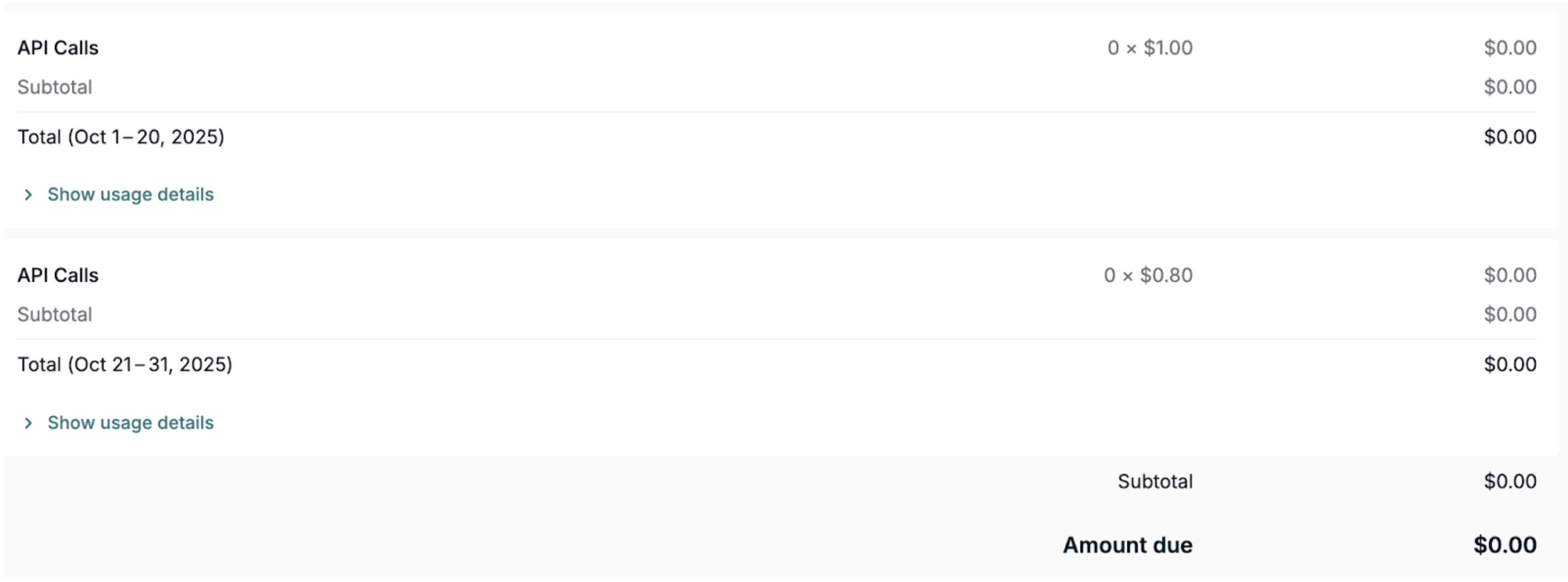
On Sep 12, you increase the monthly API Calls price from $1.00/1K calls to $2.00/1K calls effective immediately and choose to defer the invoice. The subscription also has a quarterly platform fee with a next regular invoice on Nov 1.
Result:
• Earliest-date billing applies: Orb does not wait for Nov 1, the price change keeps a monthly cadence and establishes an Oct 1 billing date
• On the Oct 1 invoice, API Calls appear as two line items:
- Sep 1-12 at $1.00/1K calls
- Sep 12-30 at $2.00/1K calls
• The Nov 1 invoice includes the platform fee and the API usage fee from Oct 1-31 at $2.00/1K
b) Ending the final monthly price (no regular monthly invoice exists)
On Sep 12, you end the API Calls price ($1.00/1K calls), which is the only remaining monthly usage price effective immediately and choose to defer the invoice. The only other regular invoice is quarterly on Nov 1.
Result:
• Orb does not wait for Nov 1 and issues a one-time invoice on Oct 1 for the deferred usage, with API Calls from Sep 1-12 at $1.00/1K
• The Nov 1 invoice includes the quarterly fee that is supposed to be billed on Nov 1 |
Backdating
Backdating means setting a price change with an effective date in the past.
If backdated changes fall inside the current billing period, Orb moves the resulting mid-period charges to your next scheduled invoice. No extra, out-of-cycle invoice is issued.
If a backdated price change takes effect before the last scheduled billing date (i.e., in a previous billing period), Orb does not carry those charges forward to the next invoice. Instead, Orb re-issues the previously billed invoice to reflect the corrected rates for that past period. | a) Backdated inside the current period
On Sep 12, you backdate a price decrease to API Calls from $1.00/1K calls to $0.80/1K calls effective Sep 5 and choose to defer the invoice.
Result:
• No invoice is generated on Sep 12 for this change
• On the Oct 1 invoice, API Calls appear as two line items:
- Sep 1-5 at $1.00/1K calls
- Sep 5-30 at $0.80/1K calls
b) Backdated into a previous period
On Sep 12, you backdate a price decrease to API Calls from $1.00/1K calls to $0.80/1K calls effective Aug 20 and choose to defer the invoice.
Result:
• Orb will re-issue the Sep 1 invoice where API Calls appear as two line items:
- Aug 1-20 at $1.00/1K calls (old rate)
- Aug 20-31 at $0.80/1K calls (new rate)
• On the Oct 1 invoice, a new rate of API Calls at $0.80/1K calls is reflected for the entire month of Sep |
Quantity change-only invoices
A mid-cycle fixed-fee edit (e.g., seat/rate/quantity change) can generate an immediate change-only invoice. That invoice is not a scheduled billing date for deferral.
Deferred charges from a mid-period price change still bill on the next scheduled invoice (your normal cadence anchor). If no regular invoice occurs by that date, Orb issues a one-time invoice on that scheduled date. We do not attach deferred charges to ad-hoc, quantity change-only invoices. | a) Mid-cycle fixed fee quantity change and usage fee change, a regular monthly invoice exists
On Sep 12, you backdate a price decrease to API Calls from $1.00/1K calls to $0.80/1K calls effective Sep 5 and choose to defer the invoice. You also increase the quantity of in-advance fixed fee seats effective Sep 20. Another monthly price ensures a regular Oct 1 invoice.
Result:
• The Sep 1 invoice is edited to include the cost for the old seat quantity from Sep 1-20
• Orb will issue a Sep 20 invoice, which includes the pro-ration for the new seat quantity from Sep 20-30
• On the Oct 1 invoice, API Calls appear as two line items:
- Sep 1-12 at $1.00/1K calls
- Sep 12-30 at $0.80/1K calls
b) Mid-cycle fixed fee quantity change and usage fee change, no regular monthly invoice exists
On Sep 12, you end the only remaining monthly usage price effective immediately and choose to defer the invoice. The only other regular invoice is quarterly on Nov 1. On Sep 20, you increase the seat quantity effective immediately.
Result:
• The Sep 1 invoice is edited to include the cost for the old seat quantity from Sep 1-20
• Orb will issue a Sep 20 invoice, which includes the pro-ration for the new seat quantity from Sep 20-30
• On Oct 1, Orb bills the deferred usage via a one-time invoice for the period of Sep 1-12
c) Mid-cycle fixed fee quantity change and usage fee change, with mixed cadences
On Sep 12, you decrease the API Calls price from $1.00/1K calls to $0.80/1K calls effectively immediately and choose to defer the invoice. There is also a quarterly platform fee with the next regular invoice scheduled for Nov 1. On Sep 20, you increase seat quantity effective immediately.
Result:
• The Sep 1 invoice is edited to include the cost for the old seat quantity from Sep 1-20
• Orb will issue a Sep 20 invoice, which includes the pro-ration for the new seat quantity from Sep 20-30
• On the Oct 1 invoice, API Calls appear as two line items:
- Sep 1-12 at $1.00/1K calls
- Sep 12-30 at $0.80/1K calls
Note: Orb does not attach the deferred usage to the Sep 20 change-only invoice or wait to include it in the Nov 1 quarterly invoice. Orb bills the deferred monthly usage separately on Oct 1, either as a regular monthly invoice (if another monthly item exists) or as a one-time invoice (if it doesn’t). |
Changes to allocation amounts mid-cycle
Changes to allocation amount mid-cycle will lead to a one-time invoice with no line items. Currently these cannot be deferred. | On Sep 12, you edit the allocation for a plan and increase it from $500 to $1000 effective immediately and choose to defer the invoice.
Result:
• On Sep 12, Orb will issue an invoice without any line items (this is because currently we don’t show allocations as line items on an invoice as they are $0 cost basis) |
Adjustment (e.g., discount application)
Changing only a discount mid-cycle doesn’t create a new invoice, the new discount applies to the entire current billing period, not just from the change date. To have it start later, set the effective date to the beginning of the next period.
Changing both the price and discount mid-cycle updates each for the time they were active, the old price and discount apply up to the change date, and the new price and discount apply after. On the next invoice, both appear separately so charges reflect the timing of each change. | a) Discount-only change mid-cycle
On Sep 12, you change the “API Calls” discount from 10% to 15% without changing anything else.
Result:
• No mid-cycle invoice is created
• On the Oct 1 invoice, the 15% discount shows that it is applied to the entire Sep 1-30 period
b) Price and discount change mid-cycle
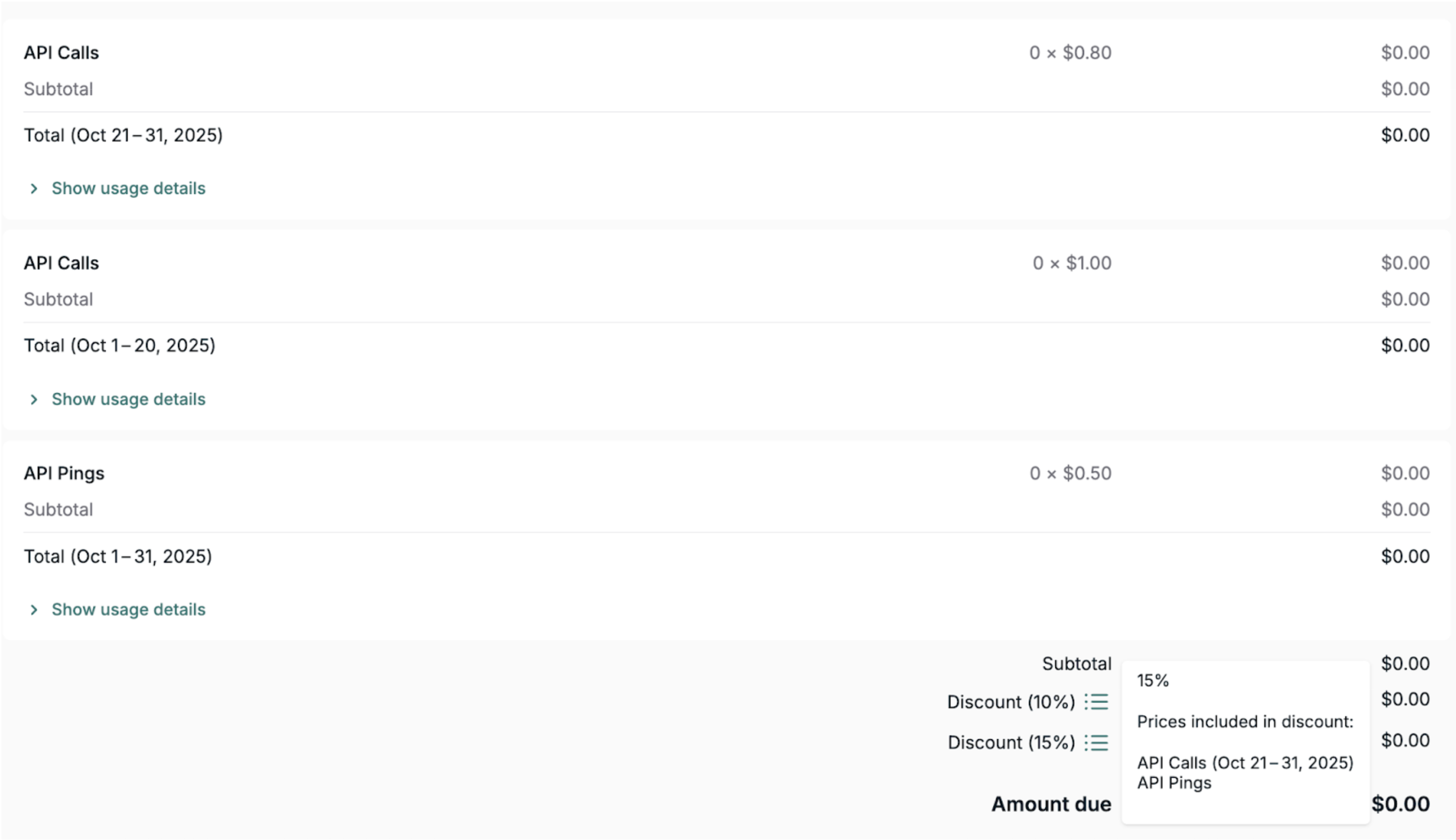
On Sep 12, you decrease the price for API Calls from $1.00/1K calls to $0.80/1K calls, you also increase the discount for API Calls from 10% to 15% effective immediately and choose to defer the invoice.
Result:
• The Oct 1 invoice shows two line items:
- 10% discount for Sep 1-12 for the $1 price
- 15% discount for Sep 12-30 for the $0.80 price |