

Introduction
Orb’s NetSuite integration connects Orb’s billing and revenue data to your NetSuite environment to trigger the creation of native transaction records in NetSuite. This allows you to leverage NetSuite’s standard accounting objects, fields, and workflows for revenue recognition, general ledger updates, and downstream reporting. Orb remains the source of truth for billing, while automatically pushing the necessary information to NetSuite without manual re-entry or reliance on custom scripting. The result is a complete, accurate, and auditable system of record.Key components
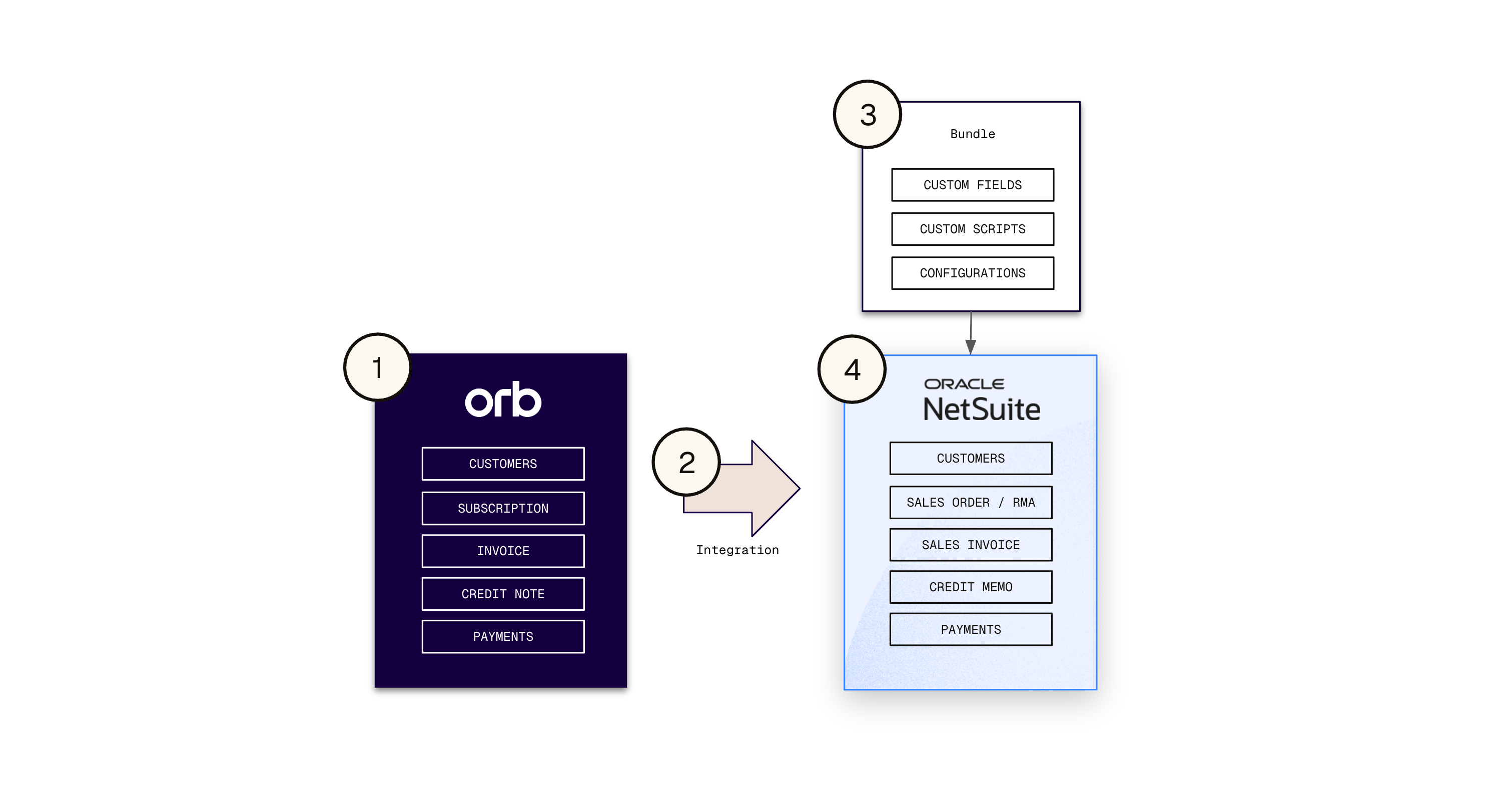
At a high level, the integration experience spans four main components:- Orb (billing provider) This is the source of your transaction data.
- The Integration This is how data “syncs” from Orb to NetSuite. It is a one-way push via REST APIs, is configured in Orb, and requires a dedicated NetSuite integration user for authentication.
- Orb NetSuite Integration Bundle This is a packaged set of customizations – fields, scripts, configurations – that will be installed into your NetSuite account to enable integration functionality.
- NetSuite (ERP) This is the destination of your transaction data. Your general ledger / chart of accounts, item records, revenue configurations are here. This integration requires NetSuite’s Advanced Revenue Management (ARM) module, Essentials module. ARM Essentials specifically is what enables automated revenue arrangements, period-level recognition schedules, and accurate deferred revenue tracking in NetSuite. ARM Advanced (Revenue Allocation) is not required.
Integration scope
Orb’s NetSuite integration supports the following:- New Customer creation, existing customer mapping
- Customer metadata sync
- Item mapping
- Transaction record creation and transformation
- Revenue arrangement creation
- Payments sync and application
- Credit drawdown with item-specific recognition and reporting
- Breakage revenue
Integration behavior
Orb’s NetSuite integration is designed as an asynchronous, queue-based experience.
- NetSuite is not designed for synchronous, high-throughput writes. NetSuite enforces rate limits, variable response times, and occasional transient failures.
- Async processing allows us to queue, retry, and reconcile transactions. This better guarantees delivery, prevents data loss, and enables idempotency and safe retries.
Orb records are synced post-issuance for financial integrity
- This is by design, especially in a usage-context where the underlying data is continuously changing up until the point of invoice issuance.
- Pushing in-progress or “real-time” data into NetSuite introduces significant risk that requires reversals and corrections, leading to inconsistencies and unnecessary operational overhead.
- By syncing only finalized transactions, Orb ensures that NetSuite reflects stable, accurate financial records—eliminating the need for reversals and enabling a clean, scalable integration model.
Sync timing
- In a stable state, new or updated transaction records should sync to NetSuite within ~10 minutes, and no more than 30 mins under normal operating conditions.
- Actual timing can fluctuate based on NetSuite API availability, your account’s performance (based on concurrency limits and your service tier), or temporary maintenance outages.
This is a passthrough integration enabled by a NetSuite RESTlet built on REST APIs and SuiteQL.
- A RESTlet is a server‑side script (deployed as part of the bundle) that exposes custom endpoints into your NetSuite account needed to enable integration behaviors.
- We power Orb “writes” to NetSuite (for creating transactions and records, transforms and mutations etc.) using REST APIs.
- REST APIs provide a more modern, efficient, and scalable way to interact with NetSuite. They support structured JSON payloads, improved performance, and more predictable behavior.
- This aligns with NetSuite’s ongoing shift away from legacy SOAP-based integrations. As NetSuite continues to invest in REST as its primary integration framework, this approach ensures long-term compatibility and avoids reliance on deprecated or legacy interfaces.
- We power Orb “reads” from NetSuite (for returning configuration values like customer, subsidiary and bank account etc.) using SuiteQL.
- This is NetSuite’s native SQL‑like query language that lets Orb run parameterized queries over NetSuite records via the same modern REST channel.
It’s designed as a one-way sync from Orb to NetSuite
- This approach is grounded in maintaining strong data integrity across your systems, and preventing data contamination from conflicting updates, data drift, or missing transactions.
- To preserve a consistent and auditable source of truth, data should always move downstream—from CRM → Orb → NetSuite—rather than being written back upstream or modified across systems.