

- Anrok
- Avalara (AvaTax)
- Numeral
- Sphere
- Stripe Tax
- TaxJar
How your billing (Orb) and tax provider interact
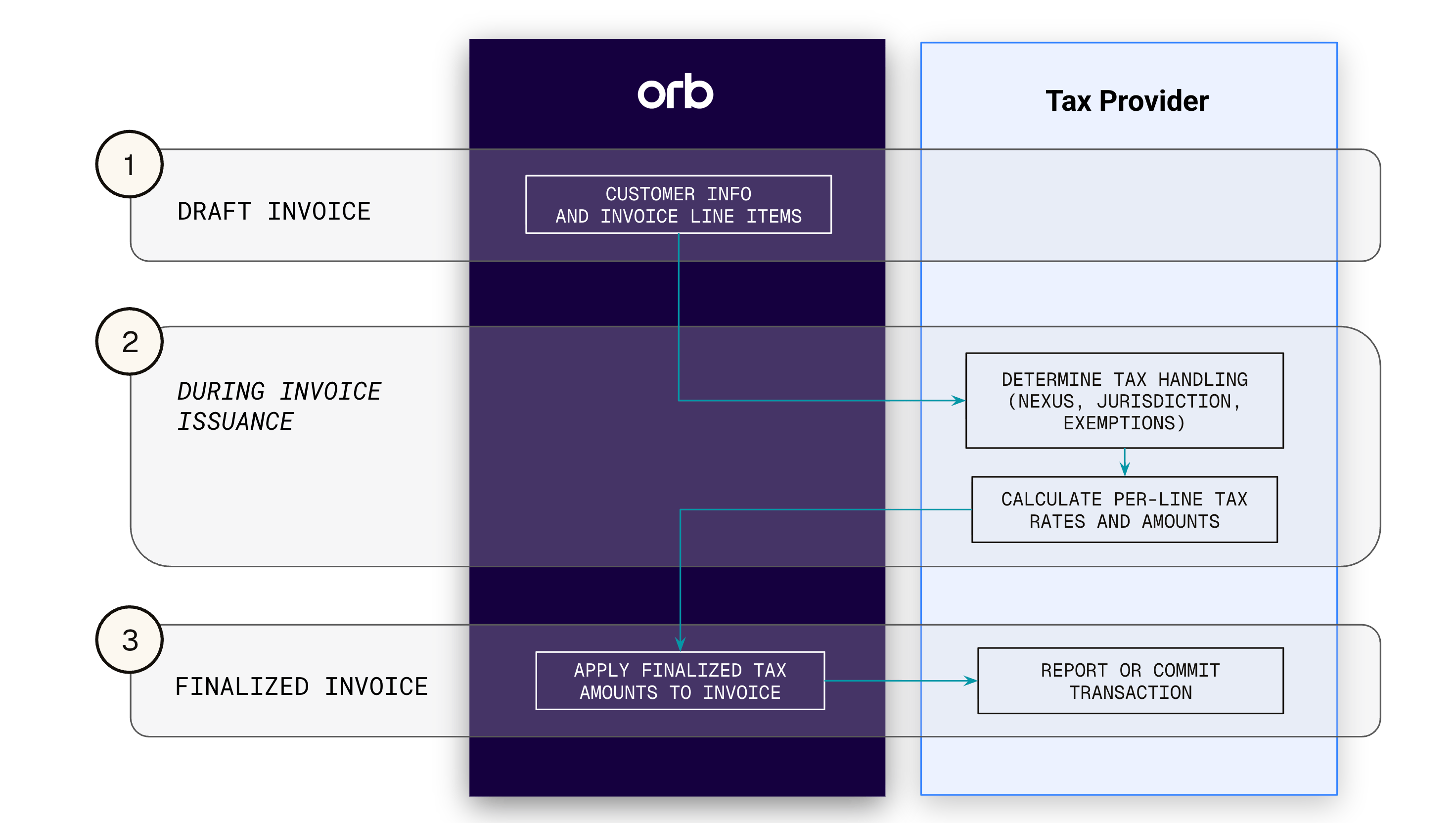
Orb is the system of record for the invoice and the source of the data that feeds a tax calculation. Your tax provider is the source of truth for tax law, rates, and filings. Orb does not calculate tax or determine what you owe — it packages up invoice data, sends it to your configured provider, and reflects the result back on the invoice.Orb is responsible for
Your tax provider is responsible for
You are responsible for
What Orb sends and receives
Each tax provider expects a different payload shape and field naming convention, but the data Orb sends follows the same general pattern across all six integrations.What Orb sends for tax calculation (request)
- Customer identity and address — the Orb customer ID and the shipping address (falling back to billing address) used to determine jurisdiction. Where a provider’s calculation supports specifying origin/seller context (e.g. Avalara’s ShipFrom, Numeral’s origin_address), that context reflects your merchant tax registration.
- Line items — one entry per invoice line item, each with its amount, quantity where applicable, and an external tax code, product ID, or category configured on the Orb Item.
- Currency and dates — the invoice currency and the accounting/reporting date used for rate lookups.
- Tax ID and exemption context — the customer’s tax ID and/or tax-exempt status, for providers that use it to apply reverse charge or exemption logic.
- Metadata — identifiers linking the transaction back to the originating Orb invoice and line items, so the response can be reconciled.
What Orb receives for tax calculation (response)
- A tax amount per line item, plus an invoice-level total tax amount.
- Jurisdiction and rate detail per line item (e.g. jurisdiction name, tax rate, tax name), for providers that return it — Orb surfaces this in the dashboard for auditing.
- Any not-taxed or exemption reasons the provider determines for a given line item.
Committing / reporting on the taxable transaction
For most providers, Orb makes two separate calls per invoice:- A calculation call (described above) to compute the tax amount, and
- A second reporting or commit call once the invoice is issued or finalized to register the transaction with the provider so it can be filed with a tax authority.
- Anrok, TaxJar, Stripe Tax, and Numeral: Orb makes a second create/report-transaction call referencing the original calculation, once the invoice is issued or finalized.
- Avalara is the one true “commit” flow: Orb creates the transaction during calculation, then later calls commit_transaction on that same document. This is gated by the Commit tax setting and fires specifically when the invoice transitions from issued to paid — not at issuance like the others.
- Sphere has no separate reporting or commit call. Its “report tax” step just re-runs the same calculation call, and Sphere instead receives updates via webhook.
Configuring customers for tax calculation
Address requirements Each taxable customer is required to have a valid shipping address in Orb. If none is present at the time of invoice issuance, Orb uses the billing address. If the address is invalid or missing, Orb fails invoice issuance and notifies you in the dashboard. Updating customer addresses Customer addresses can be set via the API or via the dashboard from the customer details page. Tax-exempt customers For a customer that qualifies for a tax exemption, create a Certificate for the customer in your tax provider dashboard, using the same customer ID as in Orb so the exemption is appropriately applied. Exempt from automated tax (Orb customer setting) Orb has a customer-level operational control to skip tax calculation for that customer or account. This is not a legal determination, and is typically used when taxes are handled outside of Orb, such as in a marketplace, an external invoicing system, or another tax engine. Customer tax IDs If a customer has a tax ID configured in Orb, Orb sends that ID to the tax provider when calculating and reporting tax. The tax provider can use it to determine whether the transaction is subject to a reverse charge for eligible VAT countries. The customer tax ID can be set via the API or via the dashboard from the customer details page.Merchant and customer tax identifiers
Orb supports both customer and merchant tax identifiers. This information is displayed on the invoice, and passed to the tax provider as an input.Customer tax identifiers
If your customer has a tax ID that’s required to be displayed on an invoice, set the Customer Tax ID via the API or from the customer details page in the dashboard.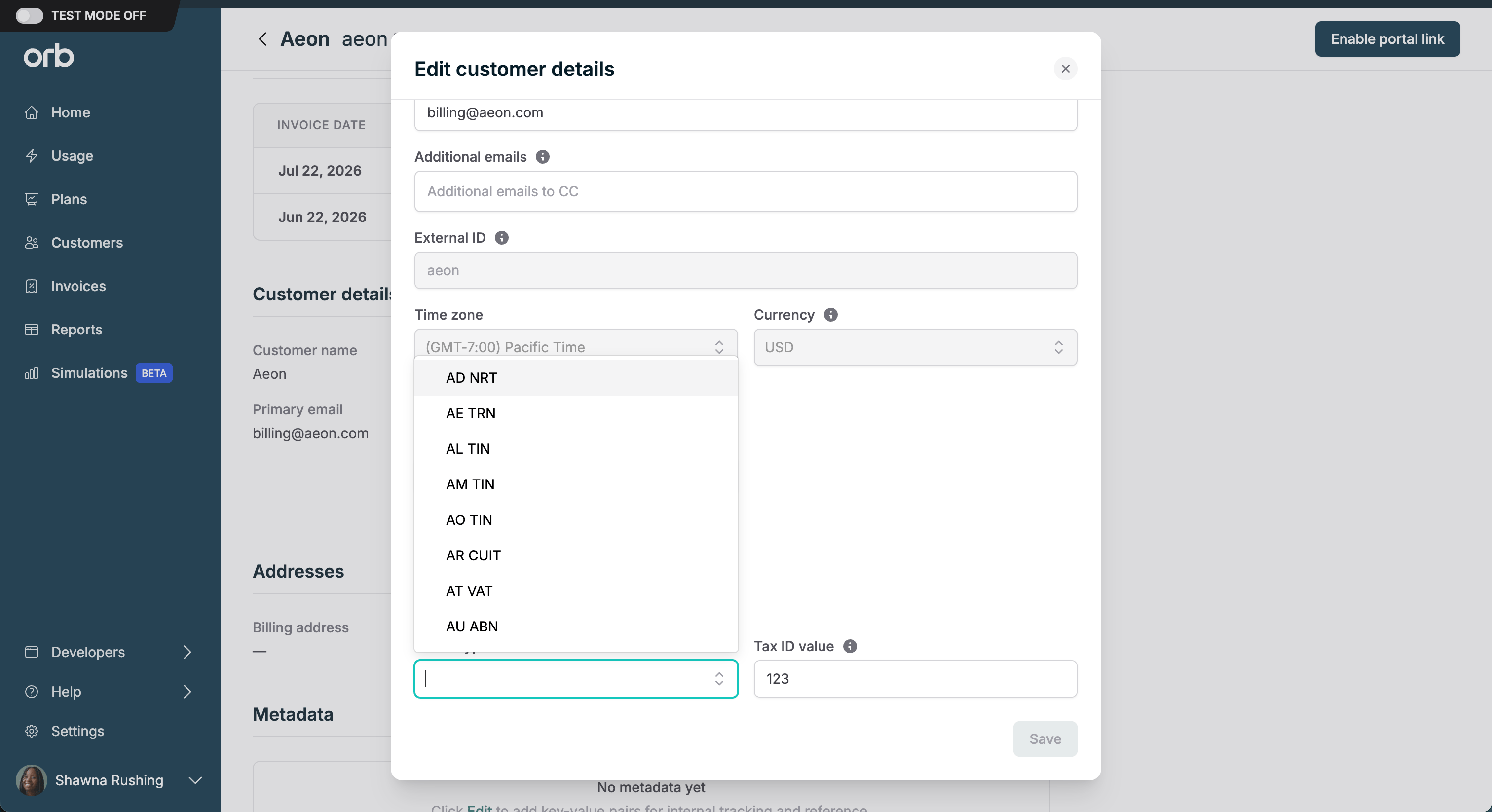
A customer’s tax ID is final at the time of invoice issuance.Any draft invoices will display the customer’s current tax ID. Any issued invoice saves the customer’s tax ID at the time of issuance, which cannot later be changed. To update this information, the invoice must be voided and re-issued. Contact Orb Support for assistance.
Merchant tax identifiers
You can add your company’s own tax registration numbers in Settings > Invoices. These merchant tax IDs appear in the invoice “From” section and on invoice and credit note PDFs when the recipient’s country or region matches the tax ID’s Applies to setting. This is an Orb-side capability, so it applies uniformly whether you’re connected to Anrok, Avalara, Numeral, Sphere, Stripe Tax, or TaxJar. Orb supports up to 50 company tax IDs per account, and cross-border invoices display both the merchant and customer country names alongside the addresses so the tax context is clear.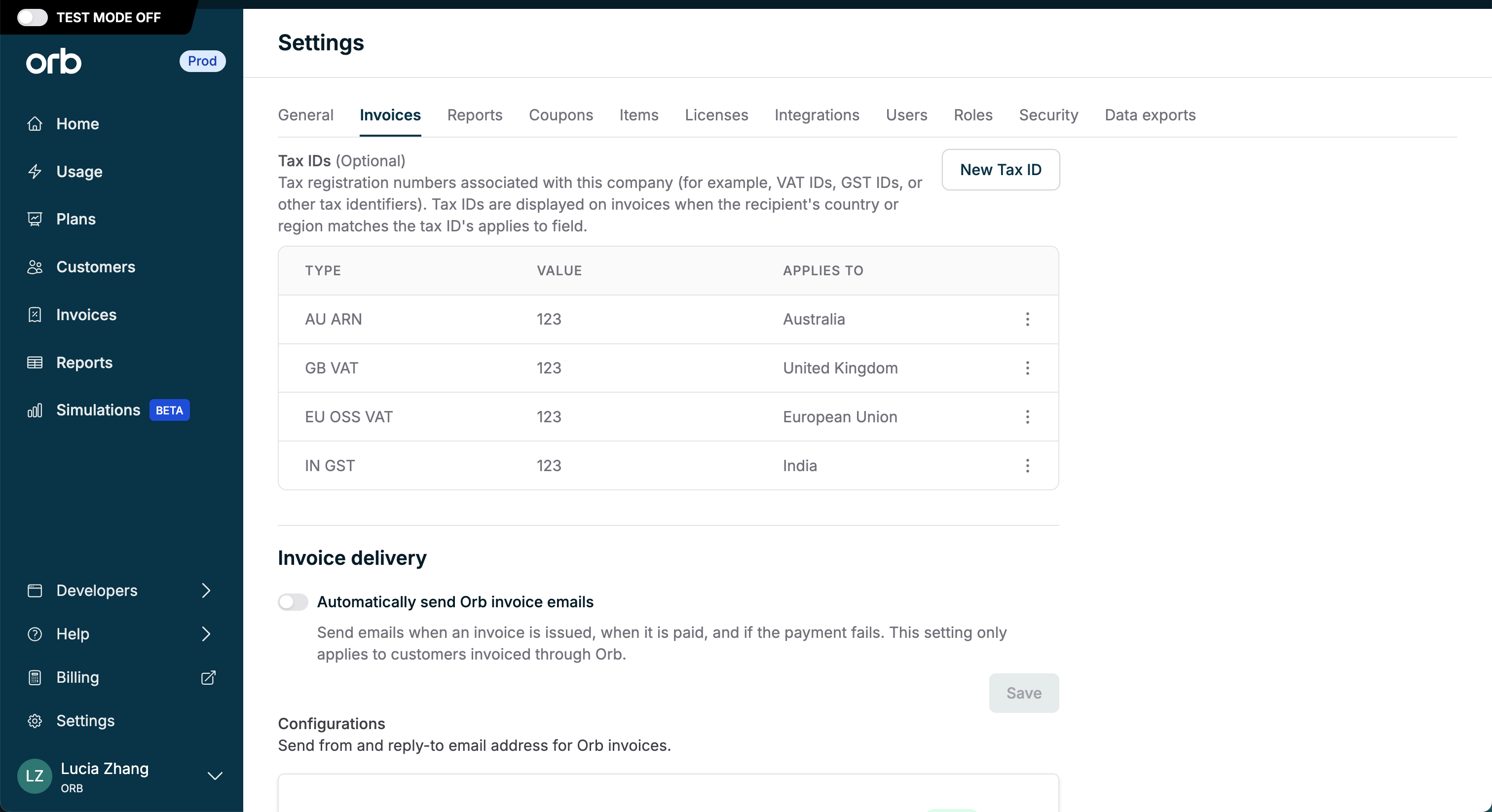
Tax handling for reversals (credit notes and voids)
- Credit notes. When a credit note is issued on a taxable invoice, Orb calculates the tax adjustment proportionally to the original transaction and reports it to your tax provider automatically. This ensures your refund activity is reflected accurately in your compliance records and maintains a complete audit trail for tax authorities.
- Voids. If a taxable invoice is voided, Orb treats that differently from a credit note: the void removes the original tax impact rather than recording a refund, and Orb sends the appropriate void or reversal to keep the tax provider reconciled with Orb.
- In both cases, the tax reversal references the customer information provided on the original invoice.