> ## Documentation Index
> Fetch the complete documentation index at: https://docs.withorb.com/llms.txt
> Use this file to discover all available pages before exploring further.
# Reporting configurations
## Reporting pivots
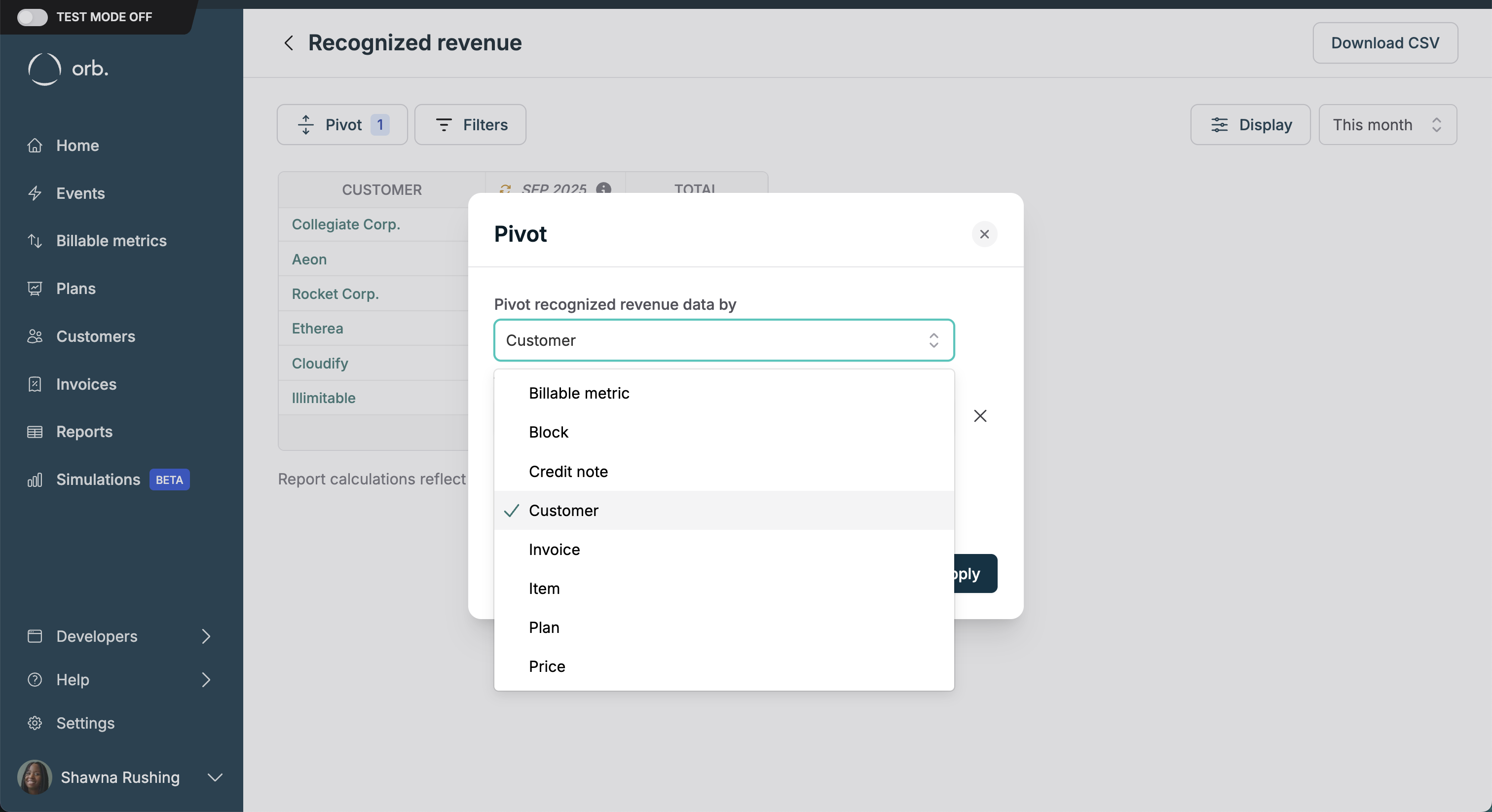 Orb’s revenue recognition dataset is meant to be as granular as possible, allowing you to split data by the following axes:
| Pivot dimension | Example use case |
| ----------------------- | ----------------------------------------------------------------------------------------------------------------------------------------------------------------------------------------------------------------- |
| Billable Metric | Evaluating how revenue differs across different implementations of a single conceptual measurement to understand which one is most effective. |
| Block (prepaid credits) | Tracking the consumption and expiration of prepaid credit blocks to ensure accurate revenue recognition and forecasting. |
| Credit note | Understanding contra revenue lost to things like refunds, concessions, subscription changes, etc. |
| Customer | A finance team wants to analyze revenue performance per customer to identify high-value clients and potential churn risks. Operationalized by tracking the revenue generated by customer A over the last quarter. |
| Invoice | Auditing the revenue recognized from Invoice #12345 to verify it aligns with the usage and services provided. |
| Item | Assessing the revenue contribution of "file processing services" versus "platform access fees". |
| Plan | Comparing the revenue from the Basic Monthly plan versus the Pro Annual plan to determine which plan drives more consistent revenue. |
| Price | Assessing the revenue contribution of "file processing services" versus "platform access fees", or previous versions of the same price. |
| Subscription plan | Comparing the revenue attributed to a plan a customer is subscribed to, inclusive of any subscription modifications like add-ons and overrides. |
Notably, Orb supports pivoting on multiple axes at once. For example, you might want to power the following use cases:
* Customer + Plan: Identify which plans are most popular among various customer segments. For instance, analyze revenue from Customer A across both the Basic Monthly and Pro Annual plans to determine customer preferences.
* Plan + Item: Determine the contribution of different items within each plan. For example, evaluate the revenue from file processing versus platform fees within the Basic Monthly plan to optimize plan offerings.
* Item + Block: Monitor the usage of prepaid credits against specific items. Track how many prepaid credits were used for file processing services versus compute fees.
* Invoice + Billable Metric + Block: Verify that invoicing, pricing, and credit block usage are aligned. Ensure that the pricing applied on Invoice #6789 accurately reflects the consumption of prepaid credits and any discounts given.
## Additional display options
Orb’s revenue recognition dataset is meant to be as granular as possible, allowing you to split data by the following axes:
| Pivot dimension | Example use case |
| ----------------------- | ----------------------------------------------------------------------------------------------------------------------------------------------------------------------------------------------------------------- |
| Billable Metric | Evaluating how revenue differs across different implementations of a single conceptual measurement to understand which one is most effective. |
| Block (prepaid credits) | Tracking the consumption and expiration of prepaid credit blocks to ensure accurate revenue recognition and forecasting. |
| Credit note | Understanding contra revenue lost to things like refunds, concessions, subscription changes, etc. |
| Customer | A finance team wants to analyze revenue performance per customer to identify high-value clients and potential churn risks. Operationalized by tracking the revenue generated by customer A over the last quarter. |
| Invoice | Auditing the revenue recognized from Invoice #12345 to verify it aligns with the usage and services provided. |
| Item | Assessing the revenue contribution of "file processing services" versus "platform access fees". |
| Plan | Comparing the revenue from the Basic Monthly plan versus the Pro Annual plan to determine which plan drives more consistent revenue. |
| Price | Assessing the revenue contribution of "file processing services" versus "platform access fees", or previous versions of the same price. |
| Subscription plan | Comparing the revenue attributed to a plan a customer is subscribed to, inclusive of any subscription modifications like add-ons and overrides. |
Notably, Orb supports pivoting on multiple axes at once. For example, you might want to power the following use cases:
* Customer + Plan: Identify which plans are most popular among various customer segments. For instance, analyze revenue from Customer A across both the Basic Monthly and Pro Annual plans to determine customer preferences.
* Plan + Item: Determine the contribution of different items within each plan. For example, evaluate the revenue from file processing versus platform fees within the Basic Monthly plan to optimize plan offerings.
* Item + Block: Monitor the usage of prepaid credits against specific items. Track how many prepaid credits were used for file processing services versus compute fees.
* Invoice + Billable Metric + Block: Verify that invoicing, pricing, and credit block usage are aligned. Ensure that the pricing applied on Invoice #6789 accurately reflects the consumption of prepaid credits and any discounts given.
## Additional display options
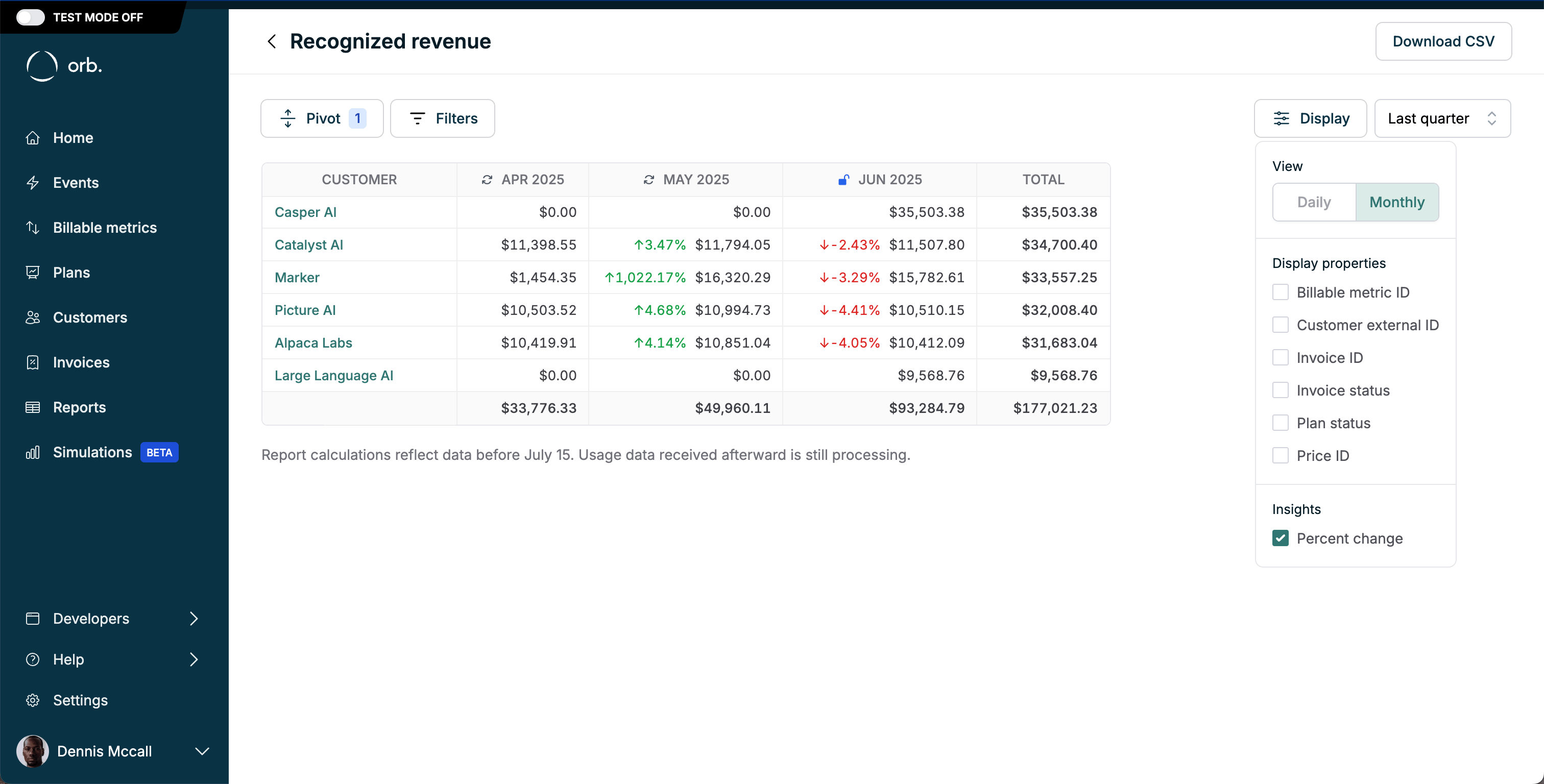 From the display options dropdown in the top right of the Recognized Revenue and Billings reports, configure:
1. View aggregation: rollup data monthly, or daily for shorter time horizons
2. Display properties: include additional metadata for richer reporting in one place
3. Insights: calculate % change from the prior period
From the display options dropdown in the top right of the Recognized Revenue and Billings reports, configure:
1. View aggregation: rollup data monthly, or daily for shorter time horizons
2. Display properties: include additional metadata for richer reporting in one place
3. Insights: calculate % change from the prior period