> ## Documentation Index
> Fetch the complete documentation index at: https://docs.withorb.com/llms.txt
> Use this file to discover all available pages before exploring further.
# Dimensional pricing
Dimensional pricing allows you to create sophisticated pricing models that vary based on multiple dimensions or properties of your usage events. It offers **unlimited flexibility** to price each dimension independently, making it ideal for complex, large-scale billing use cases.
***Dimensional pricing replaces the deprecated Matrix pricing model, which was limited to two dimensions. If you’re migrating from Matrix pricing, see this ***[***guide***](/product-catalog/dimensional-pricing#migration-from-matrix-pricing)***.***
## What is dimensional pricing?
Dimensional pricing groups your usage data by one or more dimensions (properties), then applies pricing rules to each unique combination of dimension values. Think of it as applying a "GROUP BY" operation across your chosen dimensions, then pricing each group separately.
For example, you might want to price compute usage differently based on the unique combinations of:
* **Region** (us-east-1 vs eu-west-1)
* **Instance type** (small vs large vs xlarge)
* **Environment** (production vs staging)
With dimensional pricing, you can create a single price group that handles all these combinations automatically.
## Key benefits
* **Unlimited dimensions**: Define pricing across any number of usage dimensions - such as region, environment, or instance type - for granular control and flexibility.
* **Better performance**: Optimized to handle complex, large-scale pricing scenarios efficiently.
* **Simplified management**: One pricing configuration covers all combinations of dimensions, reducing setup and maintenance overhead.
* **Flexible discounts**: Apply discounts across specific dimensions or dimension combinations
## How it works
### 1. Define your dimensions
First, identify which event properties you want to use as pricing dimensions. These should be properties that are consistently present in your events and represent meaningful pricing differentiators.
Common dimension examples:
* `region` - Geographic location
* `instance_type` - Resource size or tier
* `environment` - Production vs staging
* `product_tier` - Different product offerings
* `data_center` - Physical infrastructure location
### 2. Create a dimensional price group
Create a dimensional price group that defines the dimensions and their possible values with pricing for each combination.
### 3. Configure prices to use the group
Create prices that reference the dimensional price group and specify which dimension values should be used for that specific price.
Here's how to configure dimensional pricing via the API:
```json theme={null}
{
"model_type": "unit",
"unit_config": {
"unit_amount": "1.00"
},
"dimensional_price_group_config": {
"external_dimensional_price_group_id": "region-instance-pricing",
"dimension_values": ["us-east-1", "small"]
}
}
```
In this example:
* The price uses any pricing model (`unit` in this case)
* It references an existing dimensional price group by `external_dimensional_price_group_id`
* The `dimension_values` array specifies the exact dimension combination this price applies to, in the same order as defined in the group
You can also reference a group by its internal ID:
```json theme={null}
{
"model_type": "tiered",
"tiered_config": {
"tiers": [
{
"first_unit": 0,
"last_unit": 100,
"unit_amount": "0.10"
}
]
},
"dimensional_price_group_config": {
"dimensional_price_group_id": "dpg_12345",
"dimension_values": ["eu-west-1", "large"]
}
}
```
## Setting up dimensional pricing
### In the Orb dashboard
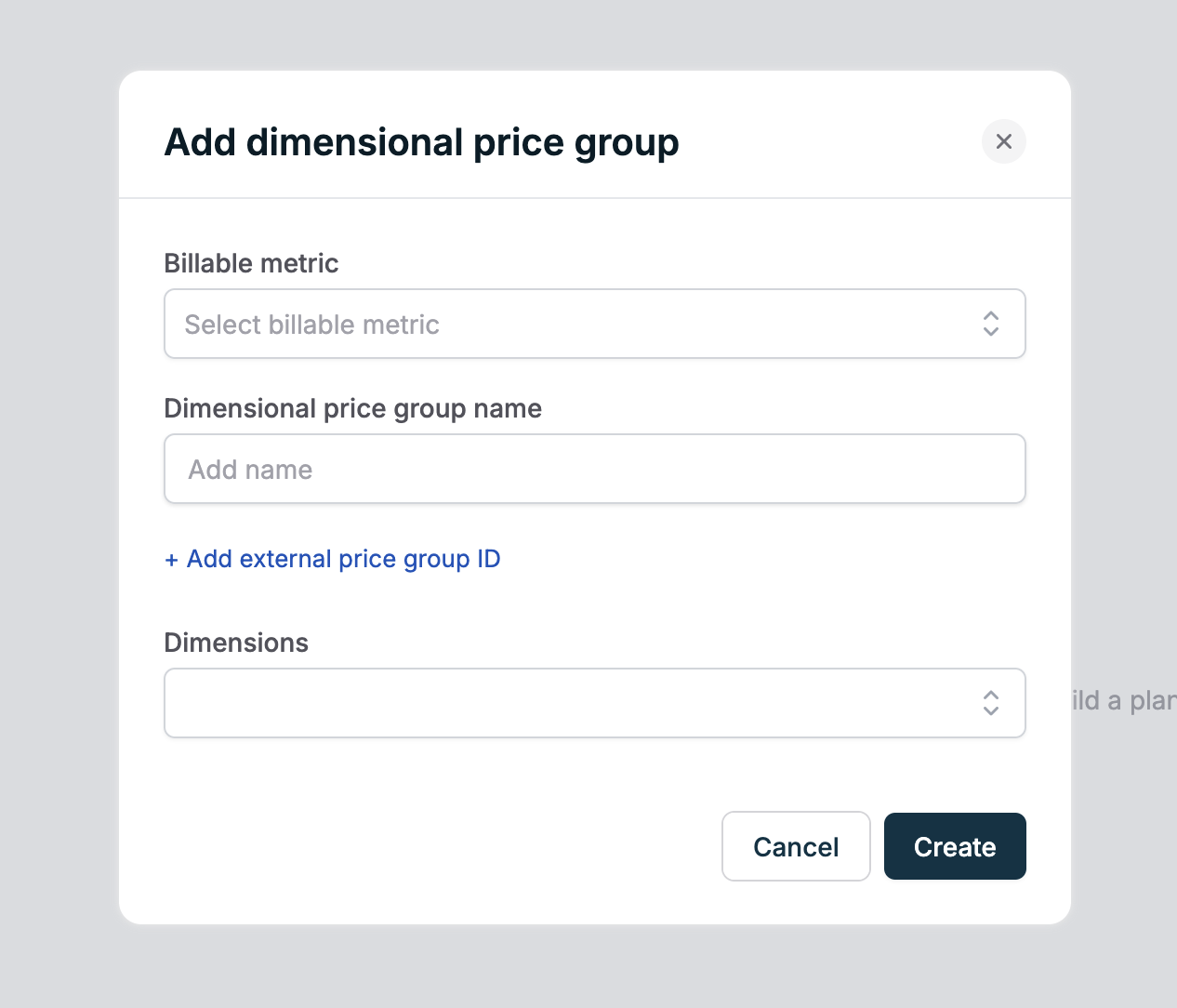
1. **Create a dimensional price group** during plan creation or subscription creation by specifying the dimensions you want to use
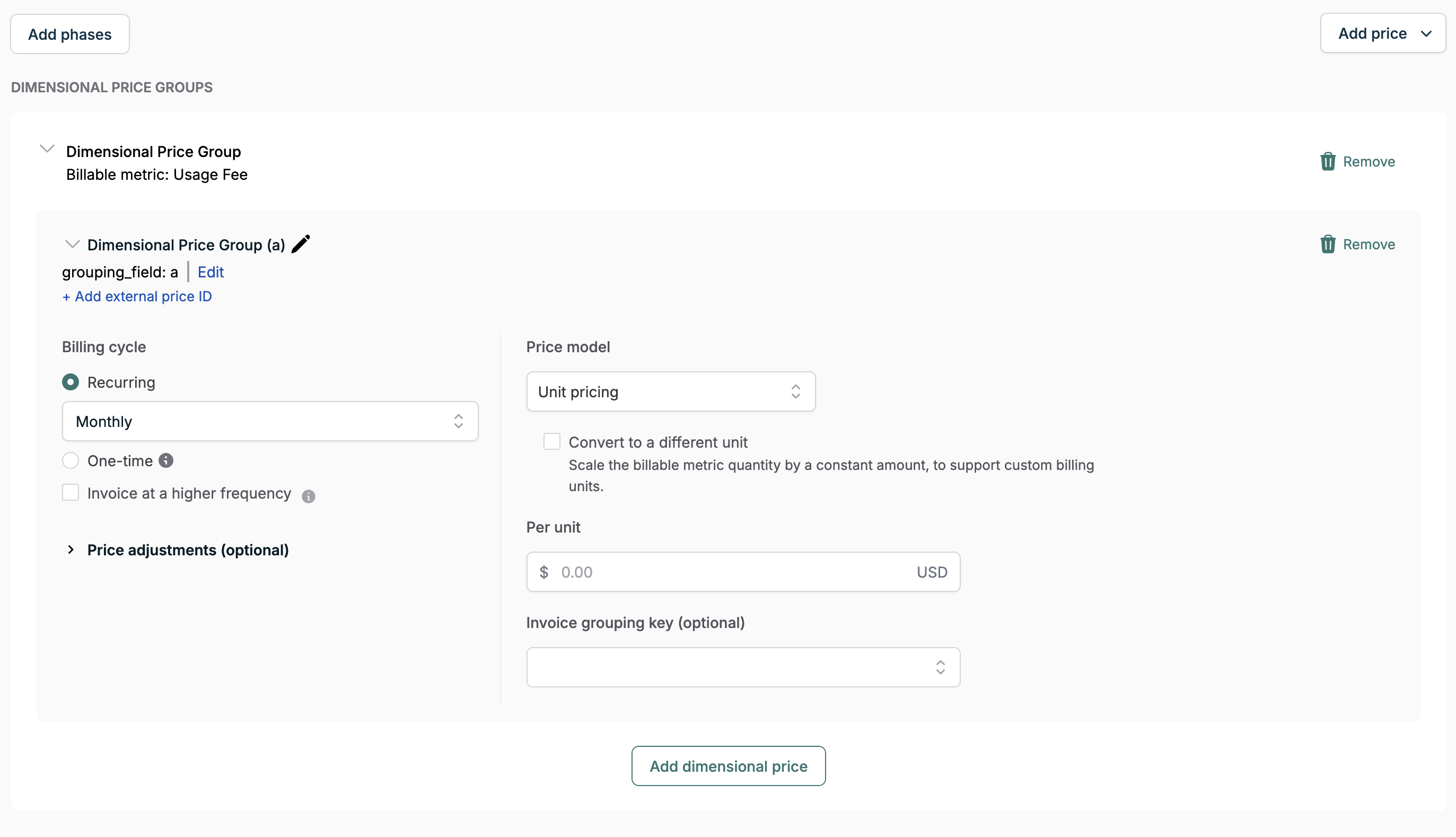
 2. **Add a price to the dimensional price group** (just like adding a price to a plan)
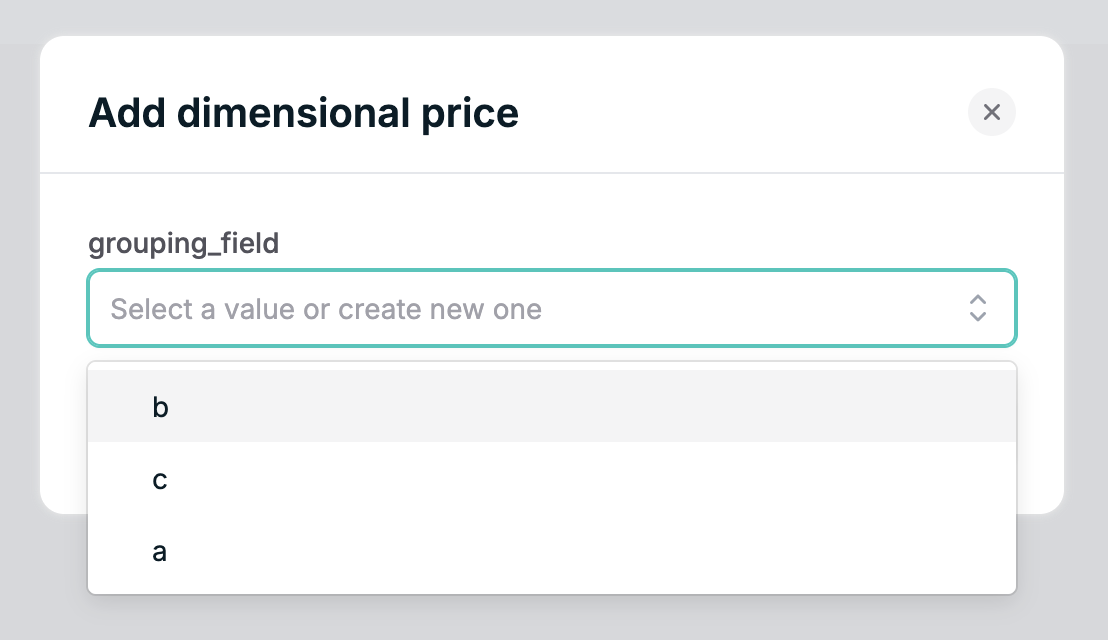
 3. **Specify the price's dimension values** for the specific combination this price applies to
 4. **Choose any pricing model** (unit, tiered, etc.) and configure it as usual
### Via API
1. [**Create a dimensional price group**](/api-reference/dimensional-price-group/create-dimensional-price-group) first
2. [**Use the Create Price API endpoint**](/api-reference/price/create-price) with the `dimensional_price_group_config` object as shown in the configuration example above
## Working with dimensional price groups
Dimensional pricing creates **Dimensional Price Groups** that manage the relationships between dimensions and their pricing. Each dimensional price group:
* Has an optional `external_id` that can be used to reference the group in API calls
* Contains all dimension value combinations and their pricing
* Can be reused across multiple prices and plans
* Supports updates to pricing without affecting active subscriptions
### Managing dimensional price groups
You can:
* [**List all dimensional price groups**](/api-reference/dimensional-price-group/list-dimensional-price-groups) in your account
* [**Create a new dimensional price group**](/api-reference/dimensional-price-group/create-dimensional-price-group)
## Best practices
### 1. Plan your dimensions carefully
* Choose dimensions that are stable and consistently present in your events
* Avoid using dimensions with high cardinality (too many unique values)
* Consider your pricing strategy before implementing
### 2. Use meaningful external IDs
* Give your dimensional price groups descriptive `external_id` values when you need to reference them programmatically
* This makes them easier to manage and reference in API calls
* Example: "compute-region-instance-pricing" vs "dpg-123"
### 3. Configure all necessary combinations
* Explicitly define pricing for all dimension combinations you expect to encounter
* Monitor for new dimension values in your usage data
* Add new combinations as your product evolves
### 4. Test thoroughly
* Build these in test mode first, and also ensure your code has been updated to reference the new dimensional pricing before migrating to dimensional pricing in production
* Verify pricing works correctly for all dimension combinations
* Use Orb's [simulation tools](/simulations/introduction) to test complex scenarios
* Check invoice calculations before going live
## Troubleshooting
### Common issues
**Missing dimension values in events**
* Ensure all required dimensions are present in your usage events
* Verify dimension values in your events exactly match the configured values
**Pricing not applied correctly**
* Check for case sensitivity and formatting differences
* Ensure all expected dimension combinations are explicitly configured
* Verify the `dimension_values` array matches the order defined in the price group
### Getting help
If you need assistance with dimensional pricing:
* Check the [API reference](/api-reference) for detailed endpoint documentation
* Review the [quickstart pricing guide](/quickstart/pricing) for implementation examples
* See the [data exports guide](/data-exports/resource-types#dimensional-price-group) for dimensional price group schema information
* Learn about [other pricing models](/product-catalog/build-catalog) available in Orb
* Contact [support](https://portal.usepylon.com/orb/forms/orb-support) for complex pricing scenario guidance
## Migration from matrix pricing
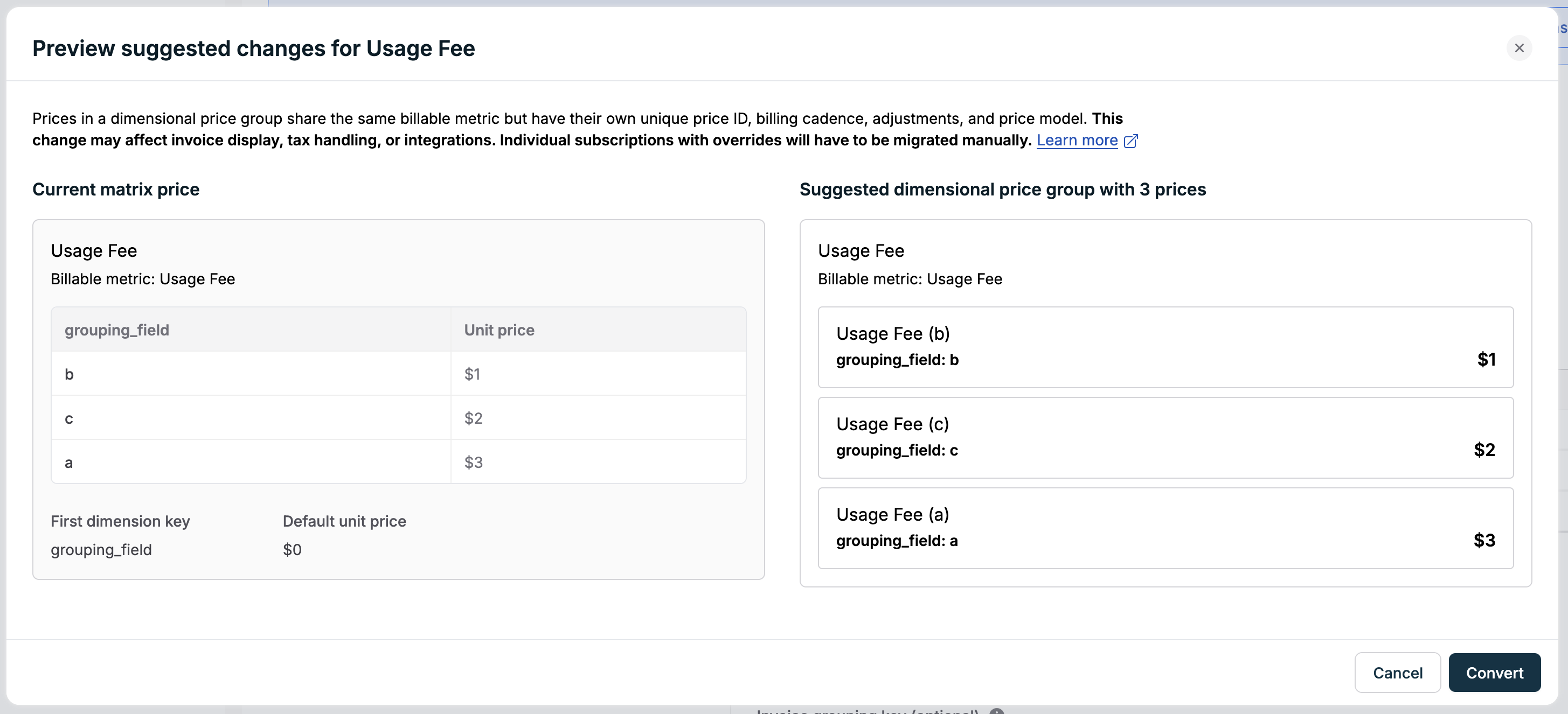
Migration from matrix pricing to dimensional pricing can be done automatically for a specific plan as part of creating a new plan version.
We recommend that you run this first in your test mode before running in production, and also making sure your code is updated to reference the dimensional pricing.
4. **Choose any pricing model** (unit, tiered, etc.) and configure it as usual
### Via API
1. [**Create a dimensional price group**](/api-reference/dimensional-price-group/create-dimensional-price-group) first
2. [**Use the Create Price API endpoint**](/api-reference/price/create-price) with the `dimensional_price_group_config` object as shown in the configuration example above
## Working with dimensional price groups
Dimensional pricing creates **Dimensional Price Groups** that manage the relationships between dimensions and their pricing. Each dimensional price group:
* Has an optional `external_id` that can be used to reference the group in API calls
* Contains all dimension value combinations and their pricing
* Can be reused across multiple prices and plans
* Supports updates to pricing without affecting active subscriptions
### Managing dimensional price groups
You can:
* [**List all dimensional price groups**](/api-reference/dimensional-price-group/list-dimensional-price-groups) in your account
* [**Create a new dimensional price group**](/api-reference/dimensional-price-group/create-dimensional-price-group)
## Best practices
### 1. Plan your dimensions carefully
* Choose dimensions that are stable and consistently present in your events
* Avoid using dimensions with high cardinality (too many unique values)
* Consider your pricing strategy before implementing
### 2. Use meaningful external IDs
* Give your dimensional price groups descriptive `external_id` values when you need to reference them programmatically
* This makes them easier to manage and reference in API calls
* Example: "compute-region-instance-pricing" vs "dpg-123"
### 3. Configure all necessary combinations
* Explicitly define pricing for all dimension combinations you expect to encounter
* Monitor for new dimension values in your usage data
* Add new combinations as your product evolves
### 4. Test thoroughly
* Build these in test mode first, and also ensure your code has been updated to reference the new dimensional pricing before migrating to dimensional pricing in production
* Verify pricing works correctly for all dimension combinations
* Use Orb's [simulation tools](/simulations/introduction) to test complex scenarios
* Check invoice calculations before going live
## Troubleshooting
### Common issues
**Missing dimension values in events**
* Ensure all required dimensions are present in your usage events
* Verify dimension values in your events exactly match the configured values
**Pricing not applied correctly**
* Check for case sensitivity and formatting differences
* Ensure all expected dimension combinations are explicitly configured
* Verify the `dimension_values` array matches the order defined in the price group
### Getting help
If you need assistance with dimensional pricing:
* Check the [API reference](/api-reference) for detailed endpoint documentation
* Review the [quickstart pricing guide](/quickstart/pricing) for implementation examples
* See the [data exports guide](/data-exports/resource-types#dimensional-price-group) for dimensional price group schema information
* Learn about [other pricing models](/product-catalog/build-catalog) available in Orb
* Contact [support](https://portal.usepylon.com/orb/forms/orb-support) for complex pricing scenario guidance
## Migration from matrix pricing
Migration from matrix pricing to dimensional pricing can be done automatically for a specific plan as part of creating a new plan version.
We recommend that you run this first in your test mode before running in production, and also making sure your code is updated to reference the dimensional pricing.
 ### Automatic migration
When you create a new plan version, Orb will provide you with the ability to automatically preview and convert eligible matrix prices into dimensional pricing. This includes carrying over relevant billable metrics, pricing values, and dimension keys into a corresponding dimensional price group.
**Current limitations of dimensional price groups:**
* We can't automatically convert usage discounts
* There's currently no equivalent support in dimensional pricing for the "default unit amount" on a matrix price
The migration process is designed to be conservative: it automatically converts prices where it can do so safely and **intentionally fails** in cases that may introduce ambiguity, so you have full control over the outcome.
**Individual subscription migration failures:**
Orb’s migration flow is intentionally conservative when it comes to migrating individual subscriptions.
In scenarios where automatic conversion could lead to unintended billing outcomes, we’ll intentionally fail those subscriptions so you can review them manually. We will fail to automatically migrate individual subscriptions where:
1. The subscription includes **overrides** for the matrix price - these may reflect intentional customizations that should be reviewed
2. The matrix price has already ended at the effective time of the migration - meaning it’s no longer active, and Orb can’t safely determine a 1:1 replacement
### Handling failed migrations
For individual subscriptions that have failed to migrate automatically:
* **Plan change approach**: A plan change to the same plan at the new version will effectively act as a version upgrade if scheduled at a billing period boundary, and will often have exactly the behavior you need
* **Need support**: If there are too many failed subscriptions, or a plan change won't have the behavior you're expecting, [reach out to Orb support for assistance](https://portal.usepylon.com/orb/forms/orb-support)
The key advantage of migrating to dimensional pricing is unlimited dimensions support with better performance and easier management.
### Automatic migration
When you create a new plan version, Orb will provide you with the ability to automatically preview and convert eligible matrix prices into dimensional pricing. This includes carrying over relevant billable metrics, pricing values, and dimension keys into a corresponding dimensional price group.
**Current limitations of dimensional price groups:**
* We can't automatically convert usage discounts
* There's currently no equivalent support in dimensional pricing for the "default unit amount" on a matrix price
The migration process is designed to be conservative: it automatically converts prices where it can do so safely and **intentionally fails** in cases that may introduce ambiguity, so you have full control over the outcome.
**Individual subscription migration failures:**
Orb’s migration flow is intentionally conservative when it comes to migrating individual subscriptions.
In scenarios where automatic conversion could lead to unintended billing outcomes, we’ll intentionally fail those subscriptions so you can review them manually. We will fail to automatically migrate individual subscriptions where:
1. The subscription includes **overrides** for the matrix price - these may reflect intentional customizations that should be reviewed
2. The matrix price has already ended at the effective time of the migration - meaning it’s no longer active, and Orb can’t safely determine a 1:1 replacement
### Handling failed migrations
For individual subscriptions that have failed to migrate automatically:
* **Plan change approach**: A plan change to the same plan at the new version will effectively act as a version upgrade if scheduled at a billing period boundary, and will often have exactly the behavior you need
* **Need support**: If there are too many failed subscriptions, or a plan change won't have the behavior you're expecting, [reach out to Orb support for assistance](https://portal.usepylon.com/orb/forms/orb-support)
The key advantage of migrating to dimensional pricing is unlimited dimensions support with better performance and easier management.