> ## Documentation Index
> Fetch the complete documentation index at: https://docs.withorb.com/llms.txt
> Use this file to discover all available pages before exploring further.
# Customer hierarchy
Orb has support for creating hierarchical relationships between your customers to power flexible pricing, usage aggregation, and invoicing.
This capability is particularly valuable when your customers desire to aggregate usage across multiple customers on a single parent
invoice while maintaining the ability to configure pricing per customer or groups of customers.
Customer hierarchy is not included with all Orb billing plans by default.
Reach out to your Orb representative if you have any questions.
Customer hierarchy works in two parts:
1. Create a hierarchy relationship between a parent and child customer(s)
2. Configure pricing to use the hierarchy relationship
### Create a hierarchy relationship
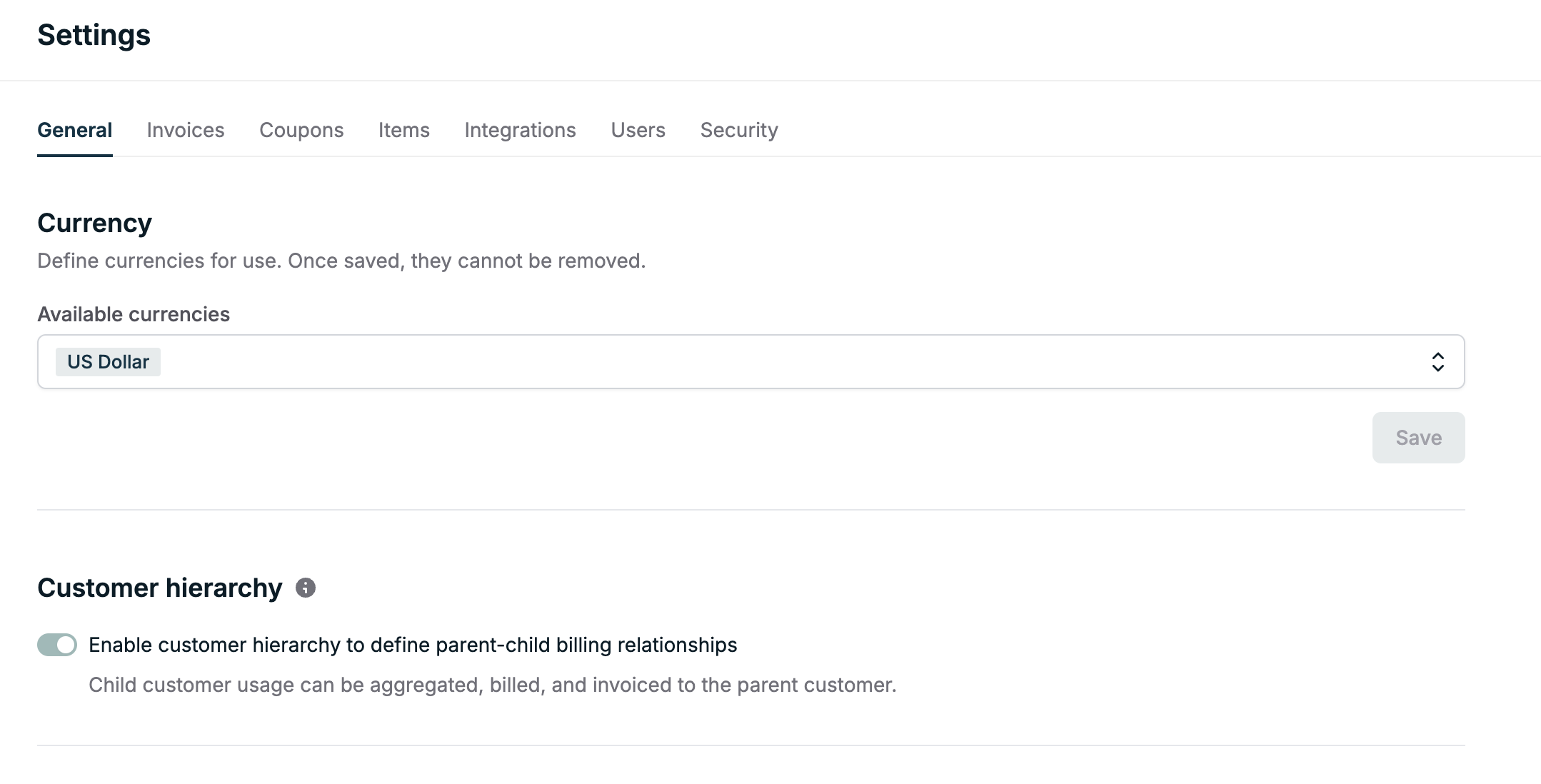
To get started, ensure your plan includes this feature. Browse to the [settings page](https://app.withorb.com/settings)
and enable the "Customer hierarchy" feature. Once Customer hierarchy is enabled, it cannot be disabled.
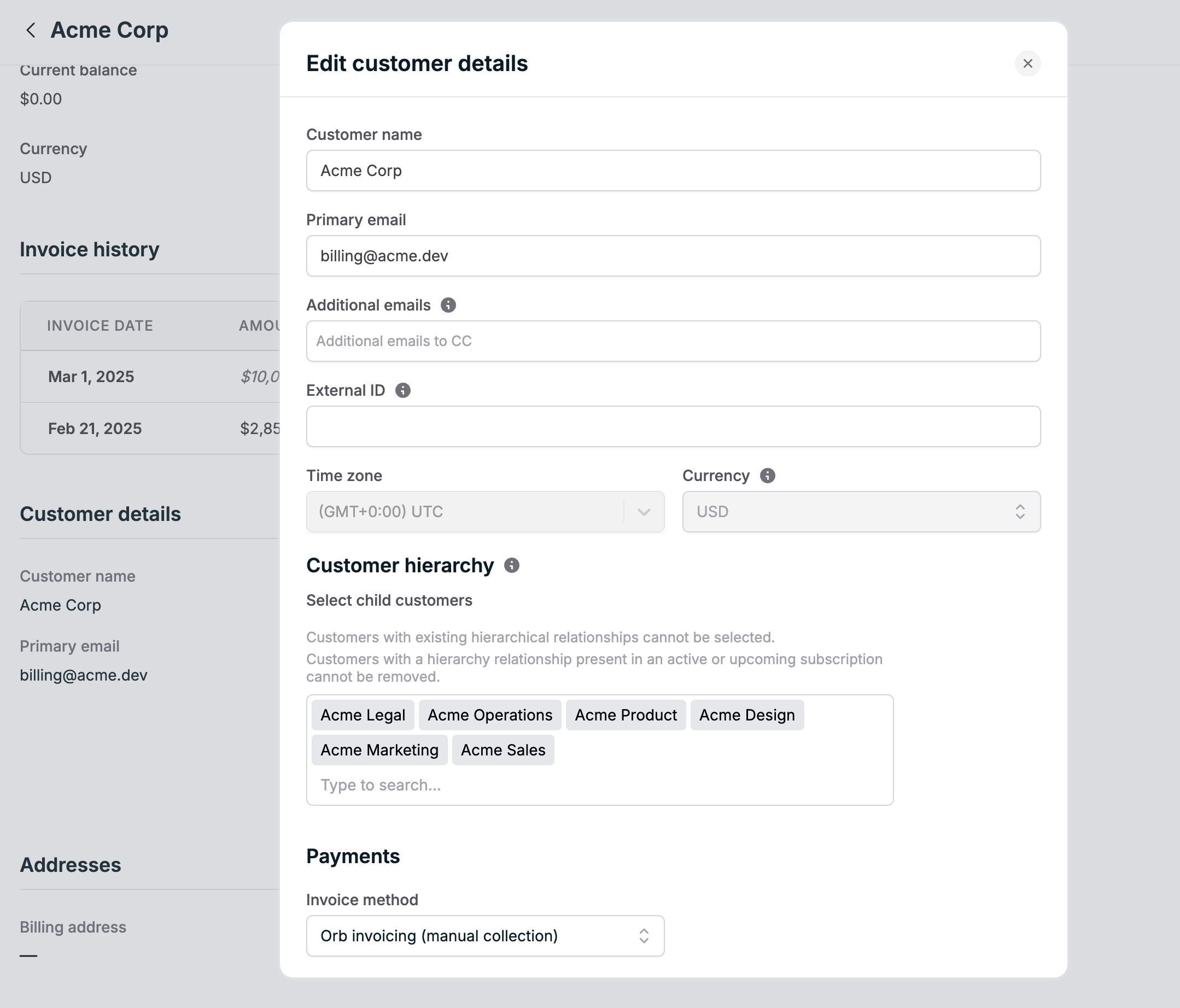
 A hierarchy relationship can be created when creating a new customer or editing an existing customer.
A parent customer can have no more than 100 child customers.
#### Creating a customer as a parent
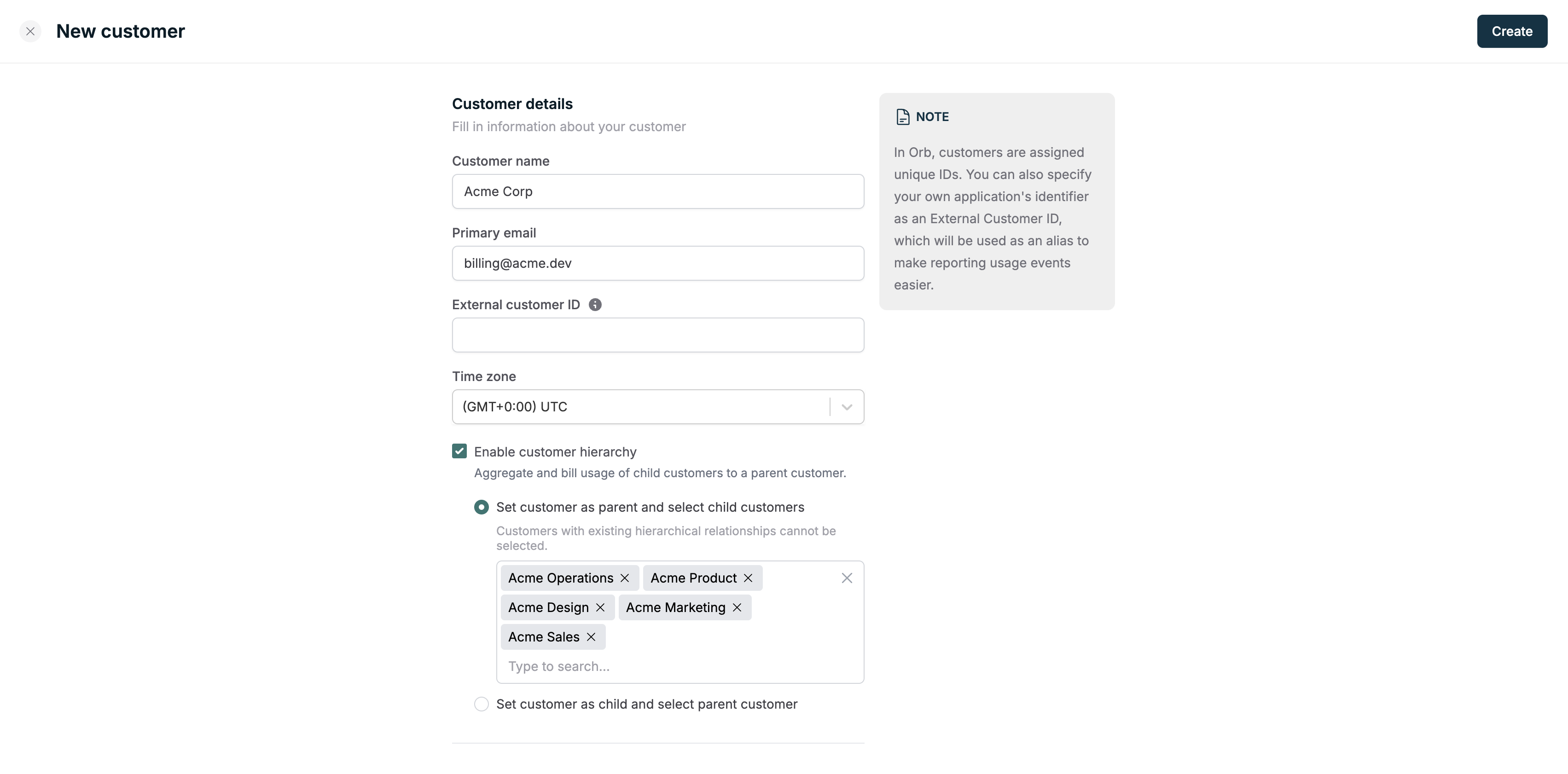
In the Orb UI, navigate to the [customer creation page](https://app.withorb.com/customers/new). Specify the child customers
to include in the hierarchy for the newly created parent customer.
Create the child customers first before creating the parent customer,
or create the parent customer first and then add the hierarchy relationships with child customers later.
Customers with existing hierarchy relationships cannot be added to another hierarchy.
A hierarchy relationship can be created when creating a new customer or editing an existing customer.
A parent customer can have no more than 100 child customers.
#### Creating a customer as a parent
In the Orb UI, navigate to the [customer creation page](https://app.withorb.com/customers/new). Specify the child customers
to include in the hierarchy for the newly created parent customer.
Create the child customers first before creating the parent customer,
or create the parent customer first and then add the hierarchy relationships with child customers later.
Customers with existing hierarchy relationships cannot be added to another hierarchy.
 In the Orb API, a hierarchy relationship can be created when
[creating a customer](https://docs.withorb.com/api-reference/customer/create-customer#body-hierarchy)
by setting the `hierarchy` field and specifying the child customers to include in the hierarchy.
```json theme={null}
{
"name": "Acme Corp",
"email": "billing@acme.dev",
"hierarchy": {
"child_customer_ids": ["child_customer_id_1", "child_customer_id_2"]
}
}
```
#### Creating a customer as a child
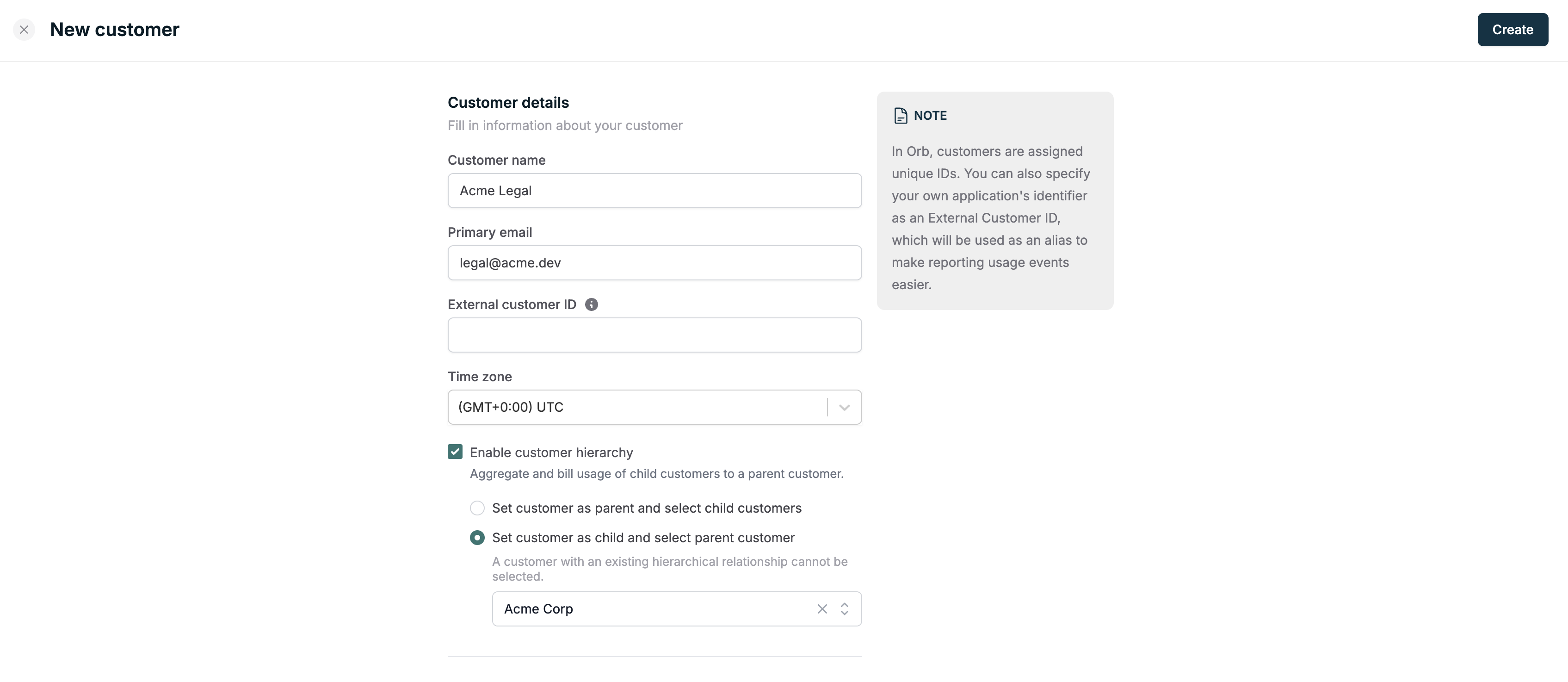
In the Orb UI, navigate to the [customer creation page](https://app.withorb.com/customers/new). Specify the parent customer
to include in the hierarchy for the newly created child customer.
In the Orb API, a hierarchy relationship can be created when
[creating a customer](https://docs.withorb.com/api-reference/customer/create-customer#body-hierarchy)
by setting the `hierarchy` field and specifying the child customers to include in the hierarchy.
```json theme={null}
{
"name": "Acme Corp",
"email": "billing@acme.dev",
"hierarchy": {
"child_customer_ids": ["child_customer_id_1", "child_customer_id_2"]
}
}
```
#### Creating a customer as a child
In the Orb UI, navigate to the [customer creation page](https://app.withorb.com/customers/new). Specify the parent customer
to include in the hierarchy for the newly created child customer.
 In the Orb API, a hierarchy relationship can be created when
[creating a customer](https://docs.withorb.com/api-reference/customer/create-customer#body-hierarchy)
by setting the `hierarchy` field and specifying the parent customer to include in the hierarchy.
```json theme={null}
{
"name": "Acme Legal",
"email": "legal@acme.dev",
"hierarchy": {
"parent_customer_id": "parent_customer_id"
}
}
```
#### Update a customer to be a child or parent
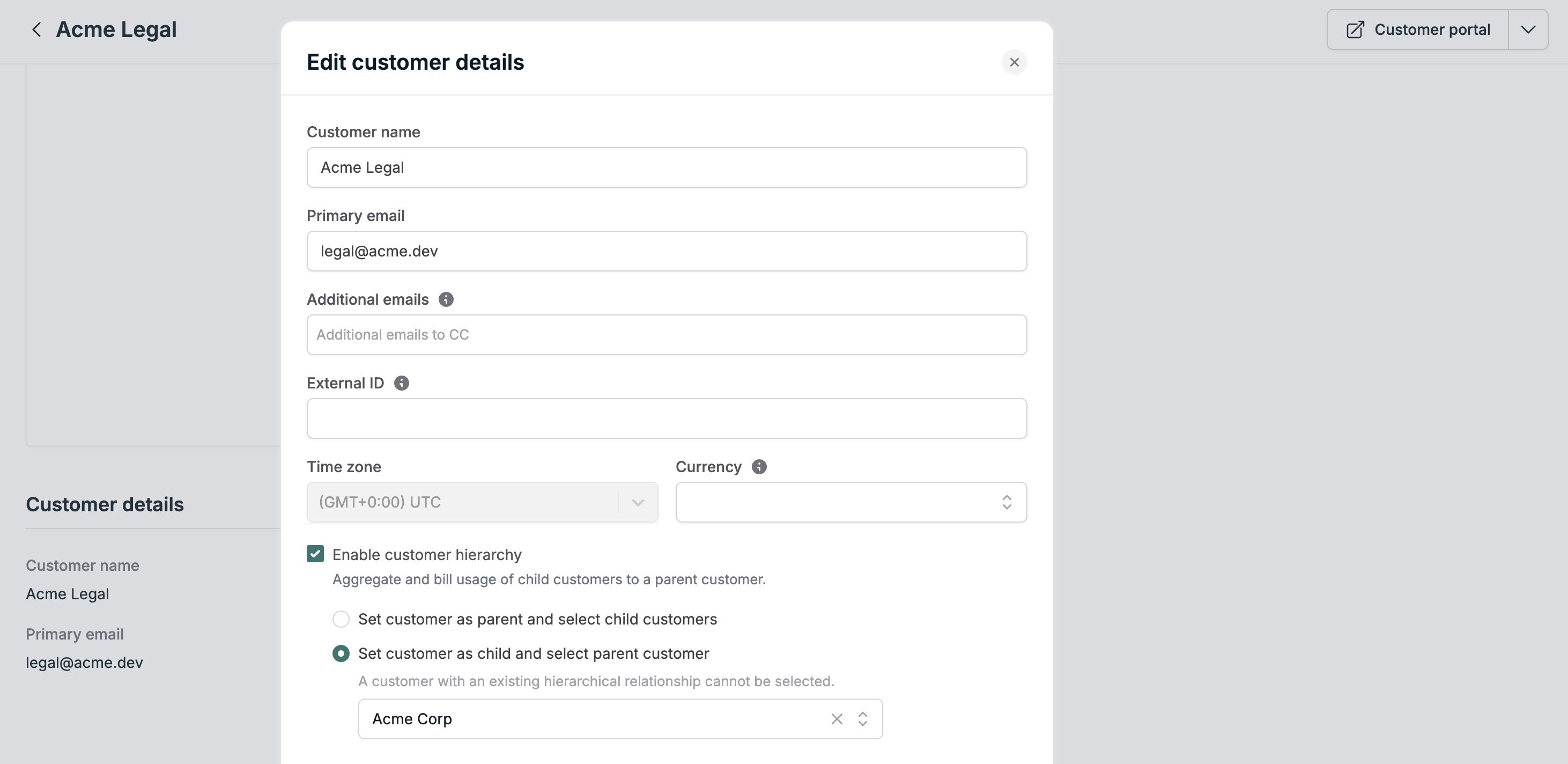
In the Orb UI, navigate to the [customers page](https://app.withorb.com/customers) and select the customer you want to update.
Scroll to the `Customer details` section to edit the customer.
In the Orb API, a hierarchy relationship can be created when
[creating a customer](https://docs.withorb.com/api-reference/customer/create-customer#body-hierarchy)
by setting the `hierarchy` field and specifying the parent customer to include in the hierarchy.
```json theme={null}
{
"name": "Acme Legal",
"email": "legal@acme.dev",
"hierarchy": {
"parent_customer_id": "parent_customer_id"
}
}
```
#### Update a customer to be a child or parent
In the Orb UI, navigate to the [customers page](https://app.withorb.com/customers) and select the customer you want to update.
Scroll to the `Customer details` section to edit the customer.
 In the Orb API, a hierarchy relationship can be created when
[updating a customer](https://docs.withorb.com/api-reference/customer/update-customer#body-hierarchy)
by setting the `hierarchy` field and specifying either the parent customer or child customer(s) to include in the hierarchy.
### Configure pricing to use a hierarchy relationship
With Customer hierarchy, you can now aggregate the usage of multiple customers on a single parent invoice. This enables the following
billing configurations:
1. Bill any mix of parent and child customers
2. Bill child customers only
3. Bill groups of child customers for different prices, with the same or different billable metric
With an existing hierarchy relationship, you can configure pricing to use the hierarchy relationship when creating a subscription
or modifying the subscription price intervals.
#### Bill parent and child customers
In the Orb UI, create a new subscription and specify the parent and child customers to bill.
In the Orb API, a hierarchy relationship can be created when
[updating a customer](https://docs.withorb.com/api-reference/customer/update-customer#body-hierarchy)
by setting the `hierarchy` field and specifying either the parent customer or child customer(s) to include in the hierarchy.
### Configure pricing to use a hierarchy relationship
With Customer hierarchy, you can now aggregate the usage of multiple customers on a single parent invoice. This enables the following
billing configurations:
1. Bill any mix of parent and child customers
2. Bill child customers only
3. Bill groups of child customers for different prices, with the same or different billable metric
With an existing hierarchy relationship, you can configure pricing to use the hierarchy relationship when creating a subscription
or modifying the subscription price intervals.
#### Bill parent and child customers
In the Orb UI, create a new subscription and specify the parent and child customers to bill.
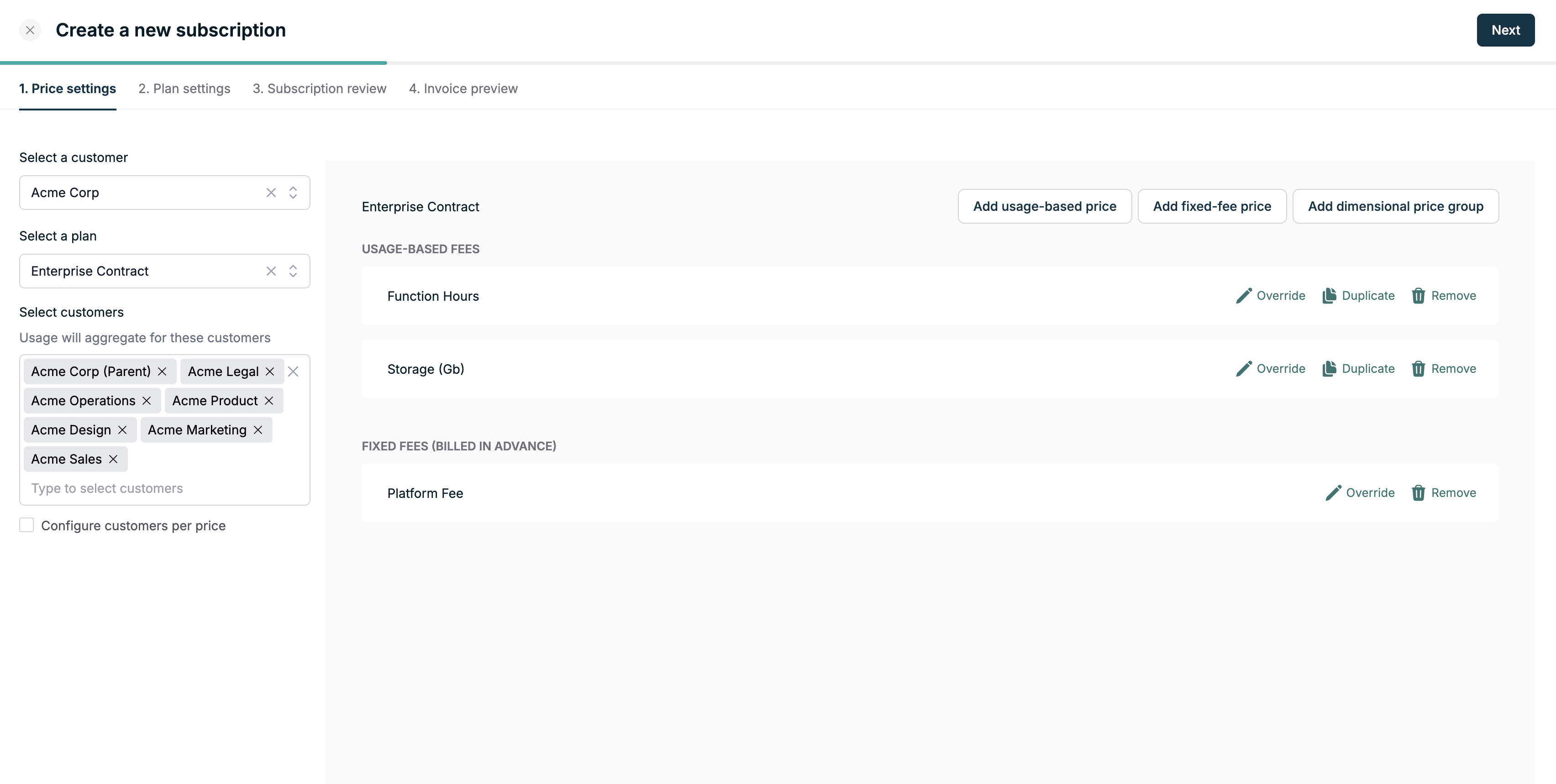 In the Orb API, [create a new subscription](https://docs.withorb.com/api-reference/subscription/create-subscription#body-usage-customer-ids)
and specify the parent and child customers to bill.
```json theme={null}
{
"plan_id": "plan_id",
"customer_id": "parent_customer_id",
"start_date": "2025-01-01",
"usage_customer_ids": ["parent_customer_id", "child_customer_id_1", "child_customer_id_2"]
}
```
#### Bill child customers only
In the Orb UI, create a new subscription and specify only the child customers to bill.
In the Orb API, [create a new subscription](https://docs.withorb.com/api-reference/subscription/create-subscription#body-usage-customer-ids)
and specify only the child customers to bill.
```json theme={null}
{
"plan_id": "plan_id",
"customer_id": "parent_customer_id",
"start_date": "2025-01-01",
"usage_customer_ids": ["child_customer_id_1", "child_customer_id_2"]
}
```
#### Specify customers to bill per price
A powerful feature of the hierarchy relationship is the ability to specify which customers will be billed individually or as part of a group
for a given price.
Toggle the `Configure customers per price` option to select specific customers from the hierarchy relationship for each price.
In the Orb API, [create a new subscription](https://docs.withorb.com/api-reference/subscription/create-subscription#body-usage-customer-ids)
and specify the parent and child customers to bill.
```json theme={null}
{
"plan_id": "plan_id",
"customer_id": "parent_customer_id",
"start_date": "2025-01-01",
"usage_customer_ids": ["parent_customer_id", "child_customer_id_1", "child_customer_id_2"]
}
```
#### Bill child customers only
In the Orb UI, create a new subscription and specify only the child customers to bill.
In the Orb API, [create a new subscription](https://docs.withorb.com/api-reference/subscription/create-subscription#body-usage-customer-ids)
and specify only the child customers to bill.
```json theme={null}
{
"plan_id": "plan_id",
"customer_id": "parent_customer_id",
"start_date": "2025-01-01",
"usage_customer_ids": ["child_customer_id_1", "child_customer_id_2"]
}
```
#### Specify customers to bill per price
A powerful feature of the hierarchy relationship is the ability to specify which customers will be billed individually or as part of a group
for a given price.
Toggle the `Configure customers per price` option to select specific customers from the hierarchy relationship for each price.
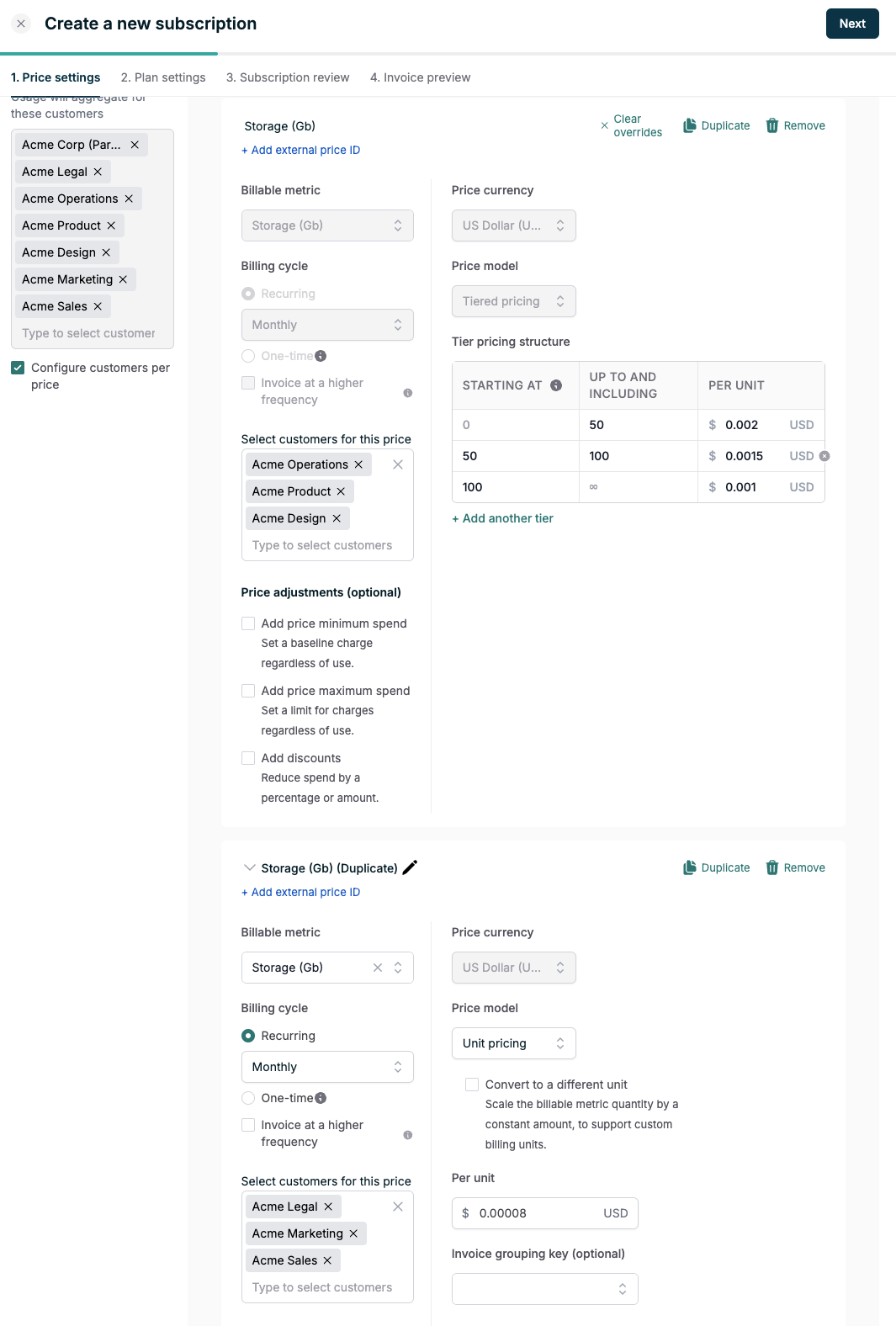
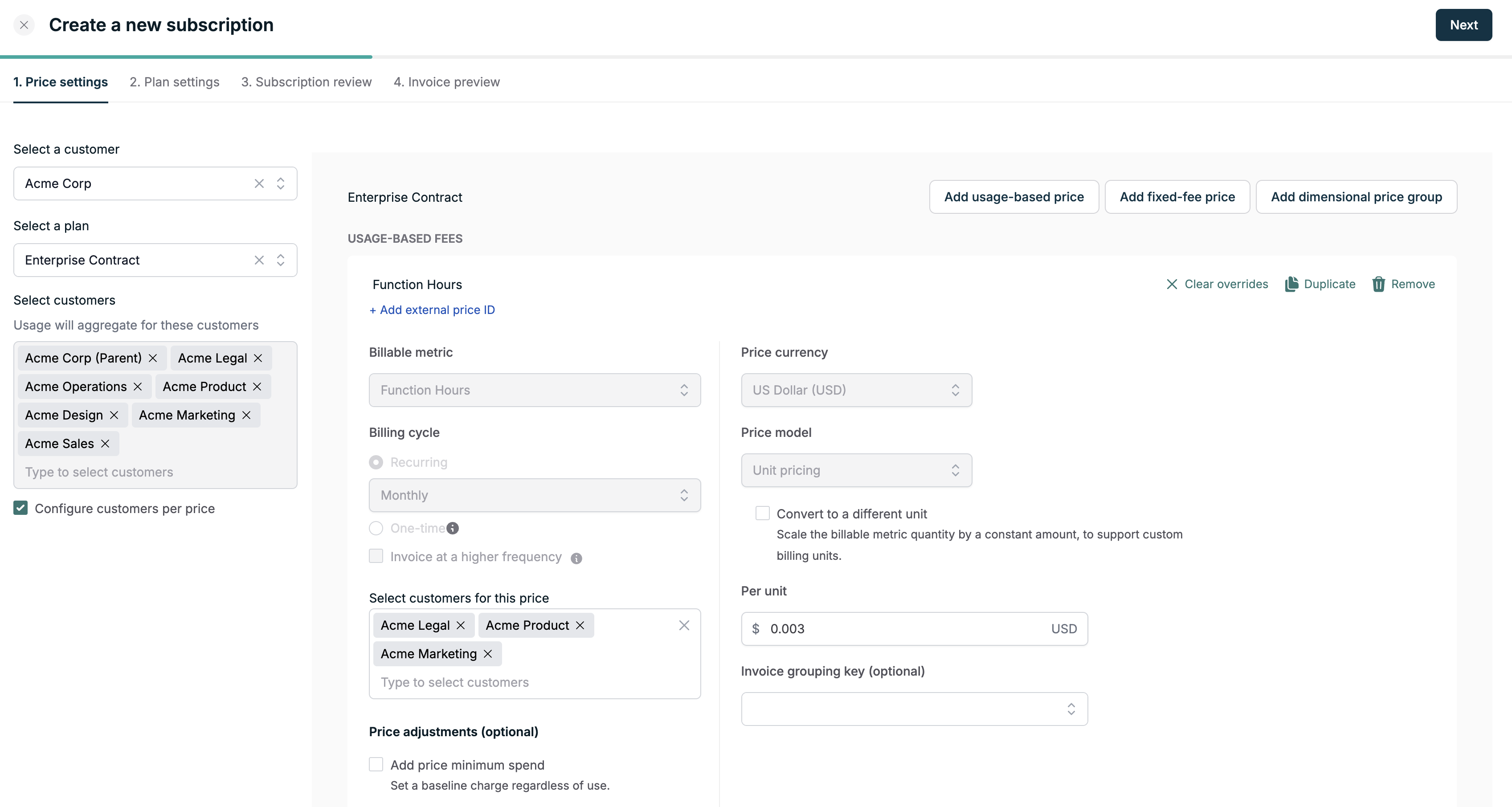 Prices can also be duplicated to apply a different rate to a different group of customers for the same billable metric.
Duplicating a billable metric could lead to double billing of usage if the
same customer is included in different price intervals with the same billable metric.
Below, a tiered price is used to rate the data storage usage for a group of customers in the hierarchy. That price is
duplicated and modified to instead use a per-unit rate for another group of customers.
Prices can also be duplicated to apply a different rate to a different group of customers for the same billable metric.
Duplicating a billable metric could lead to double billing of usage if the
same customer is included in different price intervals with the same billable metric.
Below, a tiered price is used to rate the data storage usage for a group of customers in the hierarchy. That price is
duplicated and modified to instead use a per-unit rate for another group of customers.
 In the Orb API, a existing price interval on a subscription can be
[modified](https://docs.withorb.com/api-reference/price-interval/add-or-edit-price-intervals#body-edit),
or a new price interval can be [added](https://docs.withorb.com/api-reference/price-interval/add-or-edit-price-intervals#body-add),
with the `usage_customer_ids` property set to specify the customers to bill.
```json theme={null}
{
"add": [
{
"start_date": "2025-01-01",
"price_id": "price_id",
"usage_customer_ids": [
"child_customer_id_1",
"child_customer_id_2"
]
}
],
"edit": [
{
"price_interval_id": "price_interval_id",
"usage_customer_ids": [
"parent_customer_id",
"child_customer_id_2"
]
}
]
}
```
### Modify a hierarchy relationship
A hierarchy relationship that is in use in an active or upcoming subscription price cannot be modified. Cancel or end the subscription
price before modifying the hierarchy relationship.
A hierarchy relationship can be modified by editing the customer. Note that a hierarchy relationship can only be modified if it is not
in use in an active or upcoming subscription.
In the Orb API, a existing price interval on a subscription can be
[modified](https://docs.withorb.com/api-reference/price-interval/add-or-edit-price-intervals#body-edit),
or a new price interval can be [added](https://docs.withorb.com/api-reference/price-interval/add-or-edit-price-intervals#body-add),
with the `usage_customer_ids` property set to specify the customers to bill.
```json theme={null}
{
"add": [
{
"start_date": "2025-01-01",
"price_id": "price_id",
"usage_customer_ids": [
"child_customer_id_1",
"child_customer_id_2"
]
}
],
"edit": [
{
"price_interval_id": "price_interval_id",
"usage_customer_ids": [
"parent_customer_id",
"child_customer_id_2"
]
}
]
}
```
### Modify a hierarchy relationship
A hierarchy relationship that is in use in an active or upcoming subscription price cannot be modified. Cancel or end the subscription
price before modifying the hierarchy relationship.
A hierarchy relationship can be modified by editing the customer. Note that a hierarchy relationship can only be modified if it is not
in use in an active or upcoming subscription.
 ## Invoices
Customer hierarchy leads to usage aggregation at the parent customer level. This means that the usage for a subscription
using a hierarchy relationship will be invoiced to the parent customer.
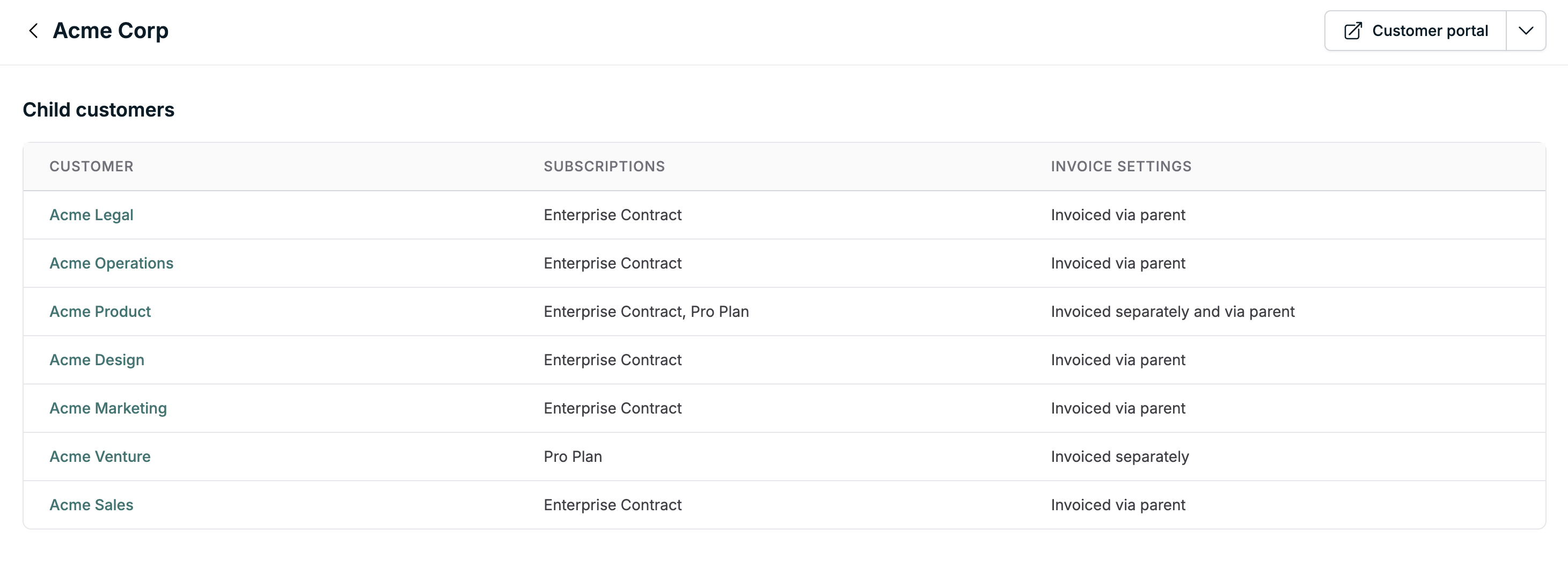
In the Orb UI, on the customer details page for the parent customer, you can view the customer hierarchy table and the invoicing mode
for each child customer.
## Invoices
Customer hierarchy leads to usage aggregation at the parent customer level. This means that the usage for a subscription
using a hierarchy relationship will be invoiced to the parent customer.
In the Orb UI, on the customer details page for the parent customer, you can view the customer hierarchy table and the invoicing mode
for each child customer.
 Additionally, line items on an invoice will denote the billed customers
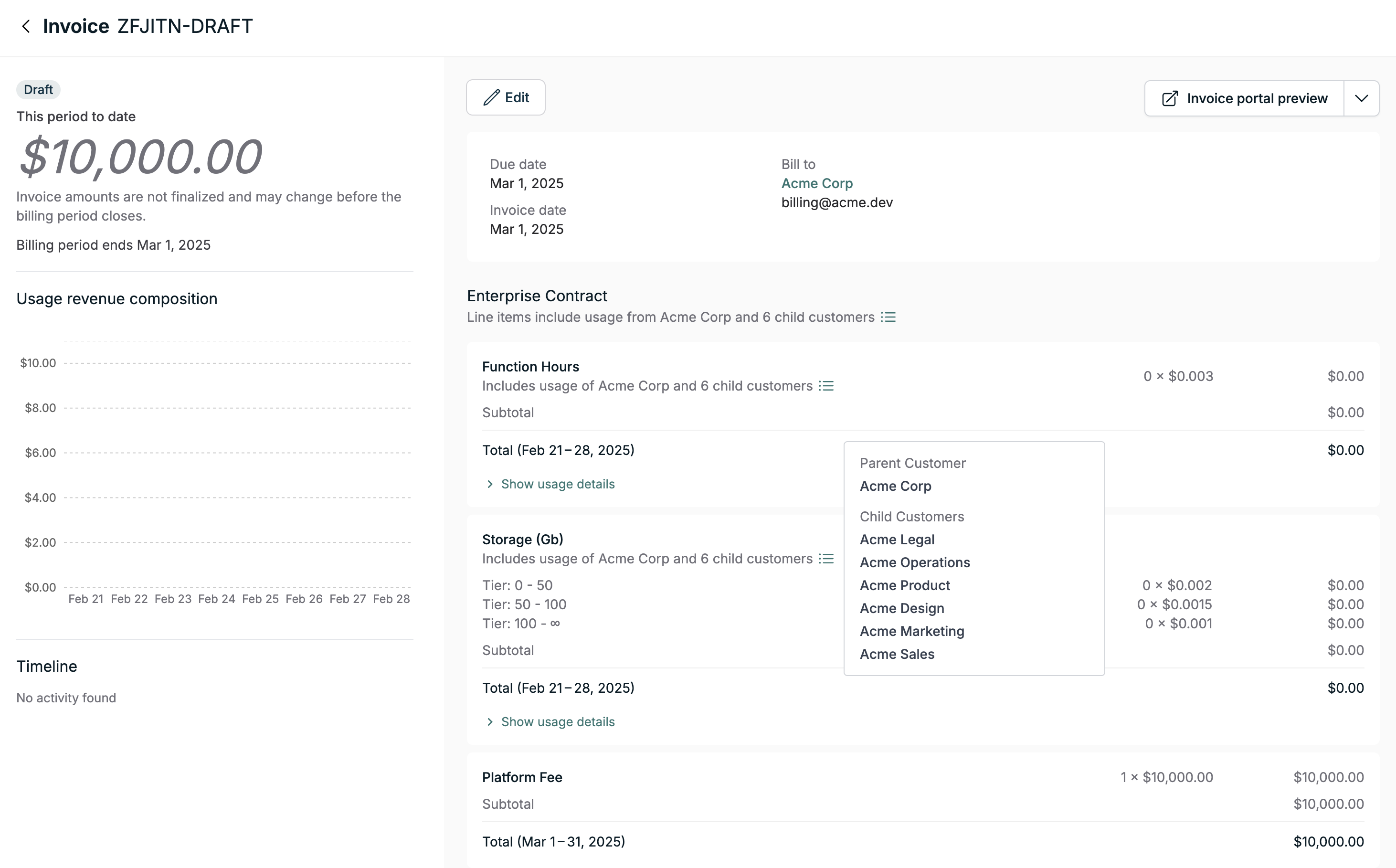 In the Orb API, the `usage_customer_ids` [property](https://docs.withorb.com/api-reference/invoice/fetch-invoice#response-line-items-usage-customer-ids)
on an invoice line item will denote the billed customers.
### Customer evaluation operations
There are several evaluation endpoints provided in the Orb API to build visualizations atop your event data and metrics.
These operations can be used to evaluate prices, costs, and usage for a given customer or subscription.
Here is a table summarizing the result of the evaluation operations based on the provided customer type in the hierarchy relationship.
| Operation | Parent Customer | Child Customer |
| :------------------------------------------------------------------------------------------------- | :------------------------------------------------------------------------------- | :--------------------------------------------------------- |
| [Evaluate price](https://docs.withorb.com/api-reference/price/evaluate-price) | This will evaluate the price solely for the parent customer | This will evaluate the price solely for the child customer |
| [Customer costs](https://docs.withorb.com/api-reference/customer/fetch-customer-costs) | This will aggregate costs across the hierarchy relationship in each subscription | Nothing will be returned for the child customer |
| [Subscription costs](https://docs.withorb.com/api-reference/subscription/fetch-subscription-costs) | This will aggregate costs across the hierarchy relationship | Nothing will be returned for the child customer |
| [Subscription usage](https://docs.withorb.com/api-reference/subscription/fetch-subscription-usage) | This will aggregate usage across the hierarchy relationship | Nothing will be returned for the child customer |
### Frequently Asked Questions
#### Can I create a hierarchy relationship between a parent and child in different currencies?
A hierarchy relationship can be created between a parent and child customers with different currencies. However since usage
will be aggregated across the hierarchy and invoiced to the parent, only the currency of the parent will be used for the invoice.
#### Can I create a hierarchy relationship between a parent and child with different tax applications?
Similar to the differing currencies, since usage will be aggregated across the hierarchy and invoiced to the parent customer, only the tax
application of the parent customer will be used for the invoice.
#### Will a newly created child customer inherit the subscription pricing from the parent customer?
The child customer will not inherit any existing subscription pricing from the parent customer. The prices on the parent customer's
subscription will need to be modified to include usage of the child customer. This can be done via the
[price intervals add or edit API](https://docs.withorb.com/api-reference/price-interval/add-or-edit-price-intervals)
#### Does this feature support resellers and MSPs?
Customer hierarchy is not currently designed to support resellers and MSPs. For implementation guidance or support,
reach out to your Orb representative.
#### How does this feature interact with deductions from a customer's credit ledger?
The [ledger](https://docs.withorb.com/product-catalog/prepurchase#prepaid-ledger) is scoped to a specific customer.
Since invoicing for a subscription using a hierarchy relationship happens at the parent customer level,
any usage (parent or child customers) will be deducted from the parent customer's ledger. The ledger will show a single
entry for usage deduction instead of a disaggregated breakdown per child customer.
In other words, usage on a subscription linked solely to a child customer will drawdown only from the child customer's ledger. However
child customer usage on a parent customer subscription using a hierarchy relationship will drawdown from the parent customer's ledger.
**Planning credit purchases for hierarchies**: Purchase credits at the parent customer level when you want them consumed by hierarchy subscriptions. Credits granted directly to child customers can only be used by that child's individual subscriptions (if any), not by hierarchy subscriptions on the parent.
#### How does this feature interact with the subscription lifecycle?
##### Plan change
A [subscription plan change](https://docs.withorb.com/product-catalog/modifying-subscriptions#subscription-plan-changes) ends
the current price intervals on the subscription. As a result, for a subscription using a hierarchy relationship, any price interval
usage customers configuration will be lost and needs to be re-configured.
##### Plan version and migration
Performing a [subscription migration](https://docs.withorb.com/product-catalog/price-changes#migrating-subscriptions-to-a-new-version)
does not affect the hierarchy relationship on existing price intervals. New price intervals created as part of a migration will bill
for usage of all customers in the hierarchy relationship.
#### How does this feature interact with manually triggered phases?
Customer hierarchy is not supported when creating a subscription with manually triggered phases. Manually triggered phases lead to the
creation of new price intervals at the point of the trigger which can then be edited via `usage_customer_ids` property in the
[price intervals add or edit API](https://docs.withorb.com/api-reference/price-interval/add-or-edit-price-intervals) to specify the customers to bill.
In the Orb API, the `usage_customer_ids` [property](https://docs.withorb.com/api-reference/invoice/fetch-invoice#response-line-items-usage-customer-ids)
on an invoice line item will denote the billed customers.
### Customer evaluation operations
There are several evaluation endpoints provided in the Orb API to build visualizations atop your event data and metrics.
These operations can be used to evaluate prices, costs, and usage for a given customer or subscription.
Here is a table summarizing the result of the evaluation operations based on the provided customer type in the hierarchy relationship.
| Operation | Parent Customer | Child Customer |
| :------------------------------------------------------------------------------------------------- | :------------------------------------------------------------------------------- | :--------------------------------------------------------- |
| [Evaluate price](https://docs.withorb.com/api-reference/price/evaluate-price) | This will evaluate the price solely for the parent customer | This will evaluate the price solely for the child customer |
| [Customer costs](https://docs.withorb.com/api-reference/customer/fetch-customer-costs) | This will aggregate costs across the hierarchy relationship in each subscription | Nothing will be returned for the child customer |
| [Subscription costs](https://docs.withorb.com/api-reference/subscription/fetch-subscription-costs) | This will aggregate costs across the hierarchy relationship | Nothing will be returned for the child customer |
| [Subscription usage](https://docs.withorb.com/api-reference/subscription/fetch-subscription-usage) | This will aggregate usage across the hierarchy relationship | Nothing will be returned for the child customer |
### Frequently Asked Questions
#### Can I create a hierarchy relationship between a parent and child in different currencies?
A hierarchy relationship can be created between a parent and child customers with different currencies. However since usage
will be aggregated across the hierarchy and invoiced to the parent, only the currency of the parent will be used for the invoice.
#### Can I create a hierarchy relationship between a parent and child with different tax applications?
Similar to the differing currencies, since usage will be aggregated across the hierarchy and invoiced to the parent customer, only the tax
application of the parent customer will be used for the invoice.
#### Will a newly created child customer inherit the subscription pricing from the parent customer?
The child customer will not inherit any existing subscription pricing from the parent customer. The prices on the parent customer's
subscription will need to be modified to include usage of the child customer. This can be done via the
[price intervals add or edit API](https://docs.withorb.com/api-reference/price-interval/add-or-edit-price-intervals)
#### Does this feature support resellers and MSPs?
Customer hierarchy is not currently designed to support resellers and MSPs. For implementation guidance or support,
reach out to your Orb representative.
#### How does this feature interact with deductions from a customer's credit ledger?
The [ledger](https://docs.withorb.com/product-catalog/prepurchase#prepaid-ledger) is scoped to a specific customer.
Since invoicing for a subscription using a hierarchy relationship happens at the parent customer level,
any usage (parent or child customers) will be deducted from the parent customer's ledger. The ledger will show a single
entry for usage deduction instead of a disaggregated breakdown per child customer.
In other words, usage on a subscription linked solely to a child customer will drawdown only from the child customer's ledger. However
child customer usage on a parent customer subscription using a hierarchy relationship will drawdown from the parent customer's ledger.
**Planning credit purchases for hierarchies**: Purchase credits at the parent customer level when you want them consumed by hierarchy subscriptions. Credits granted directly to child customers can only be used by that child's individual subscriptions (if any), not by hierarchy subscriptions on the parent.
#### How does this feature interact with the subscription lifecycle?
##### Plan change
A [subscription plan change](https://docs.withorb.com/product-catalog/modifying-subscriptions#subscription-plan-changes) ends
the current price intervals on the subscription. As a result, for a subscription using a hierarchy relationship, any price interval
usage customers configuration will be lost and needs to be re-configured.
##### Plan version and migration
Performing a [subscription migration](https://docs.withorb.com/product-catalog/price-changes#migrating-subscriptions-to-a-new-version)
does not affect the hierarchy relationship on existing price intervals. New price intervals created as part of a migration will bill
for usage of all customers in the hierarchy relationship.
#### How does this feature interact with manually triggered phases?
Customer hierarchy is not supported when creating a subscription with manually triggered phases. Manually triggered phases lead to the
creation of new price intervals at the point of the trigger which can then be edited via `usage_customer_ids` property in the
[price intervals add or edit API](https://docs.withorb.com/api-reference/price-interval/add-or-edit-price-intervals) to specify the customers to bill.