> ## Documentation Index
> Fetch the complete documentation index at: https://docs.withorb.com/llms.txt
> Use this file to discover all available pages before exploring further.
# Collections Automations
# Introduction
Collections Automations are Orb's self-serve system for recovering revenue from unpaid invoices. It lets you build multi-step workflows that combine payment retries, customer emails, and webhooks — targeted at exactly the invoices you choose, and triggered at any point in the invoice lifecycle.
Set up automations to
* Scale away the manual effort of chasing high-volume PLG/self-serve customers – without adding AR headcount
* Personalize white-glove outreach to marquee Enterprise customers
* Surface an early warning to the account team before a strategic renewal lapses
* Let Finance/RevOps own and optimize directly, without filing engineering tickets for iteration
* Route escalations straight into existing tools (Slack, CRM) so AR isn’t siloed in a billing dashboard
* Trigger downstream actions (entitlements, product upsells) to control the entire journey
This feature is available to all Orb customers on our **Enterprise** Plan. Contact Orb to learn about access and upgrade options.
# Key components
## Automation schedules
The schedule is a reusable template that defines exactly what happens to an unpaid invoice, and when.
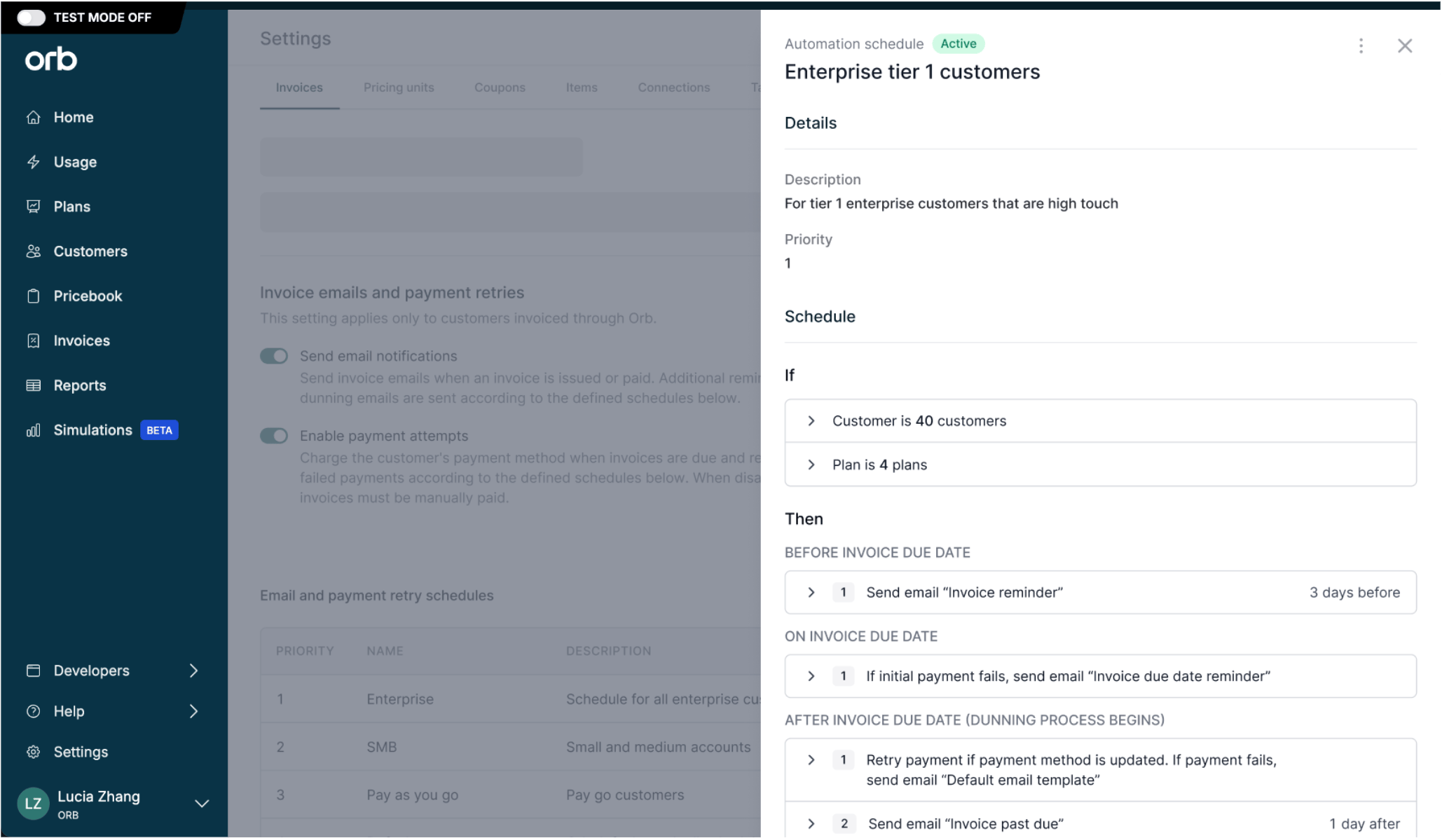
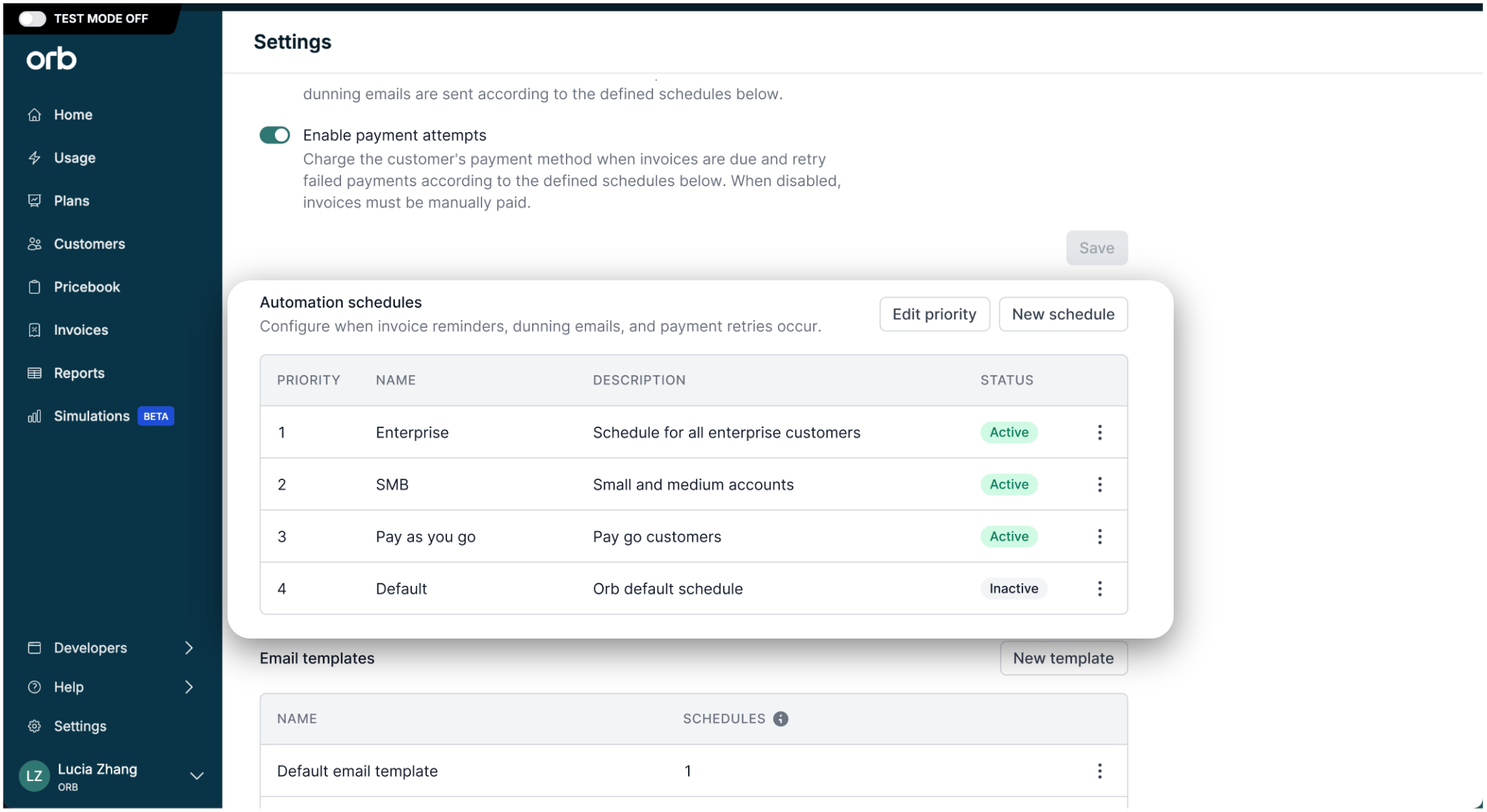 Each schedule is made up of
* **Invoice criteria (“If”)** – determines the cohort of invoices this automation is applied to when issued.
* **Automation steps (“Then”)** – configurable triggers for actions including payment attempts and retries, reminder emails, and webhooks.
* **Timeline offsets** – determines the days before or after the invoice’s due date. This is the “anchor” point.
* **Priority** – determines which automation applies to an invoice, if it meets the criteria for multiple automations.
Each schedule is made up of
* **Invoice criteria (“If”)** – determines the cohort of invoices this automation is applied to when issued.
* **Automation steps (“Then”)** – configurable triggers for actions including payment attempts and retries, reminder emails, and webhooks.
* **Timeline offsets** – determines the days before or after the invoice’s due date. This is the “anchor” point.
* **Priority** – determines which automation applies to an invoice, if it meets the criteria for multiple automations.
 ### Supported actions
1. **Payment attempts and retries**
*Eligible payment method must be configured before invoice issuance to take effect.*
Configure initial payment attempts using the payment method on file to automate kicking off the collections process. In the event of payment failure, configure additional attempts to increase changes of recovery due to things like funding availability.
2. **Emails**
Notify the customer directly with strategic reminders to increase chances of collection. Customize email content in your brand and voice by creating additional email templates.
3. **Webhooks**
A webhook fires an event from Orb that can be used to hook into additional systems when a step executes, independent of whether that step also included other actions. Use this to route collections activity into tools Orb doesn't natively integrate with, including internal email services, sales/CRM workflows, reporting, or entitlements managers.
## Email templates
Create and save re-usable content to send as part of an automation.
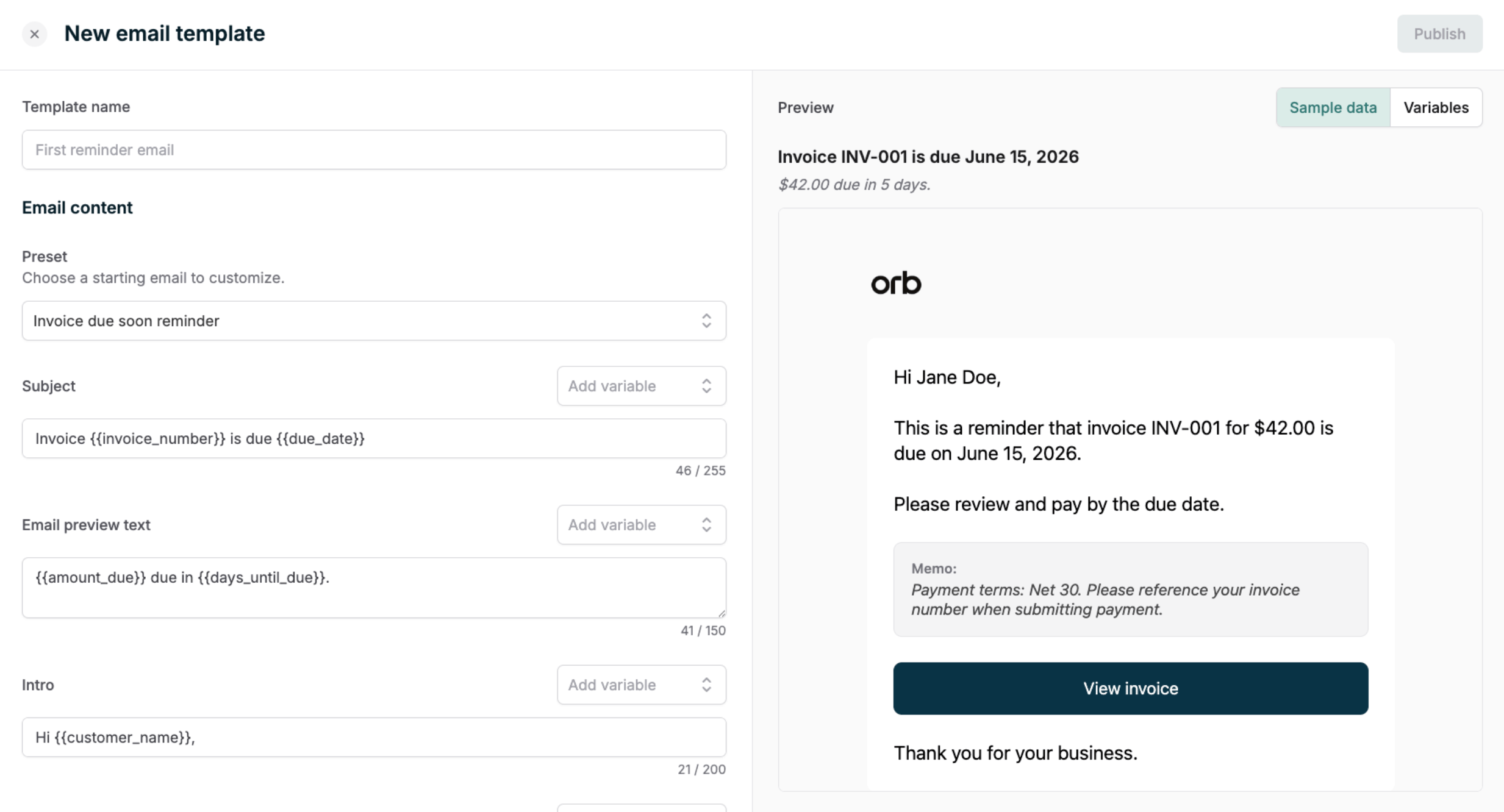
To help draft new email content, Orb provides editable preset templates to get you started. From there, add your own content, voice, and tone to the structured email sections. The subject, preview text, header, body, and footer are all customizable.
Customizations to the email layout, support for additional branding, and media attachments are not supported at this time.
Templates also support a fixed set of dynamic variables – things like customer name, amount due, retry date, and card details — which Orb resolves and drops in at send time, so the same template can serve every customer without manual customization per invoice.
### Supported actions
1. **Payment attempts and retries**
*Eligible payment method must be configured before invoice issuance to take effect.*
Configure initial payment attempts using the payment method on file to automate kicking off the collections process. In the event of payment failure, configure additional attempts to increase changes of recovery due to things like funding availability.
2. **Emails**
Notify the customer directly with strategic reminders to increase chances of collection. Customize email content in your brand and voice by creating additional email templates.
3. **Webhooks**
A webhook fires an event from Orb that can be used to hook into additional systems when a step executes, independent of whether that step also included other actions. Use this to route collections activity into tools Orb doesn't natively integrate with, including internal email services, sales/CRM workflows, reporting, or entitlements managers.
## Email templates
Create and save re-usable content to send as part of an automation.
To help draft new email content, Orb provides editable preset templates to get you started. From there, add your own content, voice, and tone to the structured email sections. The subject, preview text, header, body, and footer are all customizable.
Customizations to the email layout, support for additional branding, and media attachments are not supported at this time.
Templates also support a fixed set of dynamic variables – things like customer name, amount due, retry date, and card details — which Orb resolves and drops in at send time, so the same template can serve every customer without manual customization per invoice.
 ## Collections settings
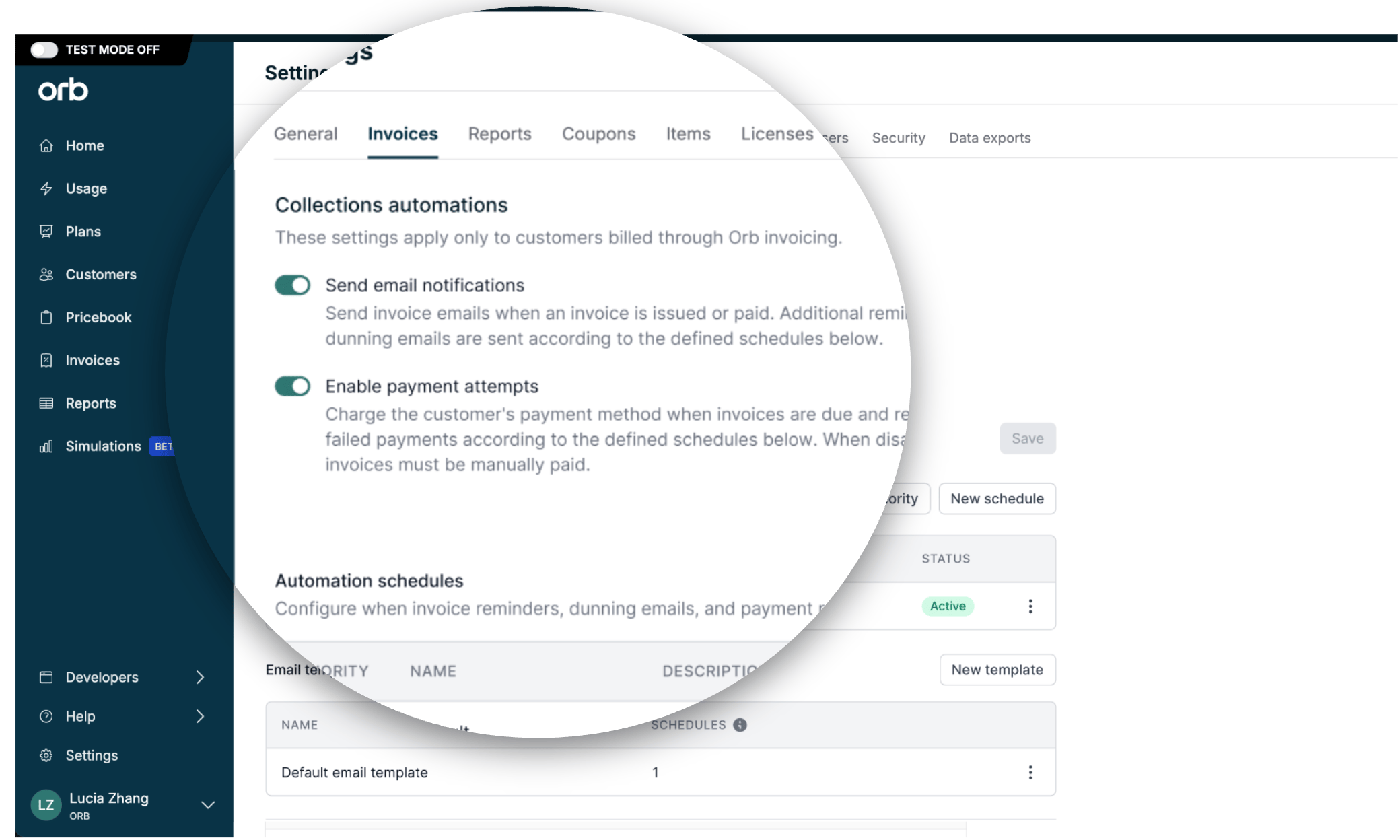 At the top of Settings > Invoices > Collections Automations, two account-level controls determine whether email and payment actions can take effect.
1. **Send email notifications** governs whether Orb sends any invoice-related email — this covers the baseline transactional emails (invoice issued, invoice paid) as well as any templated emails defined in your automation schedules. If this is off, schedules can still run their retry and webhook actions, but any email steps are effectively silenced.
2. **Enable payment attempts** governs whether Orb charges the customer's payment method at all — both the initial charge when an invoice becomes due, and any scheduled retries after a failure.
For long-time Orb users, this is the consolidated setting that replaced the previously separate auto-collection and retry-failed-payments controls. If this is off, invoices must be paid manually; schedules can still send emails and webhooks, but won't attempt to collect payment.
Together, these two toggles act as master switches for the two customer-facing action types (emails and payment retries) — you can turn either off account-wide without having to touch or disable your individual schedules. Standalone webhooks on `Active` schedules will fire independently of these settings.
## Invoice detail
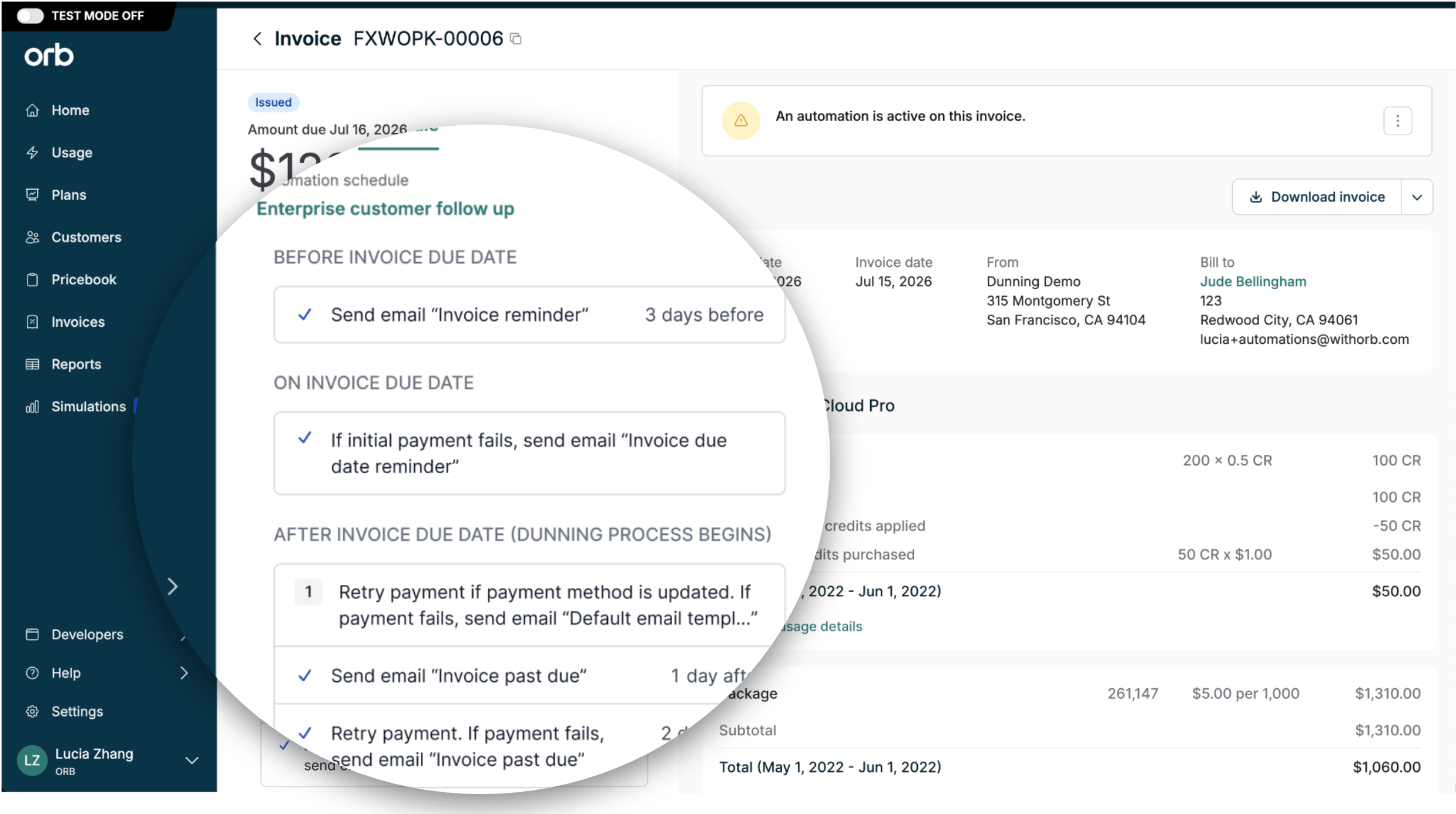
Every invoice that has ever had an automation applied to it shows an Schedule tab on its detail page, listing exactly which schedule was applied to it (e.g., "Enterprise customer follow up") and every step in that schedule. Use this to confirm automation activity, and verify what's happened and what's still coming for that specific invoice.
If an invoice is actively in an automation, a banner will appear at the top of the page.
Once the automation elapses, the Schedule tab persists as a historical record.
Invoices that never met the criteria for an active automation at time of issuance won't show this tab at all.
At the top of Settings > Invoices > Collections Automations, two account-level controls determine whether email and payment actions can take effect.
1. **Send email notifications** governs whether Orb sends any invoice-related email — this covers the baseline transactional emails (invoice issued, invoice paid) as well as any templated emails defined in your automation schedules. If this is off, schedules can still run their retry and webhook actions, but any email steps are effectively silenced.
2. **Enable payment attempts** governs whether Orb charges the customer's payment method at all — both the initial charge when an invoice becomes due, and any scheduled retries after a failure.
For long-time Orb users, this is the consolidated setting that replaced the previously separate auto-collection and retry-failed-payments controls. If this is off, invoices must be paid manually; schedules can still send emails and webhooks, but won't attempt to collect payment.
Together, these two toggles act as master switches for the two customer-facing action types (emails and payment retries) — you can turn either off account-wide without having to touch or disable your individual schedules. Standalone webhooks on `Active` schedules will fire independently of these settings.
## Invoice detail
Every invoice that has ever had an automation applied to it shows an Schedule tab on its detail page, listing exactly which schedule was applied to it (e.g., "Enterprise customer follow up") and every step in that schedule. Use this to confirm automation activity, and verify what's happened and what's still coming for that specific invoice.
If an invoice is actively in an automation, a banner will appear at the top of the page.
Once the automation elapses, the Schedule tab persists as a historical record.
Invoices that never met the criteria for an active automation at time of issuance won't show this tab at all.
 # Create an automation
1. **Draft your email templates**
Create your email templates before building the schedule itself, so you can plug in finished content rather than working around placeholders. Go to **Settings > Invoices > Collections Automations > Email templates**, start from one of Orb's preset templates, and customize the subject, preview text, header, body, and footer. Preview and send yourself a test before publishing.
2. **Create a new schedule**
From **Settings > Invoices > Collections Automations**, select **New schedule** and give it a descriptive name (e.g., "Enterprise customer follow up") so it's identifiable later on individual invoices and in your priority list.
3. **Define your cohort (“If”)**
Define the invoice criteria that determine which invoices this schedule applies to — plan, payment method type, customer attributes, and more.
**“Sticky” schedules.** This criteria is evaluated once, at invoice issuance, to decide whether an invoice is enrolled in this schedule.
If the invoice's attributes change later (e.g., payment method switches from ACH to card), it stays on its original schedule rather than jumping to a different one.
4. **Build out your steps and choose your actions (“Then”)**
For each step, set:
* Timeline offset — the anchor point in days before or after the invoice due date for each action.
* Actions — one or more of: a payment attempt/retry, an email (referencing a template from step 1), or a standalone webhook.
**A note on payment processing time**
Your payments provider controls how long it takes to respond to a payment attempt. Some payment methods — particularly ACH and wire transfers — can take significantly longer to process than card payments.
As a result, Orb may not receive a success or failure response from your PSP before the next scheduled step in the automation fires. In these cases, the next step will run based on the invoice's status at that time, which may not yet reflect the outcome of the prior payment attempt.
5. **Set priority**
If you have more than one schedule, set this schedule's priority relative to the others. When an invoice matches the criteria for multiple schedules, Orb applies whichever matching schedule has the highest priority.
6. **Turn on account controls**
Confirm the two account-level toggles in Settings > Invoices > Collections Automations are on: Send email notifications and Enable payment attempts. Without these, your schedule's email and/or retry steps won't take effect (standalone webhooks fire regardless of these toggles).
7. **Save and activate**
This applies to future invoices issued *after* the automation’s activation time.
# Manage an automation
1. **Updating priority**
When more than one schedule's criteria could match the same invoice, priority determines which one wins. From the schedule list in Settings > Invoices > Collections Automations, reorder your schedules to control this — Orb evaluates them top-down and enrolls the invoice in the first (highest-priority) schedule it matches.
Reordering priority only affects future enrollment decisions; it doesn't move invoices already enrolled in a schedule.
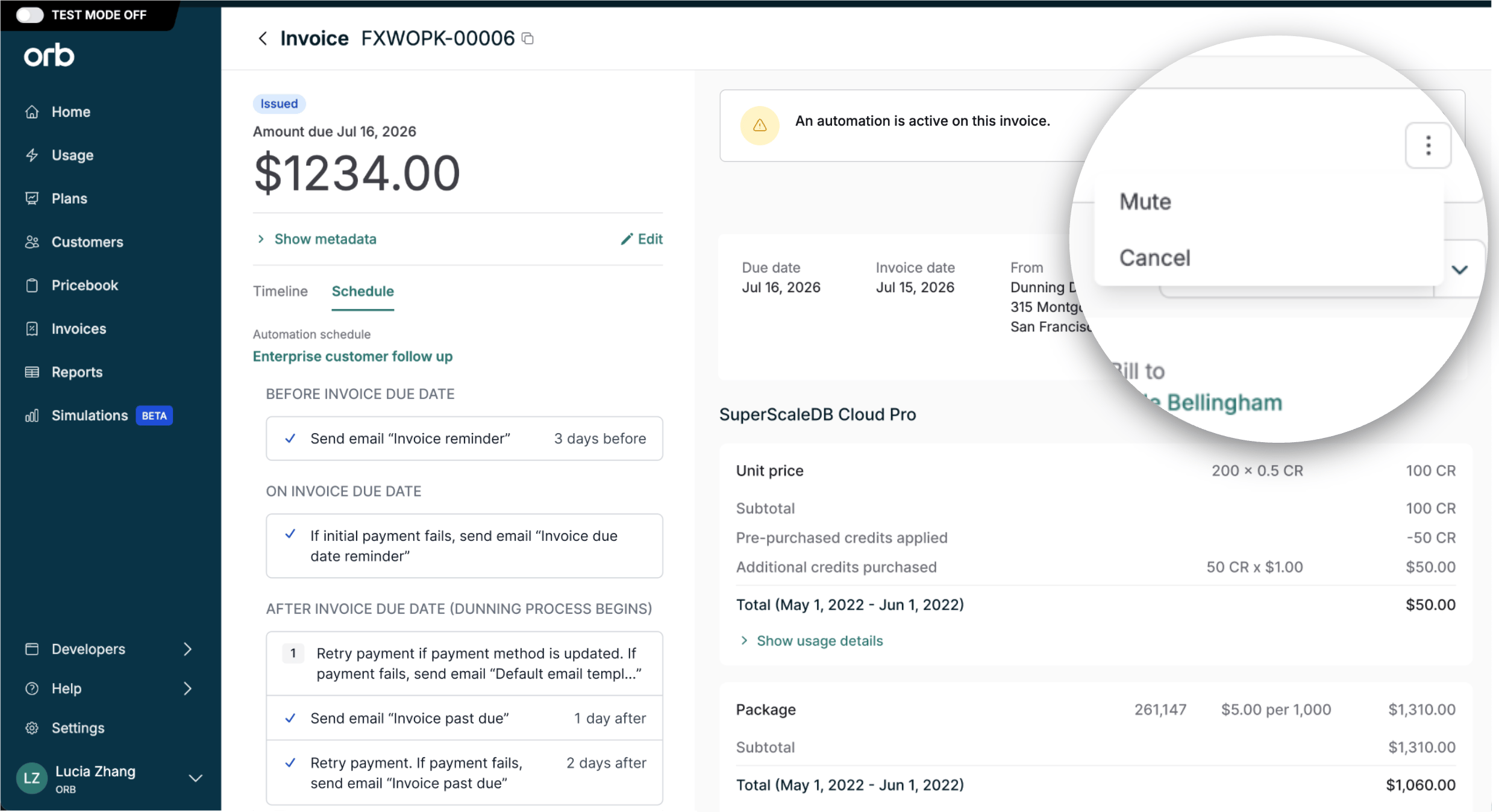
2. **Muting an automation**
Muting a schedule temporarily suppresses its actions without cancelling it outright — useful for giving a specific account a grace period (e.g., a VIP customer mid-negotiation, or a known dispute in progress) without losing the schedule's place in its timeline.
Steps that would have fired while muted are skipped, not queued up. Unmuting resumes the schedule from wherever it currently stands, rather than replaying everything that was missed.
3. **Cancelling an automation**
Cancelling a schedule permanently stops it on that invoice — unlike mute, there's no resuming it later. Any remaining steps are marked cancelled and will never fire, even if you re-enable automations for that invoice down the line.
# Create an automation
1. **Draft your email templates**
Create your email templates before building the schedule itself, so you can plug in finished content rather than working around placeholders. Go to **Settings > Invoices > Collections Automations > Email templates**, start from one of Orb's preset templates, and customize the subject, preview text, header, body, and footer. Preview and send yourself a test before publishing.
2. **Create a new schedule**
From **Settings > Invoices > Collections Automations**, select **New schedule** and give it a descriptive name (e.g., "Enterprise customer follow up") so it's identifiable later on individual invoices and in your priority list.
3. **Define your cohort (“If”)**
Define the invoice criteria that determine which invoices this schedule applies to — plan, payment method type, customer attributes, and more.
**“Sticky” schedules.** This criteria is evaluated once, at invoice issuance, to decide whether an invoice is enrolled in this schedule.
If the invoice's attributes change later (e.g., payment method switches from ACH to card), it stays on its original schedule rather than jumping to a different one.
4. **Build out your steps and choose your actions (“Then”)**
For each step, set:
* Timeline offset — the anchor point in days before or after the invoice due date for each action.
* Actions — one or more of: a payment attempt/retry, an email (referencing a template from step 1), or a standalone webhook.
**A note on payment processing time**
Your payments provider controls how long it takes to respond to a payment attempt. Some payment methods — particularly ACH and wire transfers — can take significantly longer to process than card payments.
As a result, Orb may not receive a success or failure response from your PSP before the next scheduled step in the automation fires. In these cases, the next step will run based on the invoice's status at that time, which may not yet reflect the outcome of the prior payment attempt.
5. **Set priority**
If you have more than one schedule, set this schedule's priority relative to the others. When an invoice matches the criteria for multiple schedules, Orb applies whichever matching schedule has the highest priority.
6. **Turn on account controls**
Confirm the two account-level toggles in Settings > Invoices > Collections Automations are on: Send email notifications and Enable payment attempts. Without these, your schedule's email and/or retry steps won't take effect (standalone webhooks fire regardless of these toggles).
7. **Save and activate**
This applies to future invoices issued *after* the automation’s activation time.
# Manage an automation
1. **Updating priority**
When more than one schedule's criteria could match the same invoice, priority determines which one wins. From the schedule list in Settings > Invoices > Collections Automations, reorder your schedules to control this — Orb evaluates them top-down and enrolls the invoice in the first (highest-priority) schedule it matches.
Reordering priority only affects future enrollment decisions; it doesn't move invoices already enrolled in a schedule.
2. **Muting an automation**
Muting a schedule temporarily suppresses its actions without cancelling it outright — useful for giving a specific account a grace period (e.g., a VIP customer mid-negotiation, or a known dispute in progress) without losing the schedule's place in its timeline.
Steps that would have fired while muted are skipped, not queued up. Unmuting resumes the schedule from wherever it currently stands, rather than replaying everything that was missed.
3. **Cancelling an automation**
Cancelling a schedule permanently stops it on that invoice — unlike mute, there's no resuming it later. Any remaining steps are marked cancelled and will never fire, even if you re-enable automations for that invoice down the line.
 4. **Editing existing automation schedules**
If you edit a schedule, those changes apply immediately to any invoice currently in progress on that schedule — not just to invoices issued in the future. For example, if you update the email copy on a step that *hasn't fired yet*, invoices already partway through that schedule will receive the new copy when that step runs, not the copy that existed when they were enrolled.
# Webhooks
Webhooks are system-to-system notifications that can be used to operationalize customer-side workflows like triggering Slack notifications, sending custom emails, and reporting.
A webhook is fired for every **step** in a collections schedule. The webhook payload includes:
1. Invoice information
2. Schedule properties
3. Action entries, by `action_type`
## Invoice information
| **Field** | **Description** |
| --------------------------------- | ------------------------------------------------------------------------------------------------------------------------------------------------------------------------------------------------------------------------------------------------------------------------ |
| `id` | Primary reference |
| `customer_id` | Primary reference |
| `external_customer_id` | Primary reference |
| `subscription_id` | Primary reference |
| `customer_name` | Human-readable customer name. Used by Orb's own email templates (Hi `{{customer_name}}`, ...); consumers replacing emails need it for the same purpose. |
| `invoice_number` | Human-readable identifier for the invoice (e.g., INV-2026-00417). |
| `status` | Current invoice status (issued, paid, void, ...) at webhook emit time. |
| `amount_due` | The amount owed. Same field Orb renders into (\$1,250.00) was due on `{{due_date}}`. |
| `currency` | Currency for the amount due. |
| `issued_at` | When the invoice transitioned to issued. Useful for "X days past due" calculations. |
| `due_date` | Payment due date. Anchors the automation timeline. |
| `memo` | Optional invoice memo, when set. Mirrors what Orb's templates display in the email body. |
| `hosted_invoice_url` | Link the consumer can include in their own emails or share directly with the customer. |
| `payment_method_last_four_digits` | Last four digits of the payment method that would be used for retry (or, for non-retry steps, the customer's primary payment method on file). Null if no payment method is set. Required for "your card ending in 4242 was declined" copy in replace-Orb's-emails flows. |
**Example**
```json theme={null}
{
"id": "gzaNJNM27aT7HXGr",
"created_at": "2026-05-27T14:32:18.421Z",
"type": "invoice.automation_schedule_step_executed",
"invoice": {
"id": "cvXhvjRhhUQhpu9f",
"customer_id": "XqfqQhY5fp8Gz74D",
"customer_name": "Acme Corp",
"subscription_id": "aekgWvRs8HaesKja",
"invoice_number": "INV-2026-00417",
"status": "issued",
"amount_due": "1250.00",
"currency": "USD",
"issued_at": "2026-05-15T14:30:00Z",
"due_date": "2026-05-30",
"memo": "Net 30 terms. Please remit by due date.",
"hosted_invoice_url": "https://pay.withorb.com/cvXhvjRhhUQhpu9f",
"payment_method_last_four_digits": "4242"
},
"properties": { /* see structure below */ }
}
```
## Schedule properties
| **Field** | Type | Description |
| ----------------------------------- | -------- | -------------------------------------------------------------------------------------------------------------------------------------------------------------------------------------------------------------------------------------------------------------------------------------------------------------------------------------------------------------------------------- |
| `automation_schedule_template_id` | string | The automation schedule template |
| `automation_schedule_template_name` | string | Human-readable template name at creation time. |
| `label` | string | Routing key for downstream handlers. Set by the rule author if provided, otherwise auto-generated to encode day offset + actions (e.g., day\_4\_after\_due\_retry\_payment, day\_14\_after\_due\_notification). Always present.
4. **Editing existing automation schedules**
If you edit a schedule, those changes apply immediately to any invoice currently in progress on that schedule — not just to invoices issued in the future. For example, if you update the email copy on a step that *hasn't fired yet*, invoices already partway through that schedule will receive the new copy when that step runs, not the copy that existed when they were enrolled.
# Webhooks
Webhooks are system-to-system notifications that can be used to operationalize customer-side workflows like triggering Slack notifications, sending custom emails, and reporting.
A webhook is fired for every **step** in a collections schedule. The webhook payload includes:
1. Invoice information
2. Schedule properties
3. Action entries, by `action_type`
## Invoice information
| **Field** | **Description** |
| --------------------------------- | ------------------------------------------------------------------------------------------------------------------------------------------------------------------------------------------------------------------------------------------------------------------------ |
| `id` | Primary reference |
| `customer_id` | Primary reference |
| `external_customer_id` | Primary reference |
| `subscription_id` | Primary reference |
| `customer_name` | Human-readable customer name. Used by Orb's own email templates (Hi `{{customer_name}}`, ...); consumers replacing emails need it for the same purpose. |
| `invoice_number` | Human-readable identifier for the invoice (e.g., INV-2026-00417). |
| `status` | Current invoice status (issued, paid, void, ...) at webhook emit time. |
| `amount_due` | The amount owed. Same field Orb renders into (\$1,250.00) was due on `{{due_date}}`. |
| `currency` | Currency for the amount due. |
| `issued_at` | When the invoice transitioned to issued. Useful for "X days past due" calculations. |
| `due_date` | Payment due date. Anchors the automation timeline. |
| `memo` | Optional invoice memo, when set. Mirrors what Orb's templates display in the email body. |
| `hosted_invoice_url` | Link the consumer can include in their own emails or share directly with the customer. |
| `payment_method_last_four_digits` | Last four digits of the payment method that would be used for retry (or, for non-retry steps, the customer's primary payment method on file). Null if no payment method is set. Required for "your card ending in 4242 was declined" copy in replace-Orb's-emails flows. |
**Example**
```json theme={null}
{
"id": "gzaNJNM27aT7HXGr",
"created_at": "2026-05-27T14:32:18.421Z",
"type": "invoice.automation_schedule_step_executed",
"invoice": {
"id": "cvXhvjRhhUQhpu9f",
"customer_id": "XqfqQhY5fp8Gz74D",
"customer_name": "Acme Corp",
"subscription_id": "aekgWvRs8HaesKja",
"invoice_number": "INV-2026-00417",
"status": "issued",
"amount_due": "1250.00",
"currency": "USD",
"issued_at": "2026-05-15T14:30:00Z",
"due_date": "2026-05-30",
"memo": "Net 30 terms. Please remit by due date.",
"hosted_invoice_url": "https://pay.withorb.com/cvXhvjRhhUQhpu9f",
"payment_method_last_four_digits": "4242"
},
"properties": { /* see structure below */ }
}
```
## Schedule properties
| **Field** | Type | Description |
| ----------------------------------- | -------- | -------------------------------------------------------------------------------------------------------------------------------------------------------------------------------------------------------------------------------------------------------------------------------------------------------------------------------------------------------------------------------- |
| `automation_schedule_template_id` | string | The automation schedule template |
| `automation_schedule_template_name` | string | Human-readable template name at creation time. |
| `label` | string | Routing key for downstream handlers. Set by the rule author if provided, otherwise auto-generated to encode day offset + actions (e.g., day\_4\_after\_due\_retry\_payment, day\_14\_after\_due\_notification). Always present.
label is **step-level**, not action-level: it lives in properties and applies to the whole step regardless of which actions (if any) ran. |
| `scheduled_at` | datetime | When this step was supposed to run. |
| `executed_at` | datetime | When it actually ran (may differ from scheduled\_at if jobs were delayed). |
| `actions` | array | One entry per action that ran in this step. Empty array for pure notification steps. See entry shapes below. |
## Action entries within the `actions` array
### `action_type`: `send_email`
The entry is always present in the actions array when a `send_email` action was configured in the step, regardless of whether an Orb invoice was actually sent. Use it for logging (when `sent: true`), or use it to fire your own email service (when `sent: false`. The envelope's invoice block already carries every variable Orb's templates render against, so you don't need additional context from the email entry itself to produce the equivalent email.
| **Field** | **Purpose** |
| ----------- | ----------------------------------------------------------------------------------------------------------------------------------------------------------------------------------------------- |
| `recipient` | Billing email the message was (or would have been) sent to. |
| `sent` | `true` if Orb delivered the email; `false` if Orb did not send because account-level email notifications are disabled. Critical for consumers replacing Orb's emails so they don't double-send. |
```json theme={null}
{
"action_type": "send_email",
"recipient": "billing@acme-corp.test",
"sent": true
}
```
## `action_type`: `retry_payment`
This entry signals that **the retry attempt was executed**: the job ran and the request was dispatched to the payment provider. It does not report the outcome of the underlying payment.
Two separable observability concerns, two events: final payment outcome flows through the existing `invoice.payment_succeeded` or `invoice.payment_failed` webhooks when the provider's async result arrives. The automation step webhook tells consumers *what the automation did* (it attempted a retry). The payment webhooks tell them *what the payment outcome was* (success or failure, with decline reason for templates like `payment_retry_failed`).
Correlate the automation attempt with its eventual payment outcome via two keys (whichever is more useful for your flow):
* **By specific attempt**: `payment_provider_transaction_id` is the same field that appears on `invoice.payment_succeeded` / `invoice.payment_failed`. Match on this for unambiguous attempt-to-outcome pairing.
* **By invoice**: both webhooks carry the full invoice object. If an invoice has only one in-flight retry, matching on `invoice.id` alone is sufficient.
| Field | Description |
| --------------------------------- | ------------------------------------------------------------------------------------------------------------------------------------------------------------------------------------------------------------------------------------- |
| `payment_transaction_record_id` | Orb's internal record ID for this retry attempt. Stable Orb-side reference for API lookups. |
| `payment_provider` | Which gateway ran the retry. Matches the field name in `invoice.payment_succeeded` / `invoice.payment_failed`. |
| `payment_provider_transaction_id` | The gateway's own transaction ID (e.g., `pi_xxxx`). Same field name and value as in `invoice.payment_succeeded` / `invoice.payment_failed`, so consumers can match a specific automation retry to its specific payment outcome event. |
| `amount_attempted` | The amount the retry attempted to charge. Usually equals `invoice.amount_due` but can diverge in edge cases (partial collection, balance application reducing the charge). |
| `currency` | Currency for the amount attempted. |
**Example**
```json theme={null}
{
"action_type": "retry_payment",
"payment_transaction_record_id": "9soezSxkLTW3nemS",
"payment_provider": "stripe",
"payment_provider_transaction_id": "pi_3OAbCdEfGhIjKlMn",
"amount_attempted": "1250.00",
"currency": "USD"
}
```
There is intentionally no `outcome`, `failure_reason`, or `failure_message` field on this entry. Those describe the payment result, which arrives asynchronously via the existing payment webhooks. Decoupling here avoids requiring the automation system to wait on the payment provider's response before emitting the step webhook, and keeps the "what the automation did" event distinct from the "what the payment outcome was" event.
# Not currently supported
These related features and capabilities are not yet supported, but coming soon.
* Programmatic API support for creating and managing automations.
* Data export resources