> ## Documentation Index
> Fetch the complete documentation index at: https://docs.withorb.com/llms.txt
> Use this file to discover all available pages before exploring further.
# AR aging
## Introduction
Orb’s [Accounts Receivable Aging (AR aging) report](https://app.withorb.com/reports/ar_aging) breaks down outstanding receivables invoiced through Orb by how long they’ve been unpaid, helping finance teams manage collections and end-of-month reporting.
Use this report to:
* Assess and forecast cash flow
* Monitor customer payment behavior
* Support bad-debt and allowance calculations
* Prepare financial statements as part of your month-end close
## Key components
**Standard aging buckets**
Orb groups your issued but unpaid invoices into 5 buckets:
| Bucket | Definition |
| ------------------- | ------------------------------------------------------------- |
| Current | Issued invoices that are not past the due date |
| 1-30 days past due | Issued invoices that are between 1-30 days past the due date |
| 31-60 days past due | Issued invoices that are between 31-60 days past the due date |
| 61-90 days past due | Issued invoices that are between 61-90 days past the due date |
| 91+ days past due | Issued invoices that are over 91 days past the due date |
**Date picker**
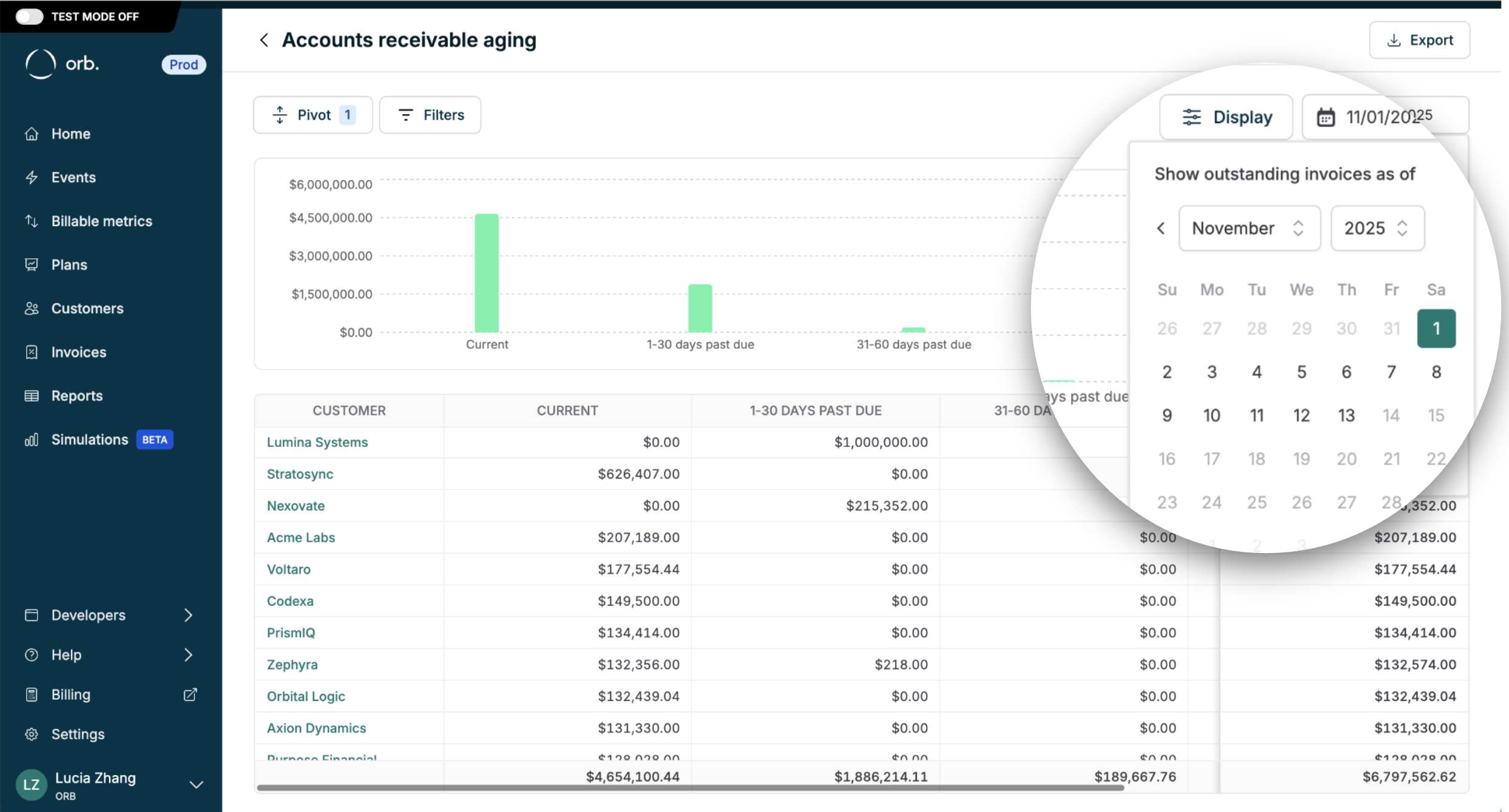
Show outstanding invoices issued on or before a specific “as of” date (through the end of the day in the customer’s timezone). Select a historical date to report on AR balances at a point in time for end-of-month close, or select the current date to follow up with customers for collections.
 **Multi-currency**
If you bill in multiple invoicing currencies, select which currency you’d like to see your AR aging report from the currency dropdown.
**Reporting configurations**
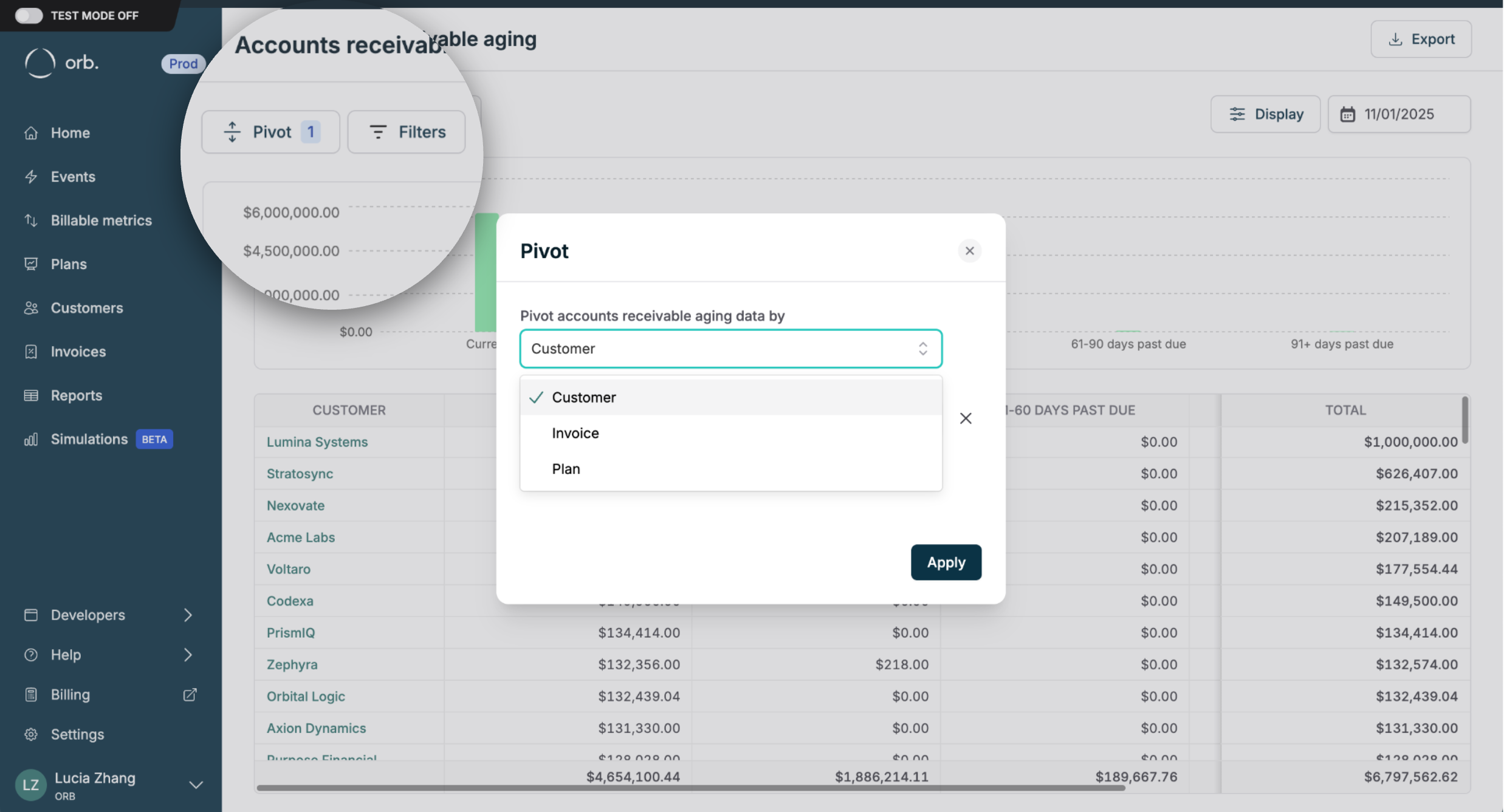
Pivot or filter data by a customer, invoice, or plan for additional reporting granularity and insights.
Note: only subscription generated invoices will be attributed to a “Plan”. There is no “Plan” attribute for [one-off invoices](https://docs.withorb.com/invoicing/one-off-invoice-creation#one-off-invoices) for ad-hoc charges your customer may incur.
**Multi-currency**
If you bill in multiple invoicing currencies, select which currency you’d like to see your AR aging report from the currency dropdown.
**Reporting configurations**
Pivot or filter data by a customer, invoice, or plan for additional reporting granularity and insights.
Note: only subscription generated invoices will be attributed to a “Plan”. There is no “Plan” attribute for [one-off invoices](https://docs.withorb.com/invoicing/one-off-invoice-creation#one-off-invoices) for ad-hoc charges your customer may incur.
 **Extending the AR aging report**
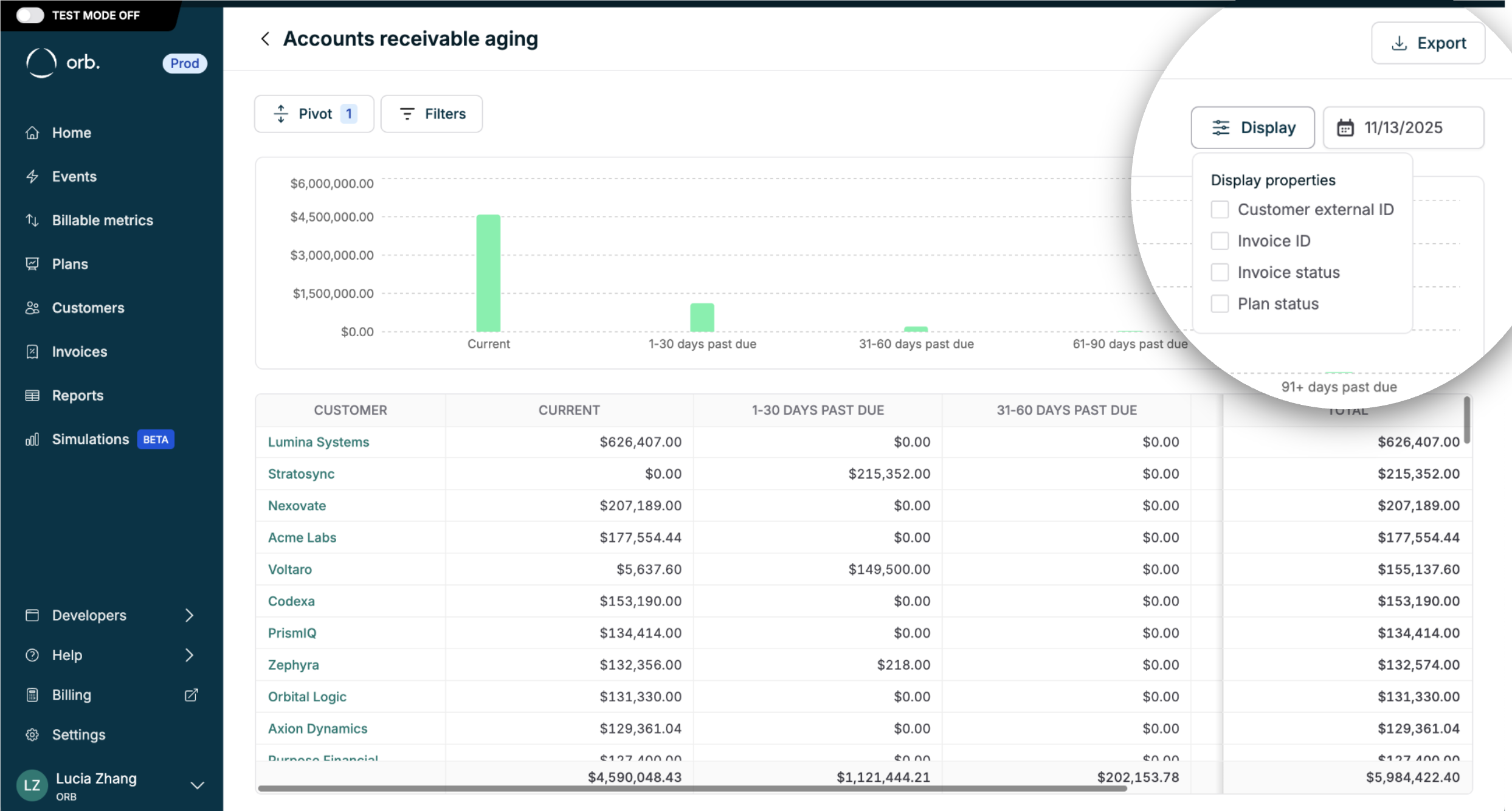
Display additional metadata and download your AR aging report from Orb to CSV for further analysis.
Note: invoice status and plan status are only available in the “as of” current date view for collections.
**Extending the AR aging report**
Display additional metadata and download your AR aging report from Orb to CSV for further analysis.
Note: invoice status and plan status are only available in the “as of” current date view for collections.
 | Column name | Description |
| -------------------- | ------------------------------------------------------------------------------------------------------------------------------------------------------------------- |
| Customer | The name of the customer. |
| Customer ID | The Orb ID of the customer. |
| External customer ID | The external ID of the customer. |
| Invoice | The identifying invoice number. |
| Invoice ID | The ID of the invoice. |
| Payment failed at | The time the invoice payment failed. |
| Plan | The name of the plan. |
| Plan ID | The ID of the plan. This value is null for one-off invoices. |
| Plan status | The status of the plan. Available options: active, archived. |
| Current | The total invoice amount in the “current” aging bucket. These are issued invoices that are not past the due date, as of the report date. |
| 1-30 days past due | The total invoice amount in the “1-30 days past due” aging bucket. These are issued invoices that are between 1-30 days past the due date, as of the report date. |
| 31-60 days past due | The total invoice amount in the “31-60 days past due” aging bucket. These are issued invoices that are between 31-60 days past the due date, as of the report date. |
| 61-90 days past due | The total invoice amount in the “61-90 days past due” aging bucket. These are issued invoices that are between 61-90 days past the due date, as of the report date. |
| 91+ days past due | The total invoice amount in the “91+ days past due” aging bucket. These are issued invoices that are over 91 days past the due date, as of the report date. |
| Total | The total invoice amount that has been issued, but not paid. |
## Worked examples
### Reading an AR aging report
Consider this AR aging snapshot for a SaaS company as of March 31:
| Customer | Current | 1-30 | 31-60 | 61-90 | 91+ | Total |
| --------- | ----------- | ----------- | ----------- | ----------- | ----------- | ------------ |
| Acme Corp | \$5,000 | \$0 | \$0 | \$0 | \$0 | \$5,000 |
| Beta Inc | \$0 | \$2,500 | \$0 | \$0 | \$0 | \$2,500 |
| Gamma LLC | \$0 | \$0 | \$3,200 | \$0 | \$0 | \$3,200 |
| Delta Co | \$0 | \$0 | \$0 | \$1,800 | \$4,500 | \$6,300 |
| **Total** | **\$5,000** | **\$2,500** | **\$3,200** | **\$1,800** | **\$4,500** | **\$17,000** |
**Interpreting this data:**
* **Acme Corp** (\$5,000 Current): Invoice issued recently, not yet due. No action needed.
* **Beta Inc** (\$2,500 in 1-30): Slightly past due. Standard reminder email may be appropriate.
* **Gamma LLC** (\$3,200 in 31-60): Requires follow-up. Consider escalating to a phone call or payment plan discussion.
* **Delta Co** (\$6,300, mostly 91+): High risk. The \$4,500 in 91+ may require escalation to collections or evaluation for bad debt reserve.
### Cash flow forecasting
Using the aging distribution, you can estimate collection timing:
| Bucket | Amount | Typical collection rate | Expected collections |
| ---------- | ------- | ----------------------- | -------------------- |
| Current | \$5,000 | 98% within 30 days | \$4,900 |
| 1-30 days | \$2,500 | 90% within 30 days | \$2,250 |
| 31-60 days | \$3,200 | 75% within 30 days | \$2,400 |
| 61-90 days | \$1,800 | 50% within 60 days | \$900 |
| 91+ days | \$4,500 | 25% eventually | \$1,125 |
**30-day cash forecast**: \~\$9,550 expected collections **Total expected recovery**: \~\$11,575 of \$17,000 (68%)
Collection rates vary significantly by industry, customer segment, and payment terms. Track your actual collection rates over time to improve forecast accuracy.
### Impact of credit notes on AR aging
When you issue a credit note against an unpaid invoice, the AR aging report reflects the reduced amount due:
**Before credit note:**
| Customer | Invoice | Amount Due | Bucket |
| --------- | ------- | ---------- | --------- |
| Acme Corp | INV-001 | \$10,000 | 1-30 days |
**After issuing \$3,000 credit note:**
| Customer | Invoice | Amount Due | Bucket |
| --------- | ------- | ---------- | --------- |
| Acme Corp | INV-001 | \$7,000 | 1-30 days |
The credit note reduces the collectible amount. If the credit note covers the full remaining balance, the invoice is marked as paid and removed from AR aging entirely.
## Report methodology
**Invoices "as of"**
Orb shows invoices “as of” a certain date that meet the following criteria:
* Collectible as of that date (invoice status = issued)
* Unpaid, or payment failed
* Created, or backdated with an invoice date as of that date
**Payment timing**
Orb records the paid date of an invoice as:
| Invoice type / payment method | Payment timestamp |
| ------------------------------------------------------------------------------------------------------------------------------------------------ | ------------------------------------------------------------------------------------------------------------------------------------------------------------------------------------------------------------------------------ |
| \$0 invoice | [\$0 invoices](https://docs.withorb.com/invoicing/structure#invoice-states) are automatically marked as paid upon issuance |
| [Auto-collected](https://docs.withorb.com/invoicing/payments#auto-collection) | Payment is recorded when the default payment method is successfully charged |
| Manually “[marked as paid](https://docs.withorb.com/api-reference/invoice/mark-invoice-as-paid#mark-invoice-as-paid)” | Payment is recorded on the payment received date. This field is distinct from the “marked as paid” action date. |
| Invoices with small amounts below Stripe’s minimum charge threshold | [Small invoice amounts](https://docs.withorb.com/invoicing/payments#automatic-balance-carryover-for-small-invoices) are automatically marked as paid upon issuance (and carried forward as a negative customer balance) |
| Fully credited invoice ([credit note](https://docs.withorb.com/invoicing/credit-notes#issuing-an-adjustment-credit-note) for full amount) | If the remaining amount due is \$0, they are automatically marked as paid upon credit note issuance |
Partial payments are not yet supported in Orb at this time.
**Invoice details**
* Invoice amounts always represent the final amount due, inclusive of credit notes, tax and adjustments
* Voided invoices are excluded from the AR aging report relative to the void action date
**Sync timing**
Invoice data in Orb reports is refreshed regularly, and is usually available in the report within 20 minutes. Actual processing times may be longer during high volume periods.
**Synced invoices**
For those invoicing outside of Orb, finalized invoices from Orb are [synced and issued from your third-party invoicing provider](https://docs.withorb.com/invoicing/structure#invoice-states). These invoices have a status of “synced” in Orb, and are included in the AR aging report.
To change the invoice status to “paid” and reflect collections in the Orb AR aging report, you must manually mark these invoices as “paid” in Orb.
| Column name | Description |
| -------------------- | ------------------------------------------------------------------------------------------------------------------------------------------------------------------- |
| Customer | The name of the customer. |
| Customer ID | The Orb ID of the customer. |
| External customer ID | The external ID of the customer. |
| Invoice | The identifying invoice number. |
| Invoice ID | The ID of the invoice. |
| Payment failed at | The time the invoice payment failed. |
| Plan | The name of the plan. |
| Plan ID | The ID of the plan. This value is null for one-off invoices. |
| Plan status | The status of the plan. Available options: active, archived. |
| Current | The total invoice amount in the “current” aging bucket. These are issued invoices that are not past the due date, as of the report date. |
| 1-30 days past due | The total invoice amount in the “1-30 days past due” aging bucket. These are issued invoices that are between 1-30 days past the due date, as of the report date. |
| 31-60 days past due | The total invoice amount in the “31-60 days past due” aging bucket. These are issued invoices that are between 31-60 days past the due date, as of the report date. |
| 61-90 days past due | The total invoice amount in the “61-90 days past due” aging bucket. These are issued invoices that are between 61-90 days past the due date, as of the report date. |
| 91+ days past due | The total invoice amount in the “91+ days past due” aging bucket. These are issued invoices that are over 91 days past the due date, as of the report date. |
| Total | The total invoice amount that has been issued, but not paid. |
## Worked examples
### Reading an AR aging report
Consider this AR aging snapshot for a SaaS company as of March 31:
| Customer | Current | 1-30 | 31-60 | 61-90 | 91+ | Total |
| --------- | ----------- | ----------- | ----------- | ----------- | ----------- | ------------ |
| Acme Corp | \$5,000 | \$0 | \$0 | \$0 | \$0 | \$5,000 |
| Beta Inc | \$0 | \$2,500 | \$0 | \$0 | \$0 | \$2,500 |
| Gamma LLC | \$0 | \$0 | \$3,200 | \$0 | \$0 | \$3,200 |
| Delta Co | \$0 | \$0 | \$0 | \$1,800 | \$4,500 | \$6,300 |
| **Total** | **\$5,000** | **\$2,500** | **\$3,200** | **\$1,800** | **\$4,500** | **\$17,000** |
**Interpreting this data:**
* **Acme Corp** (\$5,000 Current): Invoice issued recently, not yet due. No action needed.
* **Beta Inc** (\$2,500 in 1-30): Slightly past due. Standard reminder email may be appropriate.
* **Gamma LLC** (\$3,200 in 31-60): Requires follow-up. Consider escalating to a phone call or payment plan discussion.
* **Delta Co** (\$6,300, mostly 91+): High risk. The \$4,500 in 91+ may require escalation to collections or evaluation for bad debt reserve.
### Cash flow forecasting
Using the aging distribution, you can estimate collection timing:
| Bucket | Amount | Typical collection rate | Expected collections |
| ---------- | ------- | ----------------------- | -------------------- |
| Current | \$5,000 | 98% within 30 days | \$4,900 |
| 1-30 days | \$2,500 | 90% within 30 days | \$2,250 |
| 31-60 days | \$3,200 | 75% within 30 days | \$2,400 |
| 61-90 days | \$1,800 | 50% within 60 days | \$900 |
| 91+ days | \$4,500 | 25% eventually | \$1,125 |
**30-day cash forecast**: \~\$9,550 expected collections **Total expected recovery**: \~\$11,575 of \$17,000 (68%)
Collection rates vary significantly by industry, customer segment, and payment terms. Track your actual collection rates over time to improve forecast accuracy.
### Impact of credit notes on AR aging
When you issue a credit note against an unpaid invoice, the AR aging report reflects the reduced amount due:
**Before credit note:**
| Customer | Invoice | Amount Due | Bucket |
| --------- | ------- | ---------- | --------- |
| Acme Corp | INV-001 | \$10,000 | 1-30 days |
**After issuing \$3,000 credit note:**
| Customer | Invoice | Amount Due | Bucket |
| --------- | ------- | ---------- | --------- |
| Acme Corp | INV-001 | \$7,000 | 1-30 days |
The credit note reduces the collectible amount. If the credit note covers the full remaining balance, the invoice is marked as paid and removed from AR aging entirely.
## Report methodology
**Invoices "as of"**
Orb shows invoices “as of” a certain date that meet the following criteria:
* Collectible as of that date (invoice status = issued)
* Unpaid, or payment failed
* Created, or backdated with an invoice date as of that date
**Payment timing**
Orb records the paid date of an invoice as:
| Invoice type / payment method | Payment timestamp |
| ------------------------------------------------------------------------------------------------------------------------------------------------ | ------------------------------------------------------------------------------------------------------------------------------------------------------------------------------------------------------------------------------ |
| \$0 invoice | [\$0 invoices](https://docs.withorb.com/invoicing/structure#invoice-states) are automatically marked as paid upon issuance |
| [Auto-collected](https://docs.withorb.com/invoicing/payments#auto-collection) | Payment is recorded when the default payment method is successfully charged |
| Manually “[marked as paid](https://docs.withorb.com/api-reference/invoice/mark-invoice-as-paid#mark-invoice-as-paid)” | Payment is recorded on the payment received date. This field is distinct from the “marked as paid” action date. |
| Invoices with small amounts below Stripe’s minimum charge threshold | [Small invoice amounts](https://docs.withorb.com/invoicing/payments#automatic-balance-carryover-for-small-invoices) are automatically marked as paid upon issuance (and carried forward as a negative customer balance) |
| Fully credited invoice ([credit note](https://docs.withorb.com/invoicing/credit-notes#issuing-an-adjustment-credit-note) for full amount) | If the remaining amount due is \$0, they are automatically marked as paid upon credit note issuance |
Partial payments are not yet supported in Orb at this time.
**Invoice details**
* Invoice amounts always represent the final amount due, inclusive of credit notes, tax and adjustments
* Voided invoices are excluded from the AR aging report relative to the void action date
**Sync timing**
Invoice data in Orb reports is refreshed regularly, and is usually available in the report within 20 minutes. Actual processing times may be longer during high volume periods.
**Synced invoices**
For those invoicing outside of Orb, finalized invoices from Orb are [synced and issued from your third-party invoicing provider](https://docs.withorb.com/invoicing/structure#invoice-states). These invoices have a status of “synced” in Orb, and are included in the AR aging report.
To change the invoice status to “paid” and reflect collections in the Orb AR aging report, you must manually mark these invoices as “paid” in Orb.