> ## Documentation Index
> Fetch the complete documentation index at: https://docs.withorb.com/llms.txt
> Use this file to discover all available pages before exploring further.
# Managing enterprise credits
Enterprise customers often utilize prepaid credits to manage usage-based billing, ensuring predictable budgets and simplified procurement processes. This guide walks through implementing a comprehensive credit management system for enterprise deployments, from initial setup to ongoing operations.
## Overview
Credit-based billing allows enterprise customers to pre-purchase usage at negotiated rates, consume services against their credit balance, and receive automated alerts and controls as balances deplete. This model provides budget predictability while maintaining usage-based flexibility.
### When to use credit-based billing
Credit-based billing is ideal for:
* **Enterprise contracts** with annual or multi-year prepayment commitments
* **Consumption-based pricing,** where customers want budget caps and controls
* **Simplified procurement,** avoiding monthly variable invoices
* **Trial programs** providing free credits before paid conversion
* **Multi-subsidiary organizations** sharing credit pools across business units
## Credit granting workflows
There are two primary methods for granting credits to customers:
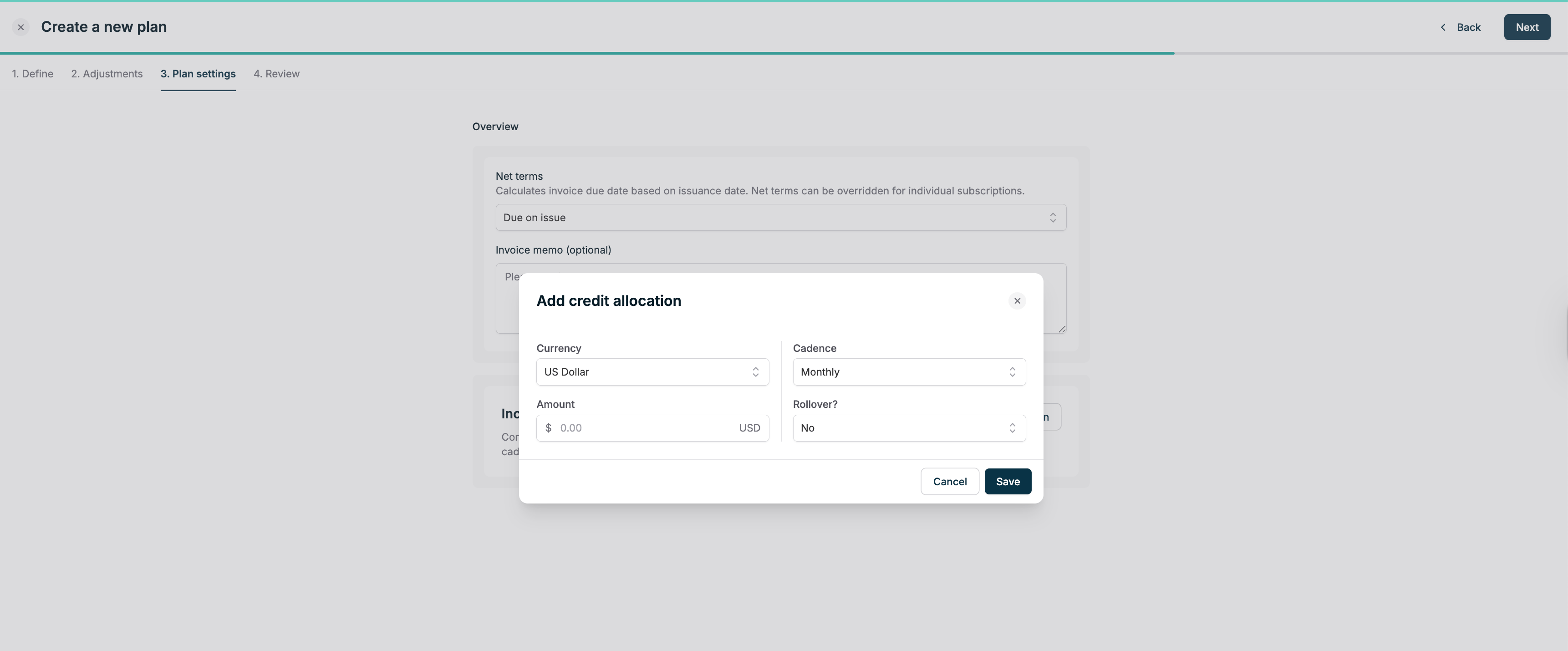
### 1. Recurring credit allocations (plan-based)
Credits automatically granted on a recurring schedule through [credit allocations](/product-catalog/prepurchase#allocations) configured on the plan:
* Credits have **zero dollar cost basis**
* Useful for monthly/quarterly credit allowances
* Automatically replenishes based on plan configuration
* Best for predictable, recurring credit grants
 ### 2. Manual credit increments (focus of this guide)
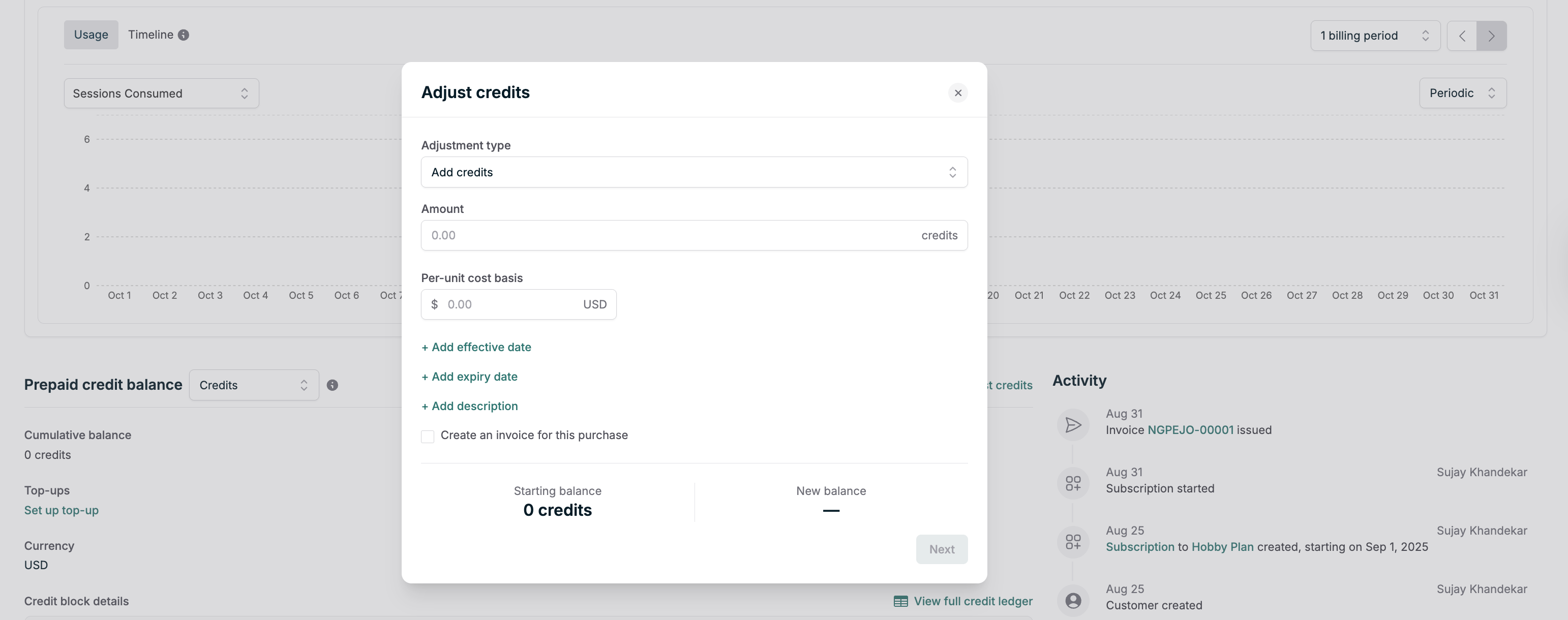
Credits are manually granted through adjustments, typically for:
* **Prepaid purchases**, where customers buy credit packages
* **One-time grants** for trials, promotions, or compensation
* **Variable amounts** based on negotiated contracts
* **Invoiced credits** with a specific cost basis
This guide primarily focuses on manual credit management workflows, as they offer maximum flexibility for enterprise scenarios.
### 2. Manual credit increments (focus of this guide)
Credits are manually granted through adjustments, typically for:
* **Prepaid purchases**, where customers buy credit packages
* **One-time grants** for trials, promotions, or compensation
* **Variable amounts** based on negotiated contracts
* **Invoiced credits** with a specific cost basis
This guide primarily focuses on manual credit management workflows, as they offer maximum flexibility for enterprise scenarios.
 ## Initial system configuration
Before onboarding customers with credits, configure these foundational elements that will be reused across all credit-based subscriptions.
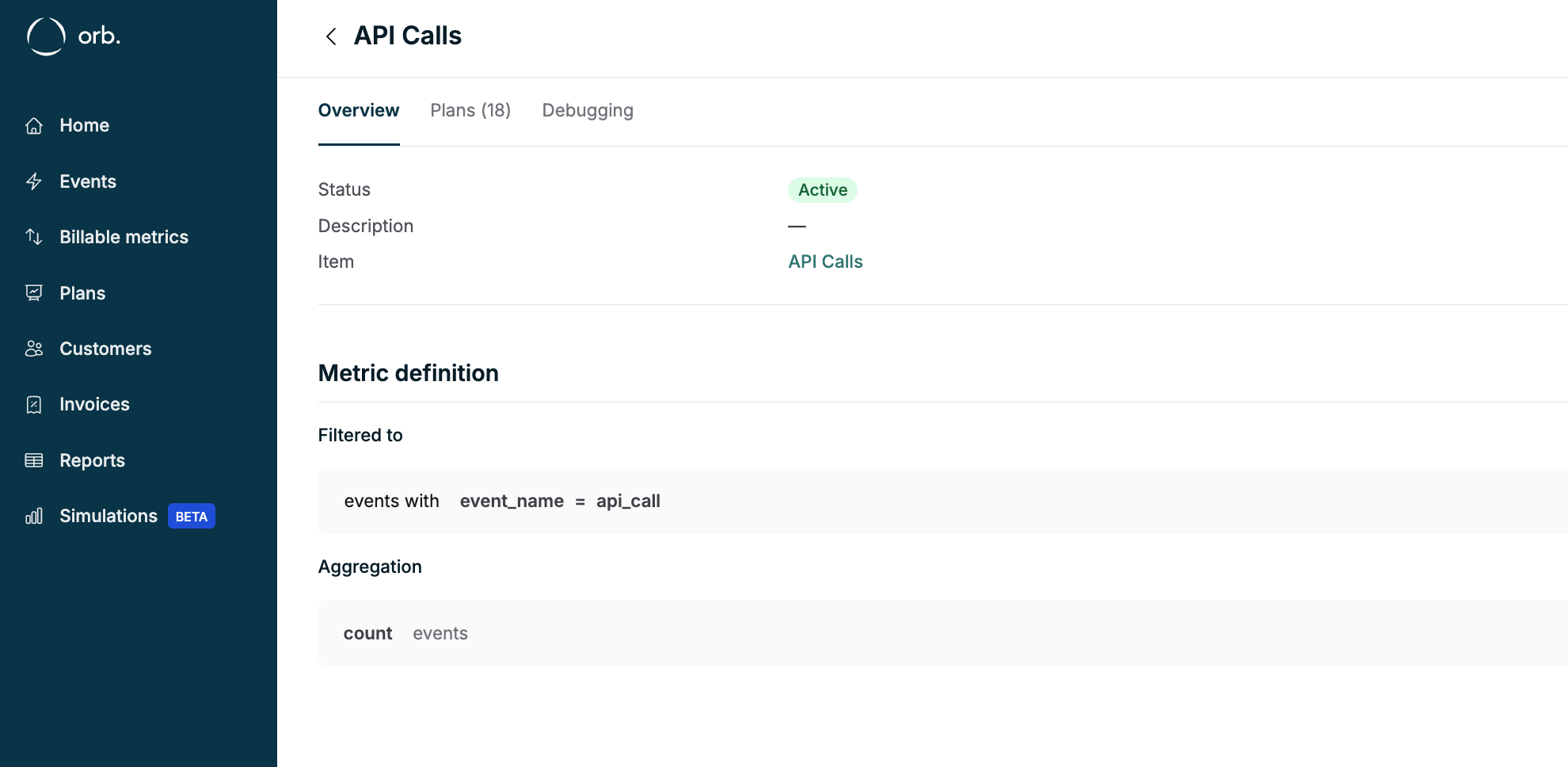
### 1. Create billing metrics
Define metrics that track the usage customers will consume credits against:
* **API calls** measured in requests
* **Compute time** measured in minutes or hours
* **Storage** measured in GB-days
* **Data transfer** measured in GB
* **Custom units** specific to your service
Each metric should have clear unit definitions and appropriate aggregation methods (sum, max, unique count).
## Initial system configuration
Before onboarding customers with credits, configure these foundational elements that will be reused across all credit-based subscriptions.
### 1. Create billing metrics
Define metrics that track the usage customers will consume credits against:
* **API calls** measured in requests
* **Compute time** measured in minutes or hours
* **Storage** measured in GB-days
* **Data transfer** measured in GB
* **Custom units** specific to your service
Each metric should have clear unit definitions and appropriate aggregation methods (sum, max, unique count).
 ### 2. Configure custom currencies (pricing units)
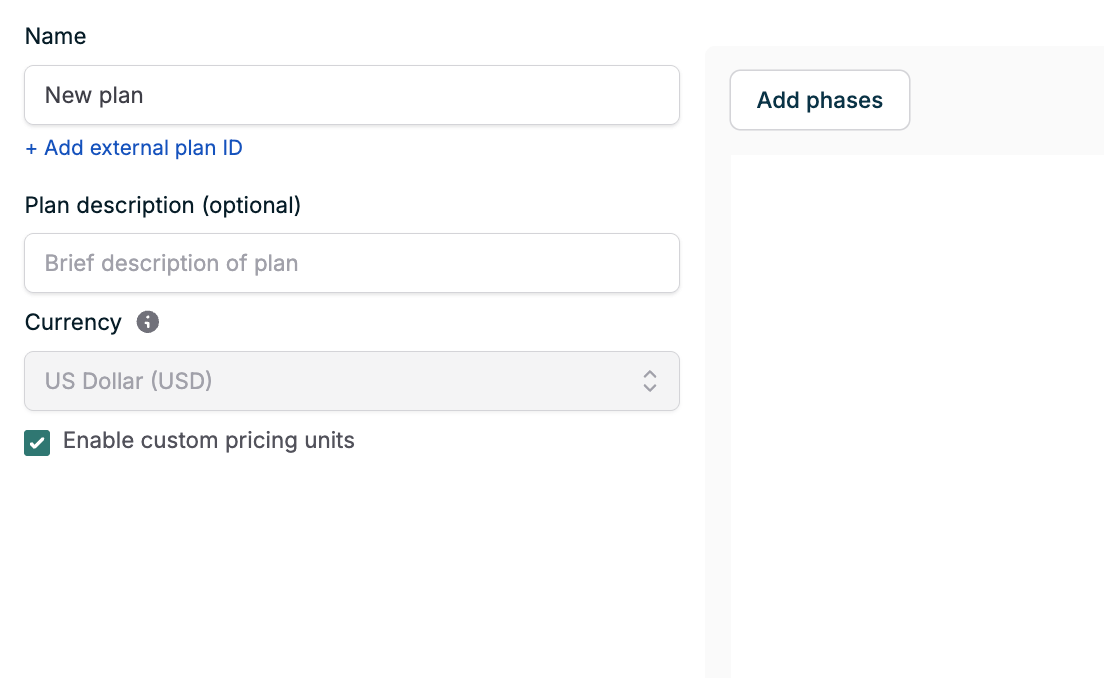
[Custom currencies](/product-catalog/prepurchase#custom-pricing-units) allow you to decouple credits from real-world currencies. Create pricing units like:
* **Credits** - Generic unit for multi-service consumption
* **Compute Credits** - Specialized for compute services
* **API Credits** - Dedicated to API usage
Configure conversion rates between credits and your invoicing currency for overage billing.
### 2. Configure custom currencies (pricing units)
[Custom currencies](/product-catalog/prepurchase#custom-pricing-units) allow you to decouple credits from real-world currencies. Create pricing units like:
* **Credits** - Generic unit for multi-service consumption
* **Compute Credits** - Specialized for compute services
* **API Credits** - Dedicated to API usage
Configure conversion rates between credits and your invoicing currency for overage billing.
 ### 3. Design credit-enabled plans
Create plans that consume credits rather than generating charges directly:
* All usage prices are denominated in the relevant currency you want your credits to be defined in (e.g. USD, credits, etc)
* For custom currencies (e.g. credits), define an overage rate of how much charge once the credits are fully depleted
### 4. Connect payment providers
For automated credit top-ups and overage billing:
* [Stripe integration](/integrations-and-exports/stripe) for card and ACH payments
* Configure auto-collection settings appropriate for enterprise terms
* Disable auto-issuance for enterprise customers to control invoice delivery
### 5. Configure internal monitoring
Set up [webhooks](/integrations-and-exports/webhooks) for credit lifecycle events:
#### Critical webhooks
* `customer.credit_balance_depleted` - Trigger service restrictions when credits exhausted
* `customer.credit_balance_dropped` - Alert when approaching depletion thresholds
Configure thresholds below auto-invoice levels to prevent alert fatigue while maintaining visibility.
## Customer onboarding workflow
### Step 1: Create the customer
Requirements:
* **External customer ID** from your system of record
* Customer name and contact information
* [Billing address](/api-reference/customer/create-customer#request.body.billing_address) for invoice generation
Customer creation checklist:
* External ID mapped from CRM/ERP
* Billing address with valid tax information
* Payment method configured (if auto-collection enabled)
* Metadata tags for segmentation
### Step 2: Configure billing settings
Edit customer billing configuration:
* **Payment terms**: Net 30/60/90 for enterprise contracts
* **Auto-collection**: Usually disabled for enterprise manual payments
* **Invoice delivery**: Email addresses for automated delivery
* **Tax settings**: Exemption certificates if applicable
Note: If customers pay through the invoice portal with Stripe connected, Orb automatically creates and links Stripe customers.
### Step 3: Create the subscription
Add the credit-enabled plan to the customer:
1. Select the enterprise plan created earlier
2. Set subscription start date
3. **Do not override prices** unless negotiating custom credit ratios
The subscription establishes the credit consumption framework without granting credits directly.
### Step 4: Grant initial credits
#### Option A: Trial credits (no charge)
For proof-of-concept or trial periods:
```
Adjust Credits:
- Amount: [trial credit quantity]
- Cost basis: $0.00
- Expiry: 14-30 days from grant date
- Description: "Trial credits - expires [date]"
```
#### Option B: Paid credits (invoiced)
For purchased credit packages:
```
Adjust Credits:
- Amount: [purchased quantity]
- Per-unit cost: [negotiated rate]
- Create invoice: Yes
- Auto-collect: [Yes/No based on terms]
- Description: "Q1 2025 credit purchase"
```
Verify the invoice subtotal matches expected charges before finalizing.
## Ongoing credit management
### Monitoring credit consumption
Track credit usage through multiple channels:
1. **Real-time balance API**: [Customer balance endpoint](/api-reference/credit/fetch-customer-credit-balance)
2. **Usage dashboard**: [Upcoming invoice API](/api-reference/invoice/fetch-upcoming-invoice) shows current period consumption
3. **Webhook events**: Real-time notifications for balance changes
4. **Reports**: Export credit ledger for historical analysis
### Handling credit depletion
When credits approach depletion:
1. **Automated alerts** trigger at configured thresholds
2. **Customer notifications** via email or API webhook to customer systems
3. **Top-up workflows** for additional credit purchases
4. **Service controls** optionally restrict access when fully depleted
### Credit top-up patterns
#### Manual top-ups
Customer-initiated purchases through:
* Self-service portal with payment method on file
* Sales-assisted process for negotiated packages
* Procurement-approved purchase orders
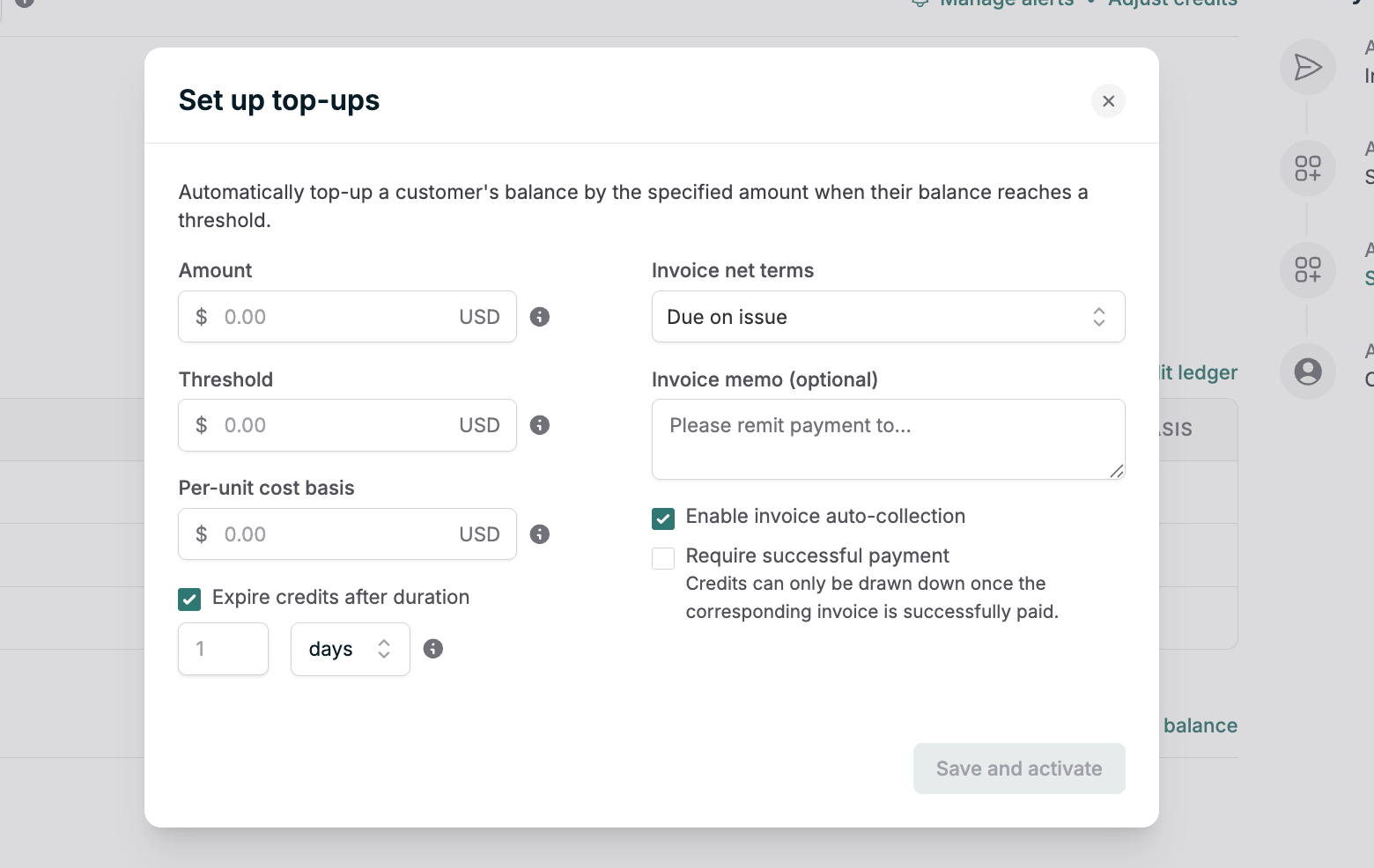
#### Automated replenishment
Configure automatic top-ups when balance drops below threshold:
* Fixed credit amounts at predetermined prices
* Requires payment method and auto-collection enabled
* Useful for preventing service interruptions
### 3. Design credit-enabled plans
Create plans that consume credits rather than generating charges directly:
* All usage prices are denominated in the relevant currency you want your credits to be defined in (e.g. USD, credits, etc)
* For custom currencies (e.g. credits), define an overage rate of how much charge once the credits are fully depleted
### 4. Connect payment providers
For automated credit top-ups and overage billing:
* [Stripe integration](/integrations-and-exports/stripe) for card and ACH payments
* Configure auto-collection settings appropriate for enterprise terms
* Disable auto-issuance for enterprise customers to control invoice delivery
### 5. Configure internal monitoring
Set up [webhooks](/integrations-and-exports/webhooks) for credit lifecycle events:
#### Critical webhooks
* `customer.credit_balance_depleted` - Trigger service restrictions when credits exhausted
* `customer.credit_balance_dropped` - Alert when approaching depletion thresholds
Configure thresholds below auto-invoice levels to prevent alert fatigue while maintaining visibility.
## Customer onboarding workflow
### Step 1: Create the customer
Requirements:
* **External customer ID** from your system of record
* Customer name and contact information
* [Billing address](/api-reference/customer/create-customer#request.body.billing_address) for invoice generation
Customer creation checklist:
* External ID mapped from CRM/ERP
* Billing address with valid tax information
* Payment method configured (if auto-collection enabled)
* Metadata tags for segmentation
### Step 2: Configure billing settings
Edit customer billing configuration:
* **Payment terms**: Net 30/60/90 for enterprise contracts
* **Auto-collection**: Usually disabled for enterprise manual payments
* **Invoice delivery**: Email addresses for automated delivery
* **Tax settings**: Exemption certificates if applicable
Note: If customers pay through the invoice portal with Stripe connected, Orb automatically creates and links Stripe customers.
### Step 3: Create the subscription
Add the credit-enabled plan to the customer:
1. Select the enterprise plan created earlier
2. Set subscription start date
3. **Do not override prices** unless negotiating custom credit ratios
The subscription establishes the credit consumption framework without granting credits directly.
### Step 4: Grant initial credits
#### Option A: Trial credits (no charge)
For proof-of-concept or trial periods:
```
Adjust Credits:
- Amount: [trial credit quantity]
- Cost basis: $0.00
- Expiry: 14-30 days from grant date
- Description: "Trial credits - expires [date]"
```
#### Option B: Paid credits (invoiced)
For purchased credit packages:
```
Adjust Credits:
- Amount: [purchased quantity]
- Per-unit cost: [negotiated rate]
- Create invoice: Yes
- Auto-collect: [Yes/No based on terms]
- Description: "Q1 2025 credit purchase"
```
Verify the invoice subtotal matches expected charges before finalizing.
## Ongoing credit management
### Monitoring credit consumption
Track credit usage through multiple channels:
1. **Real-time balance API**: [Customer balance endpoint](/api-reference/credit/fetch-customer-credit-balance)
2. **Usage dashboard**: [Upcoming invoice API](/api-reference/invoice/fetch-upcoming-invoice) shows current period consumption
3. **Webhook events**: Real-time notifications for balance changes
4. **Reports**: Export credit ledger for historical analysis
### Handling credit depletion
When credits approach depletion:
1. **Automated alerts** trigger at configured thresholds
2. **Customer notifications** via email or API webhook to customer systems
3. **Top-up workflows** for additional credit purchases
4. **Service controls** optionally restrict access when fully depleted
### Credit top-up patterns
#### Manual top-ups
Customer-initiated purchases through:
* Self-service portal with payment method on file
* Sales-assisted process for negotiated packages
* Procurement-approved purchase orders
#### Automated replenishment
Configure automatic top-ups when balance drops below threshold:
* Fixed credit amounts at predetermined prices
* Requires payment method and auto-collection enabled
* Useful for preventing service interruptions
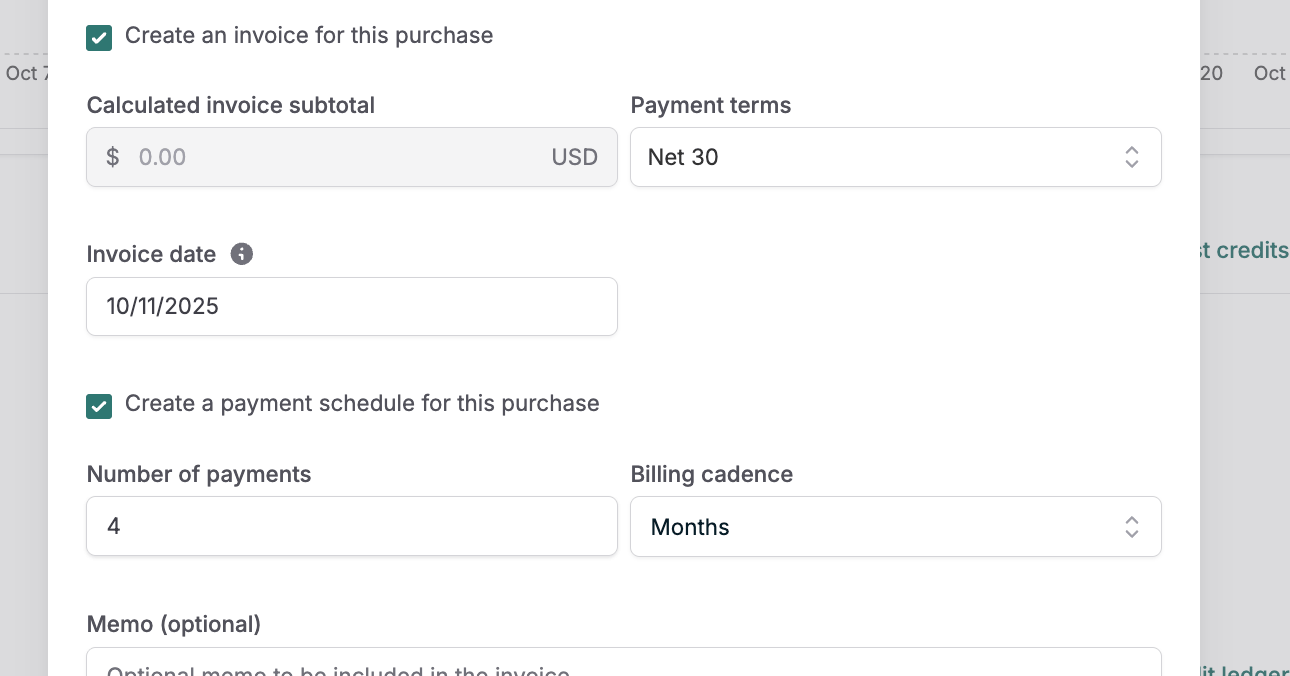
 #### Scheduled purchases
Quarterly or annual credit allocations:
* Align with enterprise budget cycles
* Bulk discounts for larger commitments
* Predictable procurement processes
#### Scheduled purchases
Quarterly or annual credit allocations:
* Align with enterprise budget cycles
* Bulk discounts for larger commitments
* Predictable procurement processes
 ## Advanced credit scenarios
### Expiring vs non-expiring credits
**Expiring credits** for:
* Trial programs (14-30 day expiration)
* Promotional grants (quarterly expiration)
* Use-it-or-lose-it annual allocations
**Non-expiring credits** for:
* Prepaid enterprise commitments
* Long-term contracts
* Rollover agreements
### Multiple credit types
Separate credit currencies for different services:
```
Compute Credits: For CPU/GPU usage
Storage Credits: For data storage
API Credits: For API calls
Support Credits: For premium support hours
```
Each with independent:
* Ledgers and balances
* Consumption rates
* Expiration policies
* Top-up workflows
## Invoice and payment workflows
### Credit purchase invoicing
When customers purchase credits:
1. **Line item generation** showing credit quantity and unit price
2. **Payment terms** following enterprise agreement
3. **Auto-collection** if configured, manual otherwise
### Overage handling
When usage exceeds credit balance:
1. **Automatic conversion** from credits to currency at configured rates
2. **Overage invoice** generated at period end
3. **Payment collection** per standard terms
4. **Optional restrictions** until overage paid
## Automation and integrations
### Webhook automation
Implement these webhook handlers:
```javascript theme={null}
// Balance depletion handler
webhook.on("customer.credit_balance_depleted", (event) => {
// Restrict API access
// Notify customer success team
// Trigger top-up workflow
});
// Low balance warning
webhook.on("customer.credit_balance_dropped", (event) => {
if (event.balance_amount < 20) {
// Send warning email
// Create support ticket
// Offer top-up options
}
});
```
### Analytics and reporting
Export credit data for analysis:
* Consumption patterns by customer segment
* Credit lifetime and expiration rates
* Top-up frequency and amounts
* Revenue recognition from credit purchases
## Troubleshooting common issues
### Credits not applying to usage
Verify:
* Subscription using credit-denominated plan
* Credits granted to correct customer
* Credit currency matches plan prices
* Credits not expired
### Unexpected credit consumption rates
Check:
* Price configuration on plans
* Credit-to-currency conversion rates
* Adjustment rules affecting consumption
* Multiple services are consuming same pool
### Invoice discrepancies
Review:
* Credit purchase amounts and rates
* Overage conversion calculations
* Timing of credit grants vs usage
* Backdated adjustments affecting balance
By following this comprehensive guide, you can implement a robust credit management system that scales from initial trials to large enterprise deployments, providing the flexibility and control that sophisticated customers require while maintaining operational efficiency.
## Advanced credit scenarios
### Expiring vs non-expiring credits
**Expiring credits** for:
* Trial programs (14-30 day expiration)
* Promotional grants (quarterly expiration)
* Use-it-or-lose-it annual allocations
**Non-expiring credits** for:
* Prepaid enterprise commitments
* Long-term contracts
* Rollover agreements
### Multiple credit types
Separate credit currencies for different services:
```
Compute Credits: For CPU/GPU usage
Storage Credits: For data storage
API Credits: For API calls
Support Credits: For premium support hours
```
Each with independent:
* Ledgers and balances
* Consumption rates
* Expiration policies
* Top-up workflows
## Invoice and payment workflows
### Credit purchase invoicing
When customers purchase credits:
1. **Line item generation** showing credit quantity and unit price
2. **Payment terms** following enterprise agreement
3. **Auto-collection** if configured, manual otherwise
### Overage handling
When usage exceeds credit balance:
1. **Automatic conversion** from credits to currency at configured rates
2. **Overage invoice** generated at period end
3. **Payment collection** per standard terms
4. **Optional restrictions** until overage paid
## Automation and integrations
### Webhook automation
Implement these webhook handlers:
```javascript theme={null}
// Balance depletion handler
webhook.on("customer.credit_balance_depleted", (event) => {
// Restrict API access
// Notify customer success team
// Trigger top-up workflow
});
// Low balance warning
webhook.on("customer.credit_balance_dropped", (event) => {
if (event.balance_amount < 20) {
// Send warning email
// Create support ticket
// Offer top-up options
}
});
```
### Analytics and reporting
Export credit data for analysis:
* Consumption patterns by customer segment
* Credit lifetime and expiration rates
* Top-up frequency and amounts
* Revenue recognition from credit purchases
## Troubleshooting common issues
### Credits not applying to usage
Verify:
* Subscription using credit-denominated plan
* Credits granted to correct customer
* Credit currency matches plan prices
* Credits not expired
### Unexpected credit consumption rates
Check:
* Price configuration on plans
* Credit-to-currency conversion rates
* Adjustment rules affecting consumption
* Multiple services are consuming same pool
### Invoice discrepancies
Review:
* Credit purchase amounts and rates
* Overage conversion calculations
* Timing of credit grants vs usage
* Backdated adjustments affecting balance
By following this comprehensive guide, you can implement a robust credit management system that scales from initial trials to large enterprise deployments, providing the flexibility and control that sophisticated customers require while maintaining operational efficiency.